Silt Fence Installation Diagram
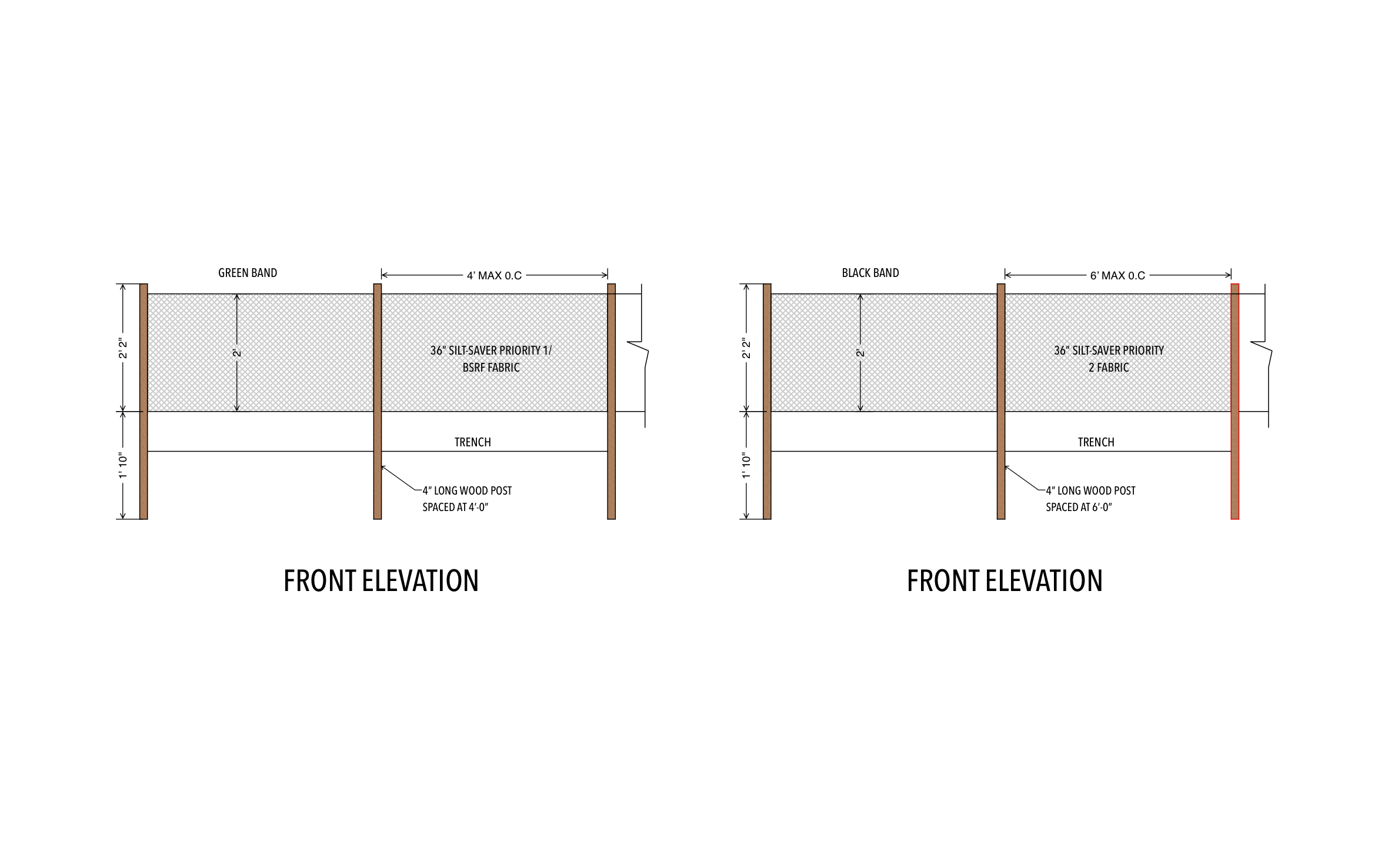
A silt fence keeps sediment on your site and out of storm drains, creeks, and the neighbor's yard while the ground is torn up. ArcSite's silt fence installation diagram puts both fabric options side by side so you can match the spec your plan calls for.
Key Features
This silt fence installation diagram includes:
- Two front elevations side by side
- 36" Silt-Saver Priority 1/BSRF fabric with wood posts at 4' max on center
- 36" Silt-Saver Priority 2 fabric with wood posts at 6' max on center
- 2' of fabric above grade
- 1'10" of post below grade
- Trench line along the base of the fabric
- Green and black band markings for each fabric grade
Priority 1 fabric needs a post every 4', while Priority 2 can stretch to 6', so check which grade your erosion control plan names before you count posts.


Fully customizable


Industry specific


Professional & accurate designs
Trusted by Pros. Recognized by the Industry.
With top ratings across Software Advice, GetApp, and Capterra, professional contractors choose us for ease of use, powerful tools, and unmatched customer support.





Landscaping & Outdoor Living
templates you might like

Frequently asked questions
What's the difference between the two fabric options?
Can I add this detail to a full site plan?
Does ArcSite work for site plans, or just house-scale drawings?