

Accurate turf estimates make or break your margins—and the right turf quote calculator can turn chaotic site notes into fast, reliable numbers that actually protect your profit.
If you install synthetic turf or landscape surfaces, you already know how easy it is for a quick “ballpark” quote to turn into a money-losing job. Mis-measured square footage, missed waste factors, or forgotten accessories can quietly eat your margin. A modern turf quote calculator—especially one built into a mobile CAD, takeoff, and estimating workflow—helps you generate precise estimates and efficient project plans every time, right from the job site.
ArcSite is built for specialty contractors who are tired of juggling paper sketches, spreadsheets, and guesswork. In this guide, we’ll break down how to use a Turf Quote Calculator effectively, how to build it into your on-site workflow, and how tools like ArcSite save contractors serious time and money.
Why Turf Estimates Are So Hard to Get Right
Turf work seems simple on the surface: measure, price, install. But anyone who lives in this world knows how quickly it gets complicated.
Common headaches include:
- Irregular shapes and curves that are hard to measure accurately
- Multiple product types (different pile heights, infill types, base materials)
- Wastage and seam planning that change the real material needed
- Add-ons and accessories (edging, weed barrier, drainage) that are easy to forget
- Customer changes on-site that force you to rework the quote on the fly
When you’re relying on hand sketches, manual calculations, or a basic spreadsheet, every extra step creates risk:
- You underbid and lose profit.
- You overbid and lose the job.
- You miscalculate and have to send a crew back out, burning more labor.
That’s the gap a purpose-built turf quote calculator is meant to close.
What a Turf Quote Calculator Should Actually Do
A lot of “turf-quote-calculator” tools online are just simple square footage x price forms. They’re better than guesswork, but they don’t reflect the reality of what you deal with in the field.
A professional-grade Turf Quote Calculator should help you:
- Measure accurately from a field drawing
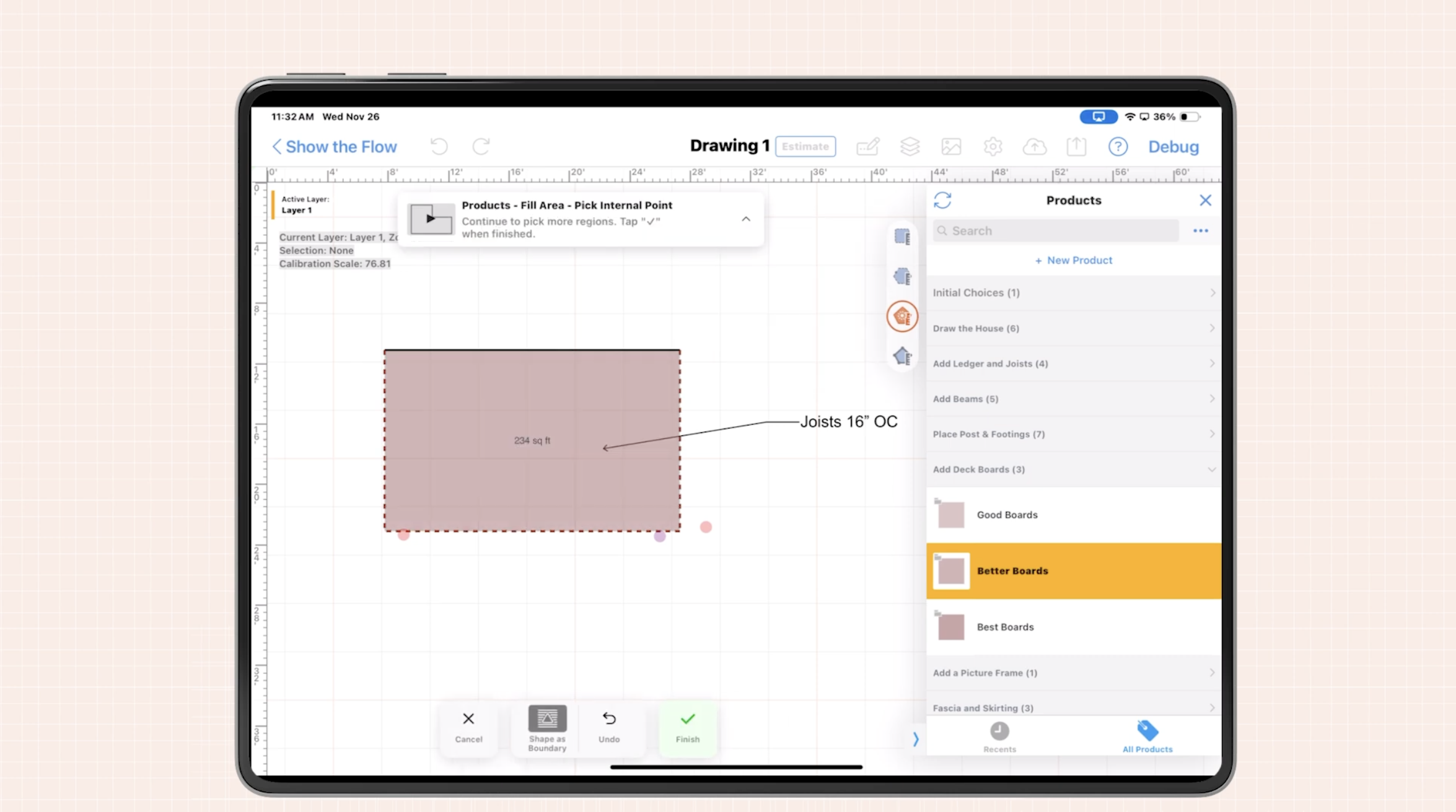
Draw the space once on a tablet or iPad, capture actual dimensions, and let the software calculate areas—including curves and odd shapes.
- Apply the right materials and assemblies
Assign turf products, base materials, infill, weed barrier, and edging to the areas you’ve drawn so the takeoff and estimate update automatically.
- Account for waste and seams
Set standard waste factors, roll widths, and seam rules so the calculator reflects how you actually install.
- Build a clean, consistent proposal
Turn your takeoff into a customer-ready quote with line items, pricing, and terms—without retyping data.
- Update instantly when plans change
Edit the drawing on-site and have quantities, costs, and pricing recalculate in seconds.
A turf quote calculator inside a mobile CAD and takeoff tool like ArcSite lets you do all of this in one place, without bouncing between apps or waiting to get back to the office.
How a Turf Quote Calculator Fits into a Modern On-Site Workflow
Step 1: Capture the Site with Mobile CAD
Instead of sketching by hand, you open your tablet, create a new project, and draw the turf areas directly over a photo or on a blank canvas. Walk the site, take measurements, and input them as you go.
- Trace curves, islands, and planter beds precisely
- Use layers to separate turf, hardscape, and planting zones
- Add notes and photos so your crew sees exactly what you promised the client
This drawing becomes the single source of truth for the job.
Step 2: Run Your Takeoff Automatically
Once the drawing is in place, your turf quote calculator kicks in:
- Each drawn area is assigned a turf product and base build-up
- The system calculates total square footage, base depth, and infill quantities
- Waste factors are applied automatically based on roll sizes and install standards
No more re-keying measurements into a spreadsheet. The takeoff data lives in the same file as your site drawing.
Step 3: Generate Your Estimate and Proposal
Now you move from quantities to dollars:
- Labor and material costs are pulled from your saved price list
- Markup, taxes, and fees are applied consistently
- A line-item proposal is generated, showing turf, base, infill, and accessories
Because everything ties back to the drawing, your estimate is both transparent and defensible when a client asks, “How did you get to this number?”
Step 4: Make Changes in Real Time
If the homeowner decides to expand the turf area or downgrade to a different product, you simply adjust the drawing. The turf quote calculator updates:
- Material quantities
- Labor time
- Final price
You can present an updated quote on the spot, helping you close the deal before you leave the driveway.
Benefits: How Accurate Turf Quotes Save Time and Money
When your quoting workflow moves from paper and guesswork to a connected turf-quote-calculator system, the impact shows up fast.
Fewer Site Re-Visits
Because you’re capturing measurements, photos, and notes correctly the first time on your tablet, you don’t need to drive back to double-check dimensions or clarify scope. Everything is already in the drawing and estimate.
Faster, More Consistent Estimates
A Turf Quote Calculator with reusable templates and pricing rules lets you:
- Turn around most quotes in minutes instead of days
- Standardize how crews bid similar jobs
- Reduce the “spread” between estimators and keep pricing tight
That consistency is key for protecting margin as you grow.
Reduced Material Waste and Surprises
Accurate takeoffs tied to real-world install rules (roll width, seam planning, waste) mean you order closer to what you actually need. Less leftover turf in the yard. Fewer emergency orders mid-project.
Better Collaboration with Crews and Sales Teams
When your drawing, takeoff, and quote are all aligned:
- Crews see exactly what was sold
- Salespeople stop over- or under-promising
- Change orders are easier to track because every change starts with an updated drawing
ArcSite’s approach is to make that information accessible wherever you are—on-site, in the truck, or back at the office.
Best Practices for Using a Turf Quote Calculator in the Field
To get the most out of any turf quote calculator, build a repeatable process your whole team can follow.
Standardize Your Product Library
Set up a library of your common turf SKUs, base specs, and accessories with:
- Default waste factors
- Standard labor production rates
- Pre-set markups or margins
This ensures every estimator is working from the same playbook.
Create Reusable Assemblies
Bundle typical systems—like “Pet-Friendly Turf,” “Putting Green,” or “Play Area”—with all the components and labor built in. Then, when you draw an area, you just apply the right assembly and let the calculator handle the rest.
Always Draw What You Sell
Train your team: If it’s in the quote, it should be in the drawing. That includes:
- Turf areas
- Edging and borders
- Drainage zones
- Hardscape transitions
This habit reduces scope disputes and makes it clear to crews what’s included (and what isn’t).
Review Key Metrics Regularly
Every few months, compare your calculated estimates to actuals:
- Did labor hours match the estimate?
- Were you consistently short or long on materials?
- Do waste factors need to be adjusted?
Refining your turf quote calculator with real job data is how you continuously improve margins.
How ArcSite Supports Turf Contractors
ArcSite brings mobile CAD, takeoffs, and estimating into one app so your turf quote calculator isn’t just a number-crunching tool—it’s part of a complete field workflow.
With ArcSite, turf and landscape contractors can:
- Draw on-site with precise measurements and annotations
- Auto-generate takeoffs for turf, base, infill, and accessories
- Produce branded proposals in minutes, aligned to the drawing
- Sync data with the office, improving communication and handoffs
The outcome: fewer surprises, faster approvals, and more profitable projects.
If you’re ready to standardize how your team measures, bids, and sells turf work, exploring a tool like ArcSite is a straightforward next step.
Get a personalized demo of ArcSite to see how your team can plan turf jobs more accurately.
Categories
FAQs
A turf quote calculator tied to a mobile CAD drawing is typically more accurate than manual estimating because it uses exact dimensions from your field sketch, not rough measurements. When you add standardized waste factors, product libraries, and labor rates, your estimates become consistent from job to job and across different estimators.
Yes. With a mobile solution like ArcSite, you can walk the site, draw the layout, and generate a quote in real time on a tablet. This speeds up your sales cycle and lets you handle design changes or budget adjustments on the spot, instead of going back to the office to rework numbers.
When your calculator is built into a drawing tool, you simply trace the actual shape of the lawn area and input key dimensions. The software computes the exact square footage and applies your standard roll and waste rules, giving you a realistic material requirement even for curved, complex spaces.
If your calculator includes labor production rates, it can estimate labor hours and crew sizes based on the scope of work. This helps you schedule crews more effectively, set realistic timelines for customers, and identify jobs that may require additional resources.
Most online calculators just multiply area by a unit price, leaving you to manage drawings, takeoffs, and proposals separately. ArcSite combines mobile CAD, detailed takeoffs, and estimating in one system, so your quotes are driven by accurate drawings, standardized assemblies, and real installation practices, helping you protect margin while saving time.
Related posts