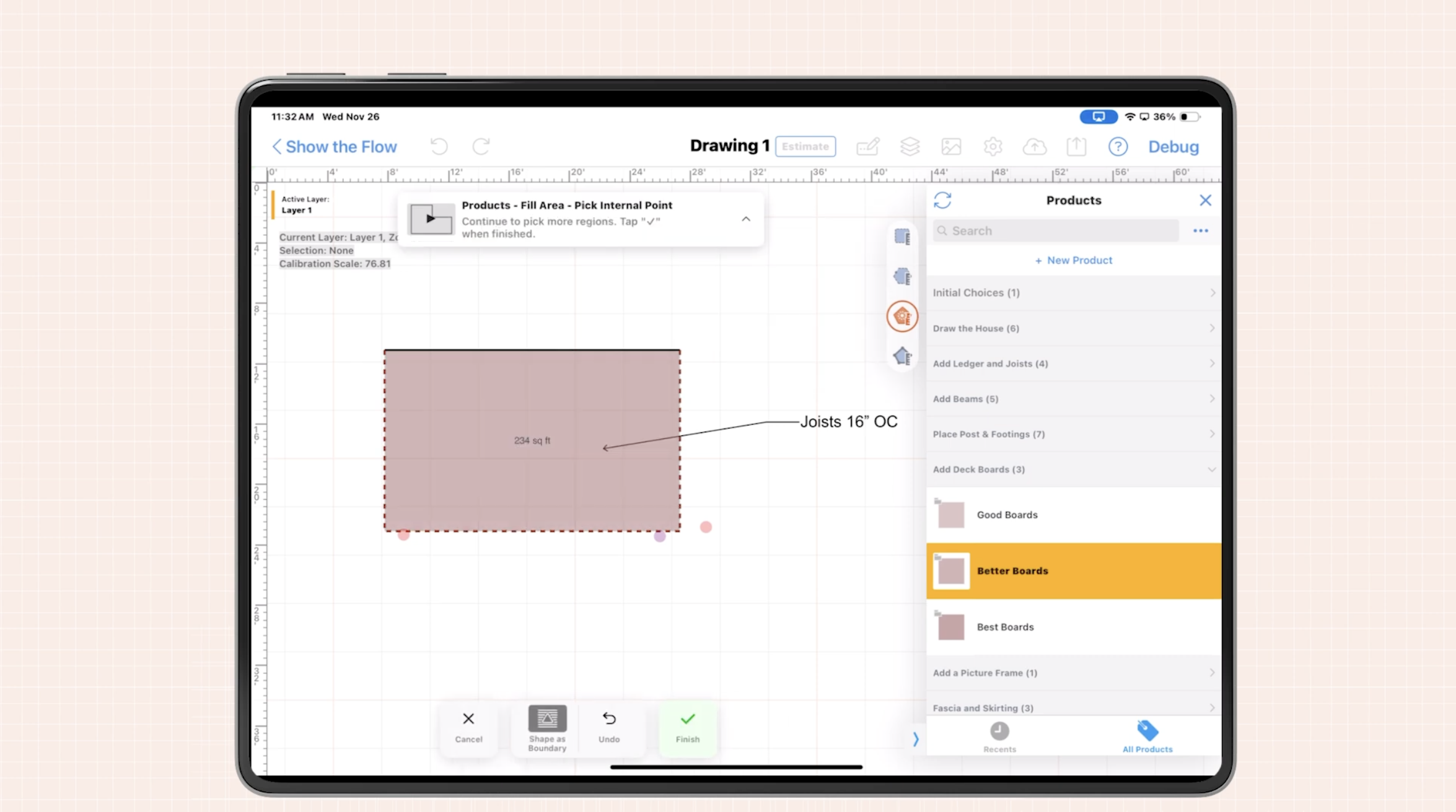

Modern concrete foundation estimating software lets contractors visually draw foundations on-site, generate instant quantities, and build professional estimates in minutes instead of hours.
For many concrete contractors, the job really starts when you pull out a pencil and grid paper in front of the customer. But hand sketches and back-office spreadsheets leave a lot of room for missed footings, wrong slab areas, and costly rework.
ArcSite gives field teams visual, mobile tools to draw and estimate foundations right on a tablet - while standing on the job site. The result: cleaner plans, faster estimates, and fewer surprises once you start pouring.
Why accurate on-site foundation drawings matter
Concrete work has tight margins and high risk. If the plan is off by even a small amount, the impact shows up immediately in labor, material overages, and change orders. That is why specialty contractors are turning to concrete foundation estimating software that ties drawing, takeoff, and estimating together.
Common pain points we hear from concrete crews and estimators include:
- Rough hand sketches taken in the field that do not match the final estimate.
- Area and volume calculations done manually, leading to errors or missed beams, piers, or thickened edges.
- Multiple trips back to the site because initial measurements or photos were not detailed enough.
- Slow turnaround on bids, giving competitors an edge.
- Disputes with GCs or owners because there is no clear visual record of what was quoted.
When your plans and quantities are locked in visually - and tied directly to pricing - everyone gains confidence in the scope and the numbers.
How ArcSite turns your tablet into a visual foundation planning tool
ArcSite is built for specialty contractors who work in the field, not just in the office. On an iPad or tablet, your crew can:
- Draw foundation layouts to scale using simple drag-and-drop tools for walls, footings, piers, slabs, and thickened edges.
- Auto-calculate quantities like linear feet of footing, cubic yards of concrete, and rebar counts as they draw.
- Attach pricing and production rates so every line drawn instantly updates the estimate.
- Store photos and notes directly on the plan for site conditions, access issues, and customer preferences.
- Generate professional proposals in minutes that clearly show the layout, scope, and price.
Because drawing, takeoff, and estimating live in one system, you avoid double entry and reduce the lag between first site visit and final bid.
Core visual tools you need for concrete foundation estimating
1. Mobile CAD drawing tools designed for the field
Traditional CAD tools are built for desktop power users. Field teams need something different: visual tools they can learn quickly and use with a finger or stylus on a tablet.
Key capabilities to look for include:
- Snapping and alignment to keep walls straight and dimensions accurate.
- Configurable layers and symbols for footings, grade beams, piers, slabs, thickened edges, and control joints.
- Real-world units (feet, inches, meters) with easy scaling so what you draw matches what you pour.
- Offline capability so you can work in basements, remote sites, or areas with weak connectivity.
With these tools, you can sketch new foundations, additions, and repairs on the spot, without waiting for office support.
2. Built-in takeoff and material calculations
The leap from a digital sketch to a usable estimate happens when the software understands what each line and shape represents. In ArcSite, drawn elements can carry metadata such as depth, width, and reinforcement details.
This lets the system automatically calculate:
- Linear feet of footing by size.
- Square footage and thickness of slabs.
- Cubic yards of concrete by pour or section.
- Rebar quantities based on spacing rules.
- Formwork lengths and hardware counts.
Instead of running numbers in a separate spreadsheet, your quantities are already done as soon as the drawing is complete.
3. Estimating templates tied to your real costs
Once your takeoff is automated, the next step is to connect it to your costs and pricing structure. ArcSite lets you build templates that reflect how your business actually bids work.
Typical setup steps include:
- Defining labor rates and production rates for footings, slabs, and walls.
- Setting up material assemblies (concrete mix, rebar, wire mesh, vapor barrier, anchor bolts, etc.).
- Adding equipment and mobilization line items.
- Creating standard inclusions and exclusions to reduce scope creep.
When you apply these templates to a drawing, you can generate consistent, repeatable estimates - whether it is you or a newer team member doing the visit.
Practical on-site workflows with concrete foundation estimating software
Walk the site, draw, and estimate in one visit
Here is a common workflow our customers use with ArcSite:
- Initial walkthrough: Take overall measurements, note site constraints, and snap a few photos.
- Sketch the plan: On your tablet, draw exterior walls, interior load-bearing walls, and any special foundation elements.
- Add structural details: Assign footing widths and depths, define slab thicknesses, and mark piers or thickened slabs.
- Review quantities: Let the software calculate cubic yards and rebar; adjust assumptions as needed with the customer.
- Produce an estimate: Apply your template, review pricing on-screen, and make any scope adjustments in real time.
- Present a proposal: Send a clear, visual proposal before you even leave the property.
This single-visit process reduces back-and-forth, shortens your sales cycle, and often improves win rates because customers see exactly what they are paying for.
Handling changes and revisions visually
Foundations change as architects, engineers, and owners refine plans. With a visual, on-site tool, you can:
- Quickly update wall locations, add or remove piers, or change slab thickness.
- Instantly see the impact on quantities and pricing.
- Create alternates (for example, thickened edge vs. perimeter footing) and compare costs during the meeting.
Instead of reworking a spreadsheet late at night, you adjust the plan on-screen and keep everyone aligned.
Implementation and change management in your concrete business
Moving from paper and spreadsheets to digital foundation plans is a big step, but it does not have to be disruptive.
We typically recommend:
- Start with a pilot group: Choose one or two crews or estimators who are open to technology and have a steady pipeline of similar projects.
- Standardize symbols and templates: Decide how you want to represent common foundation types and scope items so your team is consistent.
- Invest in short, focused training: Schedule a few short sessions focused on specific workflows: new builds, additions, and repair work.
- Capture feedback from the field: Ask users what slows them down, and refine templates and processes accordingly.
The goal is not to change how you build foundations, but to change how you capture and communicate the plan, quantities, and price.
Measuring ROI from visual foundation tools
To know if your concrete foundation estimating software is paying off, track metrics before and after implementation. Common indicators include:
- Time per estimate: How many minutes or hours do you spend per bid, from first visit to delivered proposal?
- Bid volume: With faster estimating, how many more opportunities can you quote each week?
- Win rate: When you present clear, visual plans, do more customers say yes?
- Change orders and disputes: Are misunderstandings over scope decreasing because everyone saw the same plan at the start?
- Material overages and shortages: Are you ordering closer to the true quantities, with fewer emergency deliveries?
Most contractors see the largest gains in time savings, higher bid capacity, and a noticeable drop in scope-related disputes with GCs and owners.
Getting started with ArcSite for concrete foundations
Visual tools for drawing accurate foundation plans on-site are quickly becoming a must-have for concrete businesses that want to stay competitive. With ArcSite, you combine mobile CAD, automated takeoff, and estimating into one workflow your teams can use from the field or the office.
If you want to see how this fits your projects, book a demo with our team. We will walk through your typical foundation jobs and show exactly how to capture the plan, quantities, and estimate on-site - so you can bid faster, with more confidence, and less risk.
Categories
INDUSTRY


FAQs
Accuracy in foundation drawings prevents labor and material overages, change orders, and costly rework by ensuring the plan matches the actual scope.
ArcSite provides mobile tools on a tablet to draw foundation layouts to scale, auto-calculate quantities, attach pricing, store photos and notes, and generate professional proposals instantly.
Contractors should use mobile CAD drawing tools with snapping and alignment, configurable layers and symbols, real-world units with scaling, offline capability, built-in takeoff and material calculations, and estimating templates tied to real costs.
The workflow includes an initial site walkthrough with measurements and photos, sketching the plan on a tablet, adding structural details, reviewing quantities, producing an estimate with templates, and presenting a clear proposal before leaving the site.
By starting with a pilot group, standardizing symbols and templates, investing in short focused training sessions, and capturing user feedback to refine processes and templates.
Related posts