Mechanical Drawing Title Block
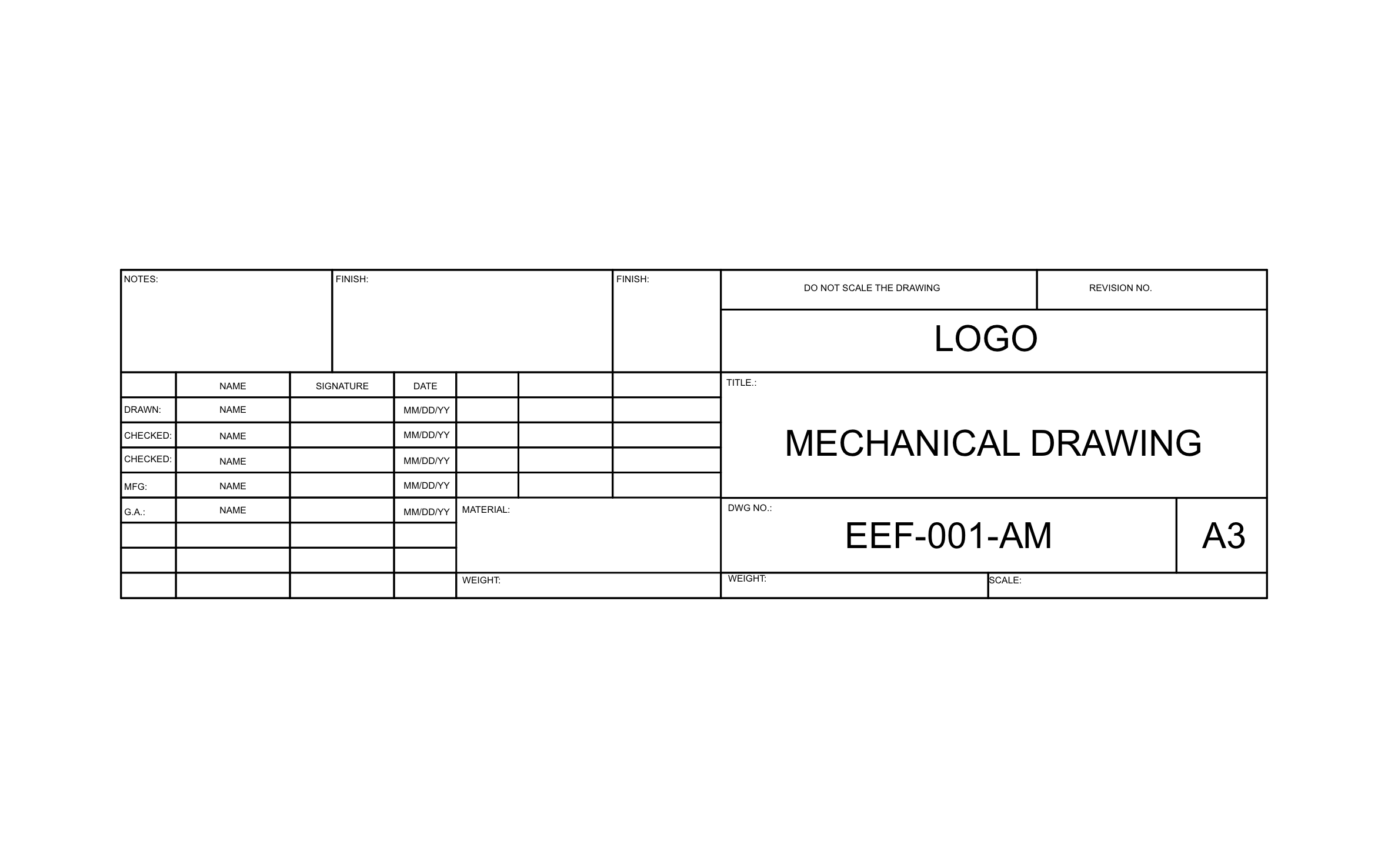
A part headed to a fabricator needs a clear record of who drew it, who checked it, and what it's made of before anyone cuts metal. ArcSite's mechanical drawing title block lines up those sign-offs next to material, finish, and weight fields on one strip.
Key Features
This mechanical drawing title block includes:
- Notes box
- Two finish fields
- Name, signature, and date grid
- Drawn, Checked, MFG, and G.A. sign-off rows
- Material and weight fields
- Drawing number EEF-001-AM sized for A3 paper
- Revision and do-not-scale cells above the logo
- Title field preset to Mechanical Drawing
The second Checked row lets two people sign before the part goes to manufacturing, which settles the question when a fabricator asks who approved a change.


Start from template


Fully customizable


Professional results
Trusted by Pros. Recognized by the Industry.
With top ratings across Software Advice, GetApp, and Capterra, professional contractors choose us for ease of use, powerful tools, and unmatched customer support.





Architectural Symbols & Site Annotation
templates you might like



Frequently asked questions
Why are there two Checked rows?
Can I swap the A3 size for a US sheet size?
Can my customer approve the drawing without printing it?