

Gas Water Heater Installation Diagram
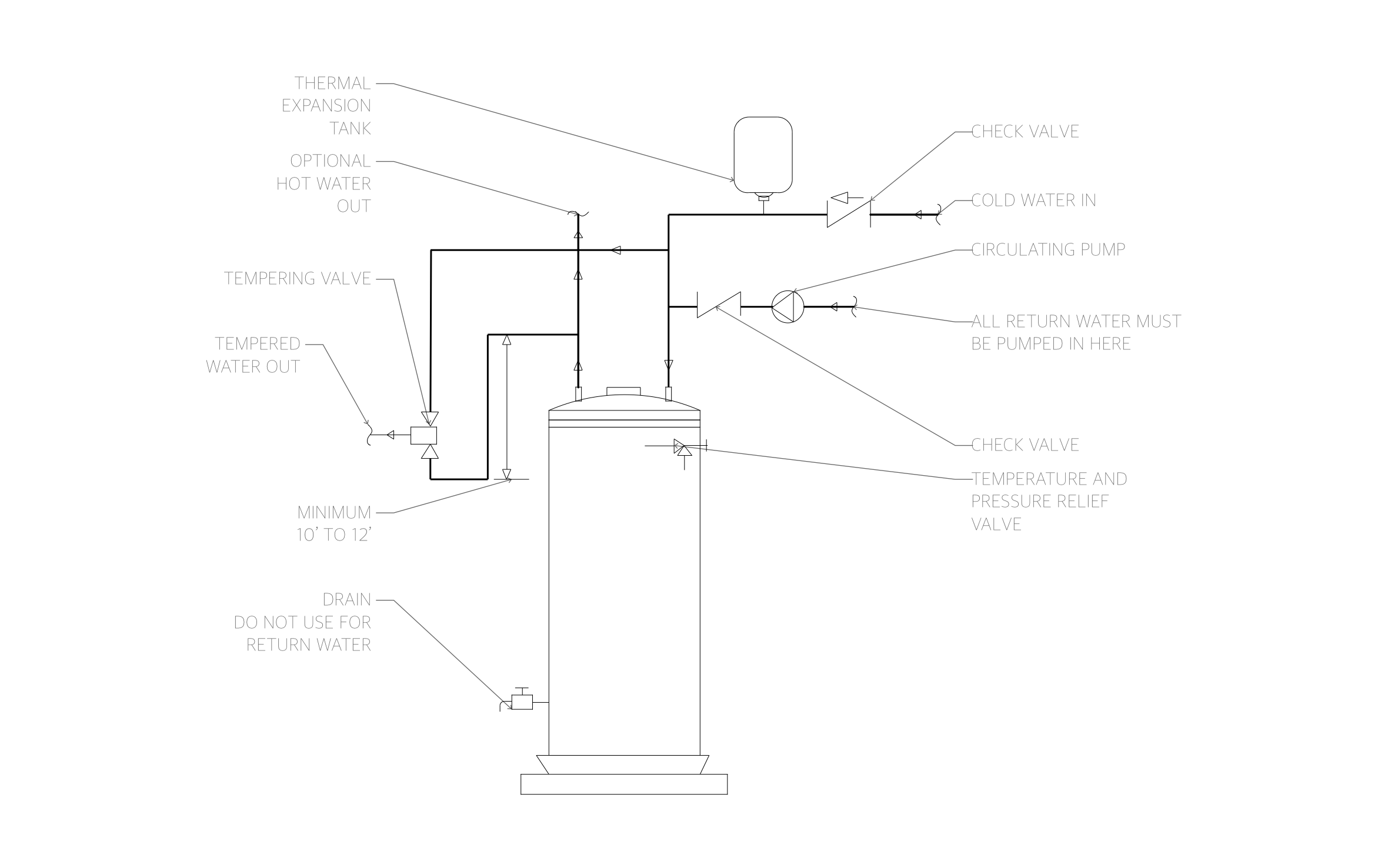
Hot water at the far tap without a long wait at the faucet is what a recirculation loop adds to a tank water heater. Above the tank, ArcSite's gas water heater installation diagram pipes the return loop, expansion tank, and tempering valve.
Opens right in your browser — no install. Make it yours within minutes.


Free access to over 1,200 shapes and blocks included with the ArcSite CAD app
Key Features
This gas water heater installation diagram includes:
- Cold water inlet with a check valve
- Thermal expansion tank on the cold supply
- Circulating pump and check valve on the return line
- Tempering valve with a tempered water outlet
- Optional hot water outlet above the tank
- Temperature and pressure relief valve
- Drain valve marked not for return water
- Flow arrows on every line
The hot line drops down before it rises into the tempering valve, a dimensioned loop that keeps heat from drifting out of the tank between draws.
Key Considerations When Installing a Gas Water Heater
Return water from the recirculation loop has to come back through the circulating pump and check valve, never through the drain valve at the bottom of the tank. ArcSite lets you mark every valve and flow arrow on this diagram, so your installer pipes the loop the same way on every job.

Trusted by the Pros. Honored for Innovation.





Plumbing & Restroom Fixtures
templates you might like
.avif)
FAQ
No. It covers the water piping only. Add the gas supply, shutoff, sediment trap, and flue in ArcSite to complete the install drawing.
Yes! You can delete the pump and return line in ArcSite for a standard install without recirculation.
Once your customer approves the proposal, the invoice pushes to QuickBooks automatically.






