
A2 Title Block Template
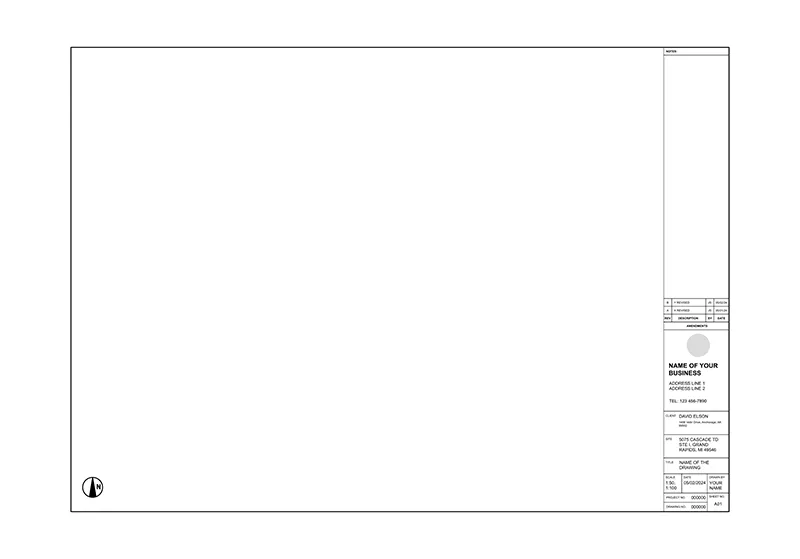
An A2 title block keeps every sheet in a set labeled the same way, so anyone reading the drawing can find the project name, scale, and revision history at a glance. ArcSite's A2 title block template gives you that structure already laid out on the sheet.




Free access to over 1,200 shapes and blocks included with the ArcSite CAD app
Key Features
This A2 title block template includes
- Project title and number field
- Drawing number and sheet ID
- Scale, date, and drawn-by fields
- Site information and client details block
- Logo placement area
- Revision and amendments table
The revision table sits along the bottom edge, matching where most reviewers expect to find it, so redlines and sign-offs stay easy to track sheet to sheet.
Trusted by the Pros. Honored for Innovation.





Why an A2 Title Block Matters
A missing or inconsistent title block is one of the fastest ways for a drawing set to look unfinished, even when the drawing itself is solid. In ArcSite, you can drop this A2 title block onto any sheet and fill in your own project details, scale, and revision notes without redrawing the border by hand.

Architectural Symbols & Site Annotation
templates you might like


FAQ
An A2 title block is a structured section of a drawing placed within an A2-sized sheet. It contains critical project metadata like drawing title, scale, and revision history.
Yes! You can customize all fields directly in the ArcSite app using annotation tools and text editing.
ArcSite offers a free 14-day trial, allowing you to fully explore its features. After the trial, you can choose a subscription plan that best fits your needs.






