
Reflected Ceiling Plan
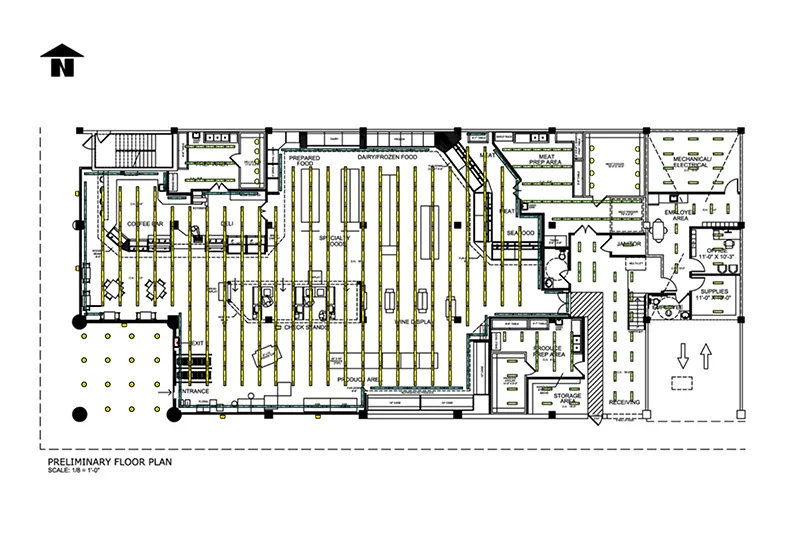
Need a clear way to map lighting fixtures, HVAC vents, and ceiling systems? A reflected ceiling plan (RCP) shows everything mounted or recessed into the ceiling—critical for electrical coordination and construction accuracy. With ArcSite, you can create precise RCPs layered over your floor plans for fast, accurate documentation and seamless field execution.




Free access to over 1,200 shapes and blocks included with the ArcSite CAD app
Key features
Features of ArcSite’s Reflected Ceiling Plan Template
Layered Ceiling Visualization
- Clearly marked rows of linear light fixtures aligned with retail aisles.
- Ceiling grids in offices, backrooms, and service areas for acoustics and lighting layout.
- Recessed can lights and pendants indicated in seating zones like the café area.
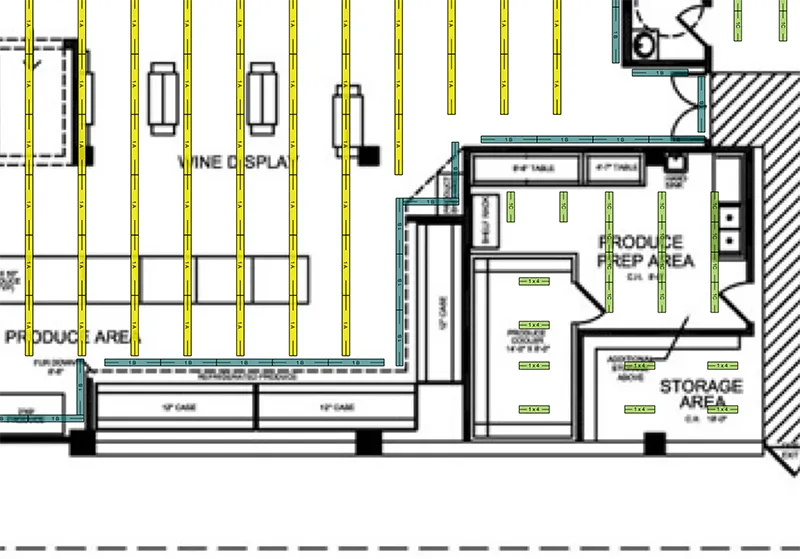
- Specialized fixture zones over prep areas and seafood counters for focused task lighting.
Supports Mechanical Coordination
- Diffusers and return vents marked in mechanical and food prep areas.
- Janitor and receiving zones labeled for utility-specific ceiling elements.
- Electrical room ceiling mapped for overhead conduit runs and controls.
Adaptable to Any Building Type
- Works for retail, grocery, restaurants, medical offices, or residential layouts.
- Accurate scaling makes this template ideal for contractors, engineers, and facility managers.
Get your free download
Trusted by the Pros. Honored for Innovation.





Key Considerations When Designing a Reflected Ceiling Plan
An RCP reflects the ceiling layout as if seen in a mirror on the floor, showing light fixtures, sprinkler heads, diffusers, and more. It's essential for coordinating with electrical, mechanical, and lighting teams. Careful spacing, clear symbols, and alignment with the floor plan are key to avoiding costly changes later in construction.

Why Use a Reflected Ceiling Plan?
RCPs are essential for:
- Lighting Design: Determining fixture type, placement, and coverage.
- Construction Coordination: Aligning ceiling elements with wall and floor components.
- Code Compliance: Ensuring spacing of emergency lights, exit signs, and ventilation.
- Client Visualization: Helping stakeholders understand lighting zones and ceiling finishes.

Architectural Symbols & Site Annotation
templates you might like



FAQ
A reflected ceiling plan (RCP) is a drawing that shows what is located on the ceiling, such as lighting, HVAC, fire sprinklers, or other elements, as though you're looking down at a mirrored floor.
Yes! ArcSite allows you to draw ceiling layouts directly over your floor plans and mark lighting, vents, and electrical with symbols and annotations.
ArcSite offers a free 14-day trial to explore all the mobile-first features before choosing a plan.






