Engineering Drawing Title Block Template
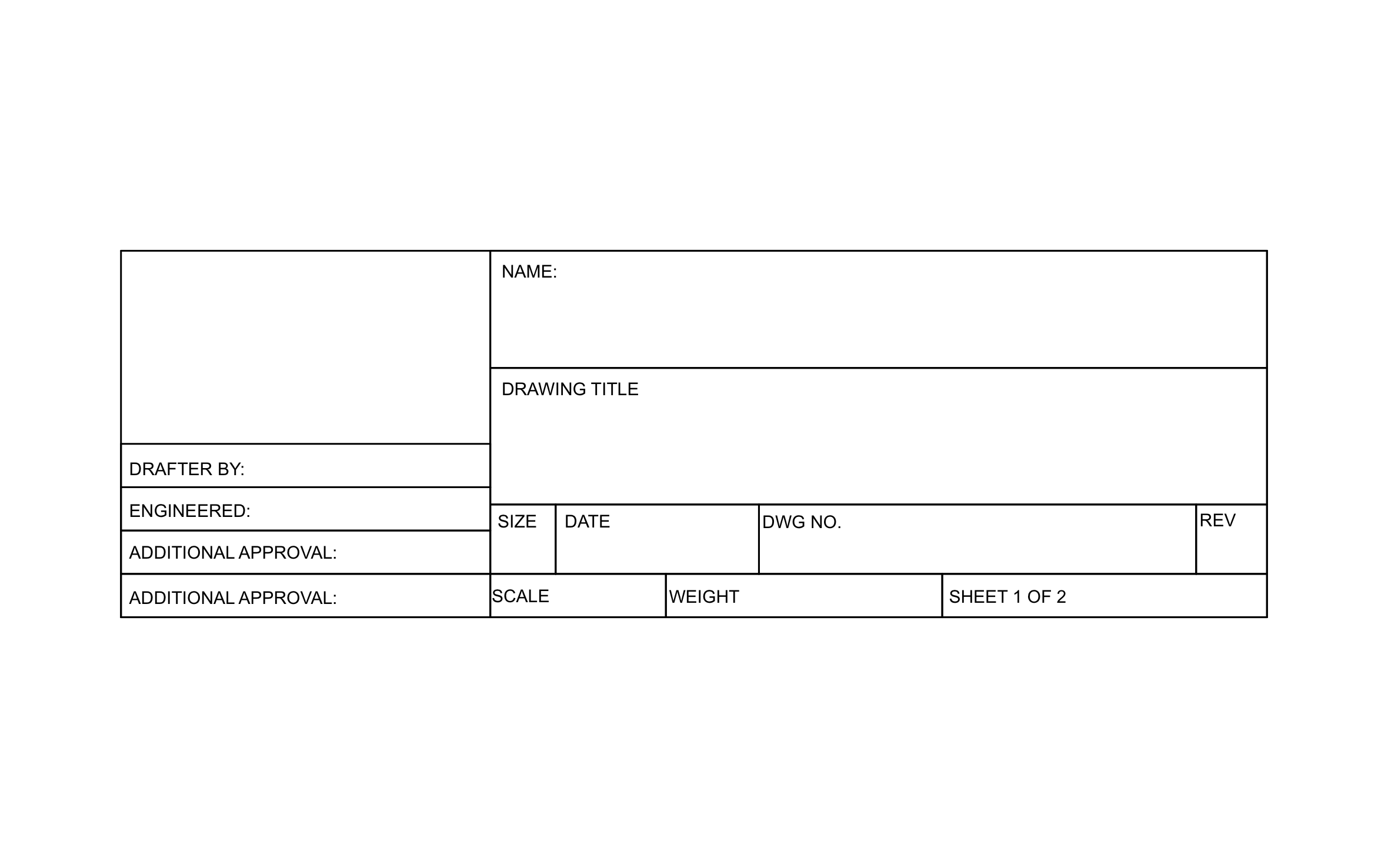
A clear title block tells the shop or the inspector who drew the sheet, who signed off on it, and which revision they're holding. ArcSite's engineering drawing title block template keeps approvals, drawing number, revision, and scale together in one block.
Key Features
This engineering drawing title block template includes:
- Open box for your company name or logo
- Name and drawing title fields
- Drafter and engineer sign-off lines
- Two additional approval lines
- Size, date, drawing number, and revision boxes
- Scale and weight fields
- Sheet 1 of 2 numbering
The weight field is one most construction title blocks leave out, and a fabricator reading the sheet uses it to plan lifting and shipping.


Start from template


Fully customizable


Professional results
Trusted by Pros. Recognized by the Industry.
With top ratings across Software Advice, GetApp, and Capterra, professional contractors choose us for ease of use, powerful tools, and unmatched customer support.





Architectural Symbols & Site Annotation
templates you might like


Frequently asked questions
What is the weight field for?
Can I add my company logo?
Can I print the finished sheet?