Reflected Ceiling Plan
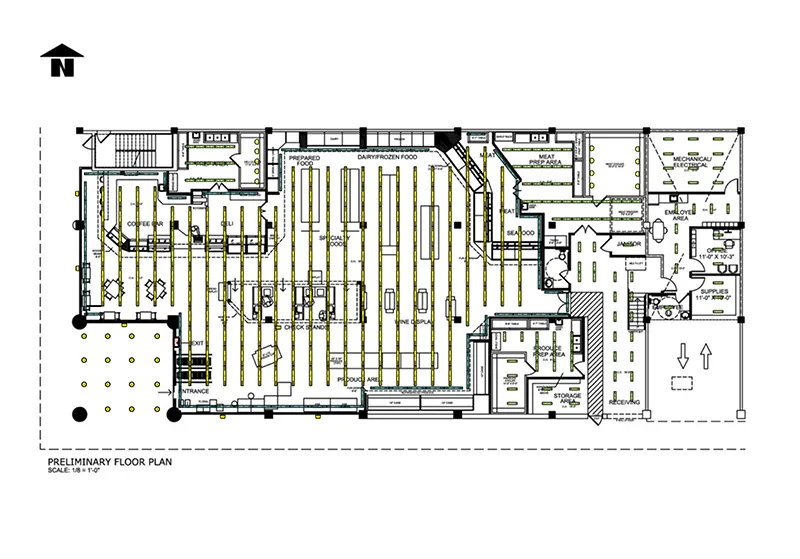
Coordinating lighting, HVAC, and electrical overhead gets confusing fast once trades start overlapping on the same ceiling. Starting from ArcSite's reflected ceiling plan template, you can map every fixture and vent before conduit gets run.
Key Features
This reflected ceiling plan includes:
- Rows of linear light fixtures aligned along the retail aisles
- Ceiling grids marked in the office, backroom, and service areas
- Recessed cans and pendants positioned over the café seating zone
- Task lighting zones called out above the prep area and seafood counter
- Diffusers and return vents marked in the mechanical and food prep rooms
- Overhead conduit runs mapped through the electrical room ceiling
The task lighting zone above the seafood counter is marked separately from the general retail grid, a detail worth catching before the electrician bids the job.


Accurate to scale


Design from anywhere


Professional results
Design tips
Key Considerations When Designing a Reflected Ceiling Plan
A reflected ceiling plan (RCP) shows your ceiling layout as if mirrored onto the floor, so light fixtures, sprinkler heads, and diffusers all read clearly against the space below. Getting spacing and symbols right here keeps your electrical, mechanical, and lighting trades coordinated before conduit runs. In ArcSite, you can align this layer directly over your floor plan to catch conflicts early.
Trusted by Pros. Recognized by the Industry.
With top ratings across Software Advice, GetApp, and Capterra, professional contractors choose us for ease of use, powerful tools, and unmatched customer support.





Architectural Symbols & Site Annotation
templates you might like


Frequently asked questions
What is a reflected ceiling plan?
Can I edit the fixture layout for my own space?
Does ArcSite track material counts as I build this out?