
Landscape Layout Design
Whether you're planning a residential garden or designing outdoor space for a commercial property, a clear landscape layout brings your vision to life. With ArcSite, you can draft, customize, and share detailed landscape plans that help organize planting beds, pathways, and site elements before the first shovel hits the ground.


Free access to over 1,200 shapes and blocks included with the ArcSite CAD app
Key features
Features of ArcSite’s Landscape Layout Template
Defined Zones for Planting and Structure
- Azalea beds near the front walkway provide seasonal color and symmetry.
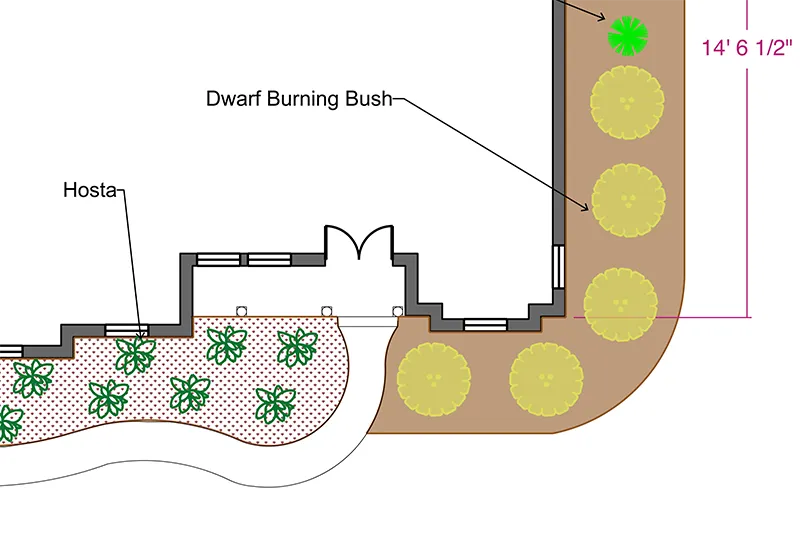
- Velvet Boxwood shrubs, Lady Ferns, and Hosta form low-maintenance planting borders.
- Arborvitae trees and Dwarf Burning Bush create natural privacy screening.
- Decorative Desert Spice crushed rock sections enhance the hardscape elements.
- Existing boulders are incorporated for a natural, grounded look.
Designed for Flow and Access
- Curved pathways guide movement throughout the yard and around the home.
- Plants are positioned to create layered visual interest, from ground covers to mid-height shrubs.
- Measurement callouts ensure precise spacing and allow contractors to build accurately from your plan.
Get your free download
Trusted by the Pros. Honored for Innovation.





Key Considerations When Designing a Landscape Layout
A great landscape layout strikes a balance between beauty and functionality. It considers the natural flow of movement, shade, privacy, and aesthetics. Grouping plants by type, arranging walkways for logical access, and spacing elements correctly ensures the landscape is both practical and low-maintenance.

How Do I Organize My Landscape Layout?
Front Entry and Curb Appeal
The pathway leading to the main entrance is flanked with Azaleas and Boxwood shrubs, creating symmetry and a sense of welcome. Flowering plants are grouped near the entry for visual impact.
Side and Rear Zones
Along the sides and rear of the home, privacy-focused elements like Arborvitae and Dwarf Burning Bush are strategically placed. The curved path guides you naturally around the home, integrating shaded areas and sunny plantings.
Balance of Hardscape and Greenery
The use of crushed rock defines planting beds and adds contrast to the greenery. This balance creates low-maintenance, professional-grade landscaping while keeping the layout visually open and flowing.

Landscaping & Outdoor Living
templates you might like


FAQ
Yes! ArcSite allows you to move elements, label plant types, add hardscape areas, and adjust paths directly on your digital canvas.
Absolutely. ArcSite is intuitive and designed for homeowners, landscapers, and designers without prior CAD experience.
Yes! You can upload site photos, before/after images, or specific plant references to clarify design intent for clients or installers.






