Landscape Design Title Block
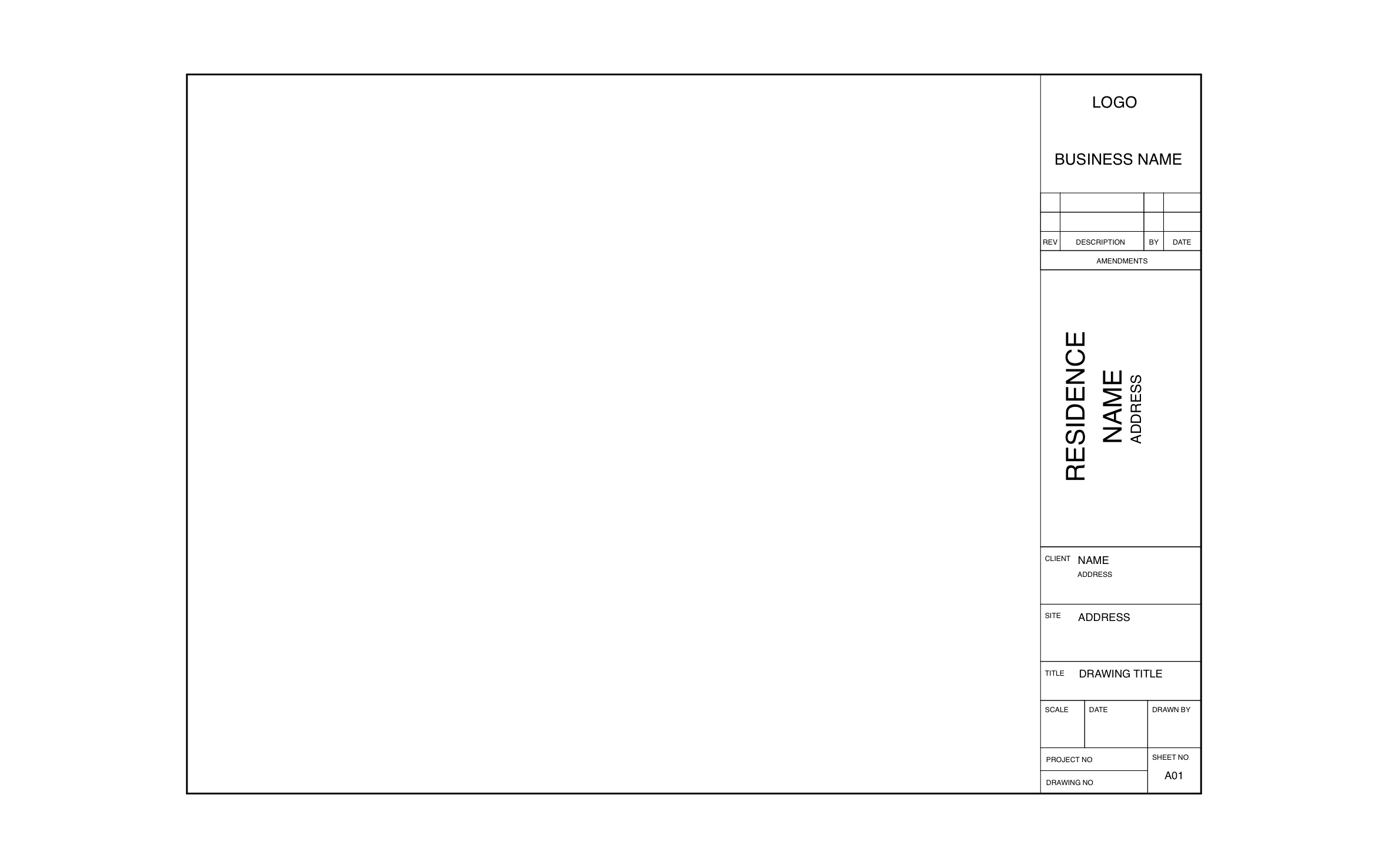
A landscape plan often gets shared between the homeowner, the install crew, and an HOA board before anyone digs, and each of them needs to know whose yard it is. ArcSite's landscape design title block keeps the client's address and the site address in separate fields, with your business name and logo above them.
Key Features
This landscape design title block includes:
- Logo and business name at the top
- Two-row amendments table under the business name
- Residence name and address running up the strip
- Separate client and site address fields
- Drawing title field
- Scale, date, and drawn by boxes
- Project number and drawing number fields
- Sheet number A01
Separate client and site fields matter on rentals and new builds, where the person paying doesn't live at the address you're planting.


Start from template

Fully customizable


Professional results
Design tips
Why a Landscape Design Title Block Matters
Trusted by Pros. Recognized by the Industry.
With top ratings across Software Advice, GetApp, and Capterra, professional contractors choose us for ease of use, powerful tools, and unmatched customer support.





Architectural Symbols & Site Annotation
templates you might like


Frequently asked questions
Why are the client and site addresses separate?
Can I change the sheet number from A01?
How fast can I get a quote out after the walk-through?