Electric Fence Installation Diagram
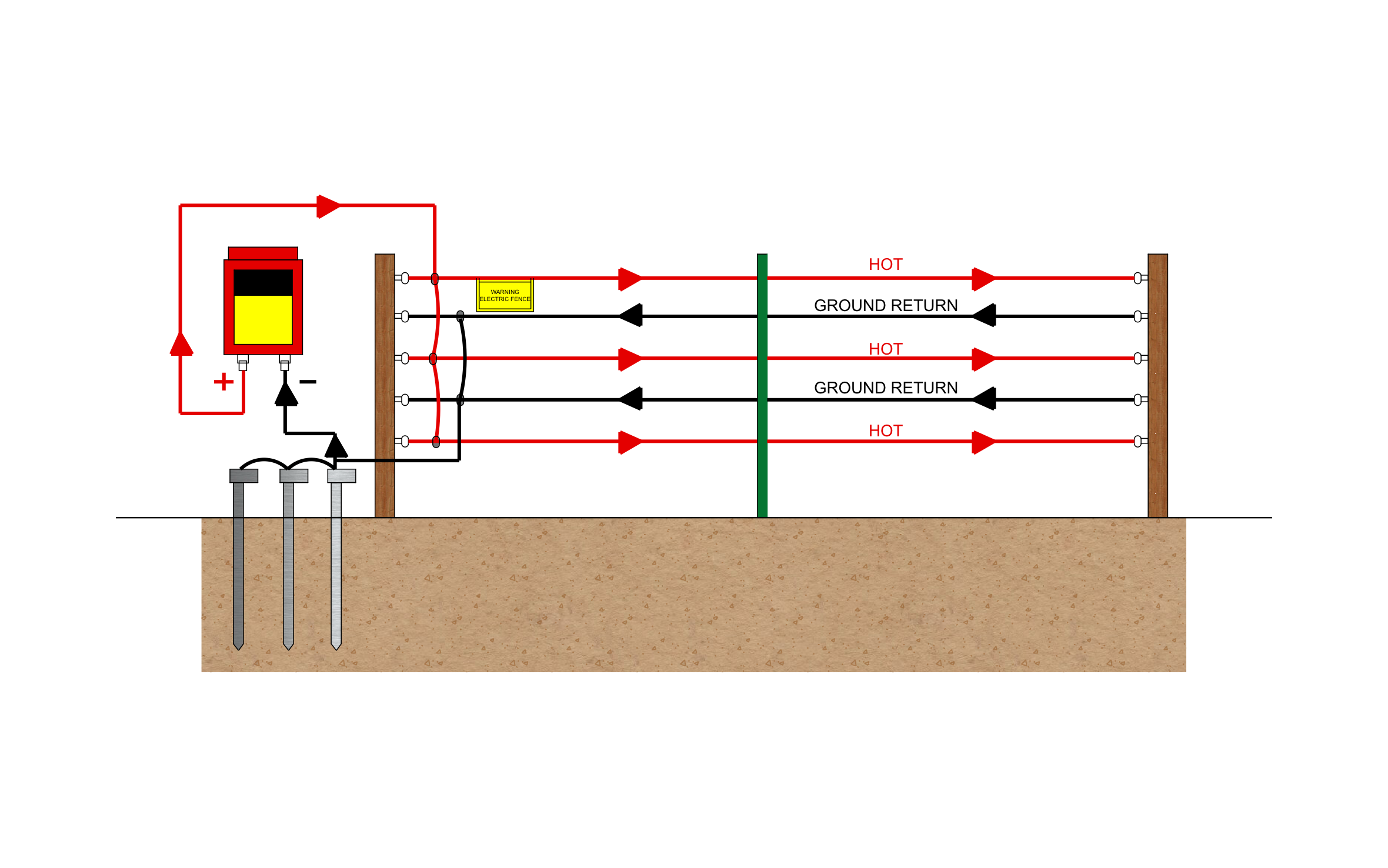
An electric fence keeps livestock in and predators out across acres of pasture with far less material than a solid fence. ArcSite's electric fence installation diagram shows the full hot and ground return wiring, so the system works the day you switch it on.
Key Features
This electric fence installation diagram includes:
- Five wires alternating hot and ground return
- Energizer with positive and negative terminals
- Three ground rods linked together
- Jumper wires tying the hot wires and the ground return wires together
- Wood end posts with insulators and a steel line post
- Warning sign on the fence line
- Arrows showing current flow on each wire
The ground return wires keep this setup working in dry or frozen soil, where a ground-only system loses its shock, a detail to raise with any customer in a dry climate.


Fully customizable


Industry specific


Professional & accurate designs
Design tips
Key Considerations When Installing an Electric Fence
Trusted by Pros. Recognized by the Industry.
With top ratings across Software Advice, GetApp, and Capterra, professional contractors choose us for ease of use, powerful tools, and unmatched customer support.





Landscaping & Outdoor Living
templates you might like

Frequently asked questions
Why are some wires labeled ground return?
Can I change the number of wires?
Can my office and field crew work from the same drawings?