Civil Engineering Title Block
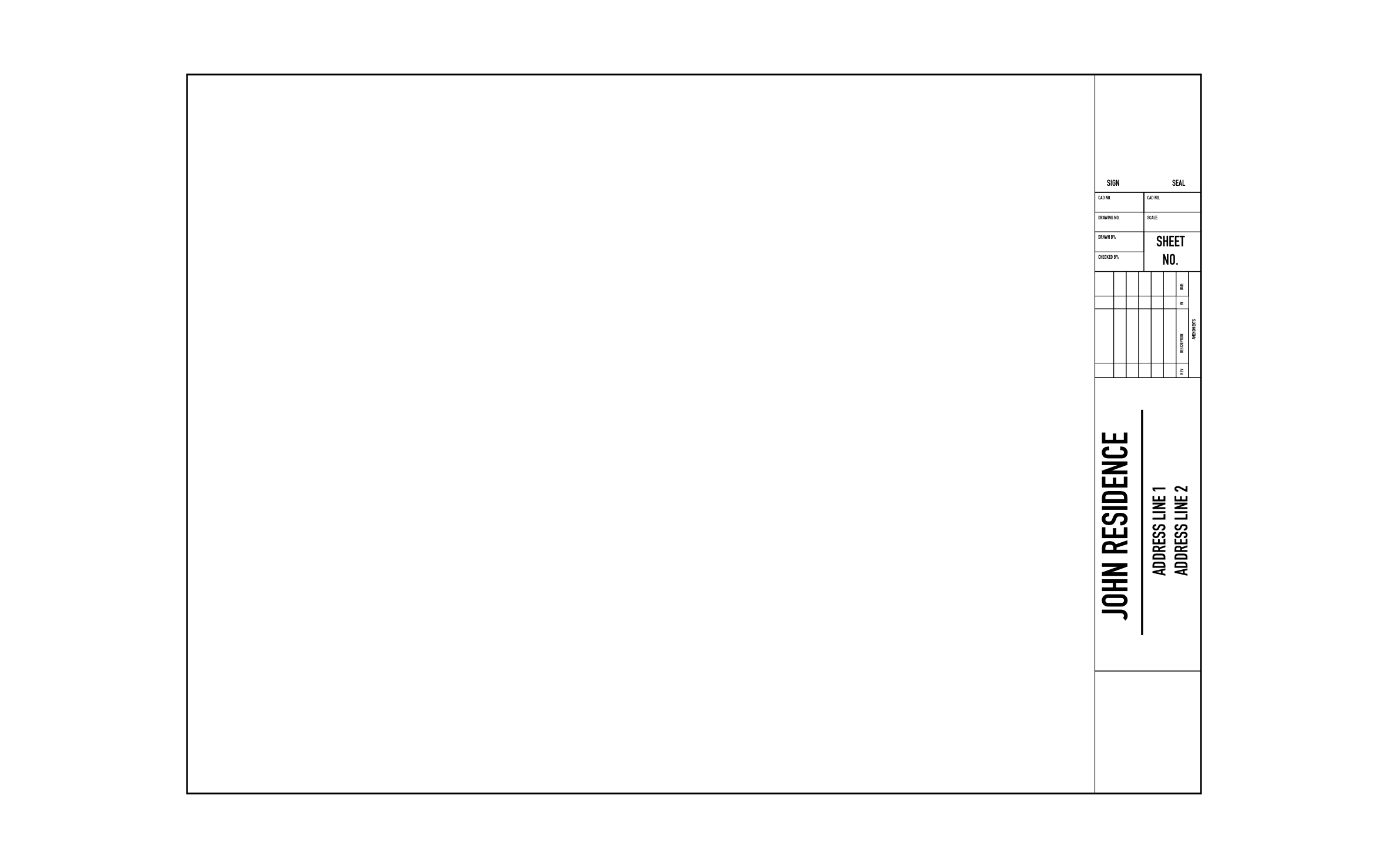
Grading, drainage, and utility plans for a building lot usually have to be signed and sealed before a reviewer will approve them, so that space can't be an afterthought. ArcSite's civil engineering title block puts sign and seal space at the top of the strip, above the drawing fields and amendments table.
Key Features
This civil engineering title block includes:
- Sign and seal space at the top
- CAD and drawing number cells below the seal
- Drawn by and checked by lines
- Open sheet number box
- Revision history turned on its side
- Project name and two address lines
- Blank box at the bottom for a key map or notes
The sheet number box comes empty, so number it to your set, like C-101, before the plans go to review.


Start from template

Fully customizable


Professional results
Trusted by Pros. Recognized by the Industry.
With top ratings across Software Advice, GetApp, and Capterra, professional contractors choose us for ease of use, powerful tools, and unmatched customer support.





Architectural Symbols & Site Annotation
templates you might like

Frequently asked questions
Why is the sheet number left blank?
Can I use it for a commercial site instead of a house?
Can ArcSite connect to the other software we use?