Structural Steel Title Block
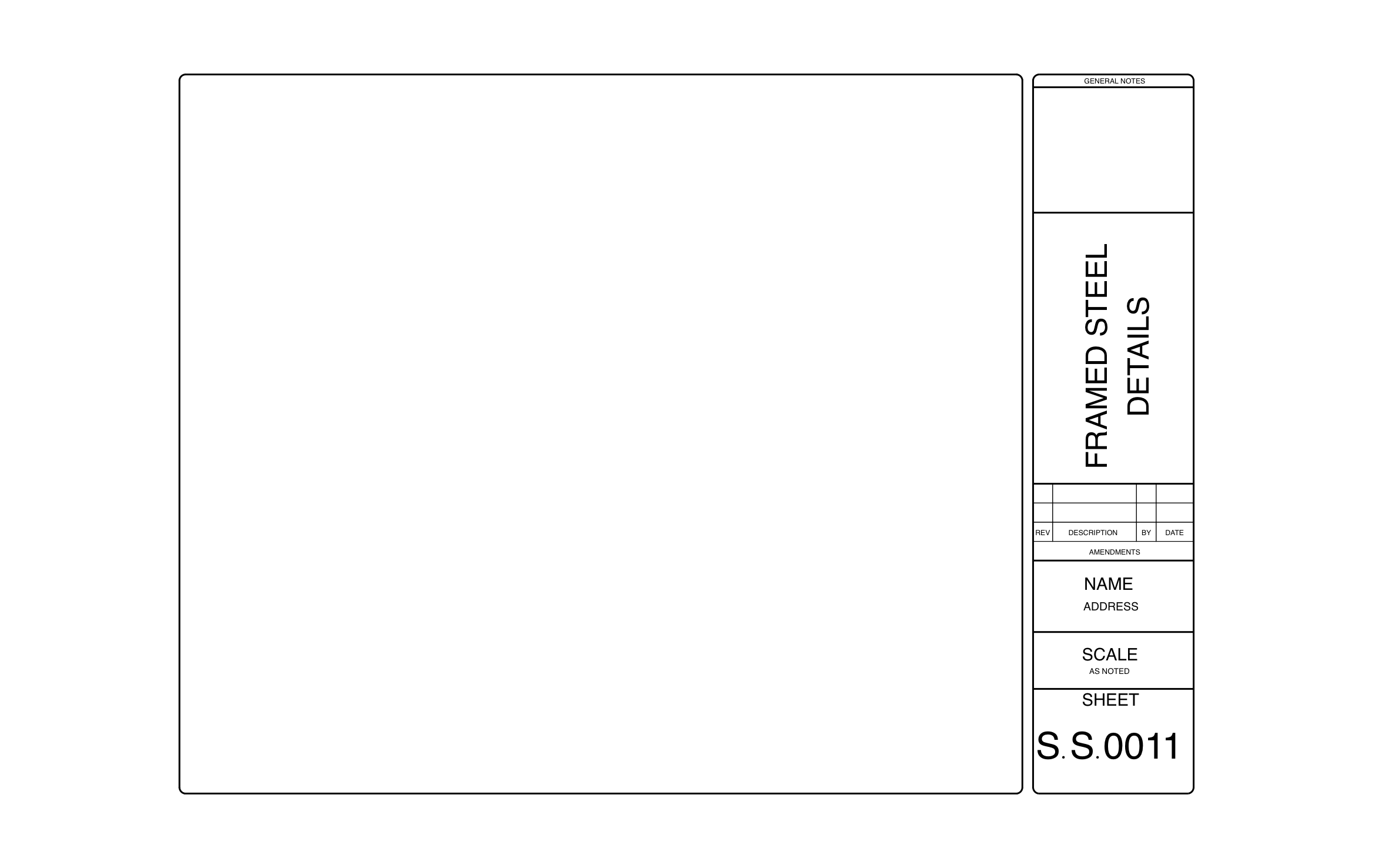
Steel connection details have to reach the fabricator and the erector with no doubt about which version is current, since a wrong bolt pattern means rework on site. ArcSite's structural steel title block runs down the right edge of the sheet with a general notes box, an amendments table, and an S.S. sheet number.
Key Features
This structural steel title block includes:
- General notes box at the top
- Sheet title set to Framed Steel Details
- Amendments log for revision, description, initials, and date
- Name and address block
- Scale marked As Noted
- Sheet number S.S.0011
- Large open drawing area
As Noted means each detail on the sheet carries its own scale label, so label every connection before the sheet goes to the shop.


Start from template

Fully customizable


Professional results
Design tips
Key Considerations When Designing a Structural Steel Title Block
Trusted by Pros. Recognized by the Industry.
With top ratings across Software Advice, GetApp, and Capterra, professional contractors choose us for ease of use, powerful tools, and unmatched customer support.





Architectural Symbols & Site Annotation
templates you might like

Frequently asked questions
What does "Scale: As Noted" mean?
Can I rename the sheet title?
Can I start this at my desk and finish it on site?