
Specialty contractors are replacing clipboards and spreadsheets with a modern building inspection app to capture conditions, generate accurate takeoffs, and deliver professional estimates in minutes. Going digital reduces rework, speeds revenue, and tightens risk control from field to office.
Budgets are tighter, timelines are shorter, and clients expect answers now. Paper forms, scattered photos, and hand-sketched notes slow teams down and introduce costly mistakes. As of 2025, top-performing inspectors and field leaders are standardizing on a mobile-first workflow that captures site data once and reuses it everywhere - design, takeoff, pricing, and reporting.
At ArcSite, we help specialty contractors make that on-site to online shift with mobile CAD, takeoff, and estimating in one app. If you are evaluating a building inspection app to streamline site work and deliver faster, more accurate proposals, this guide shows how to get results without disrupting your crew.
Why the old way no longer works
Manual inspection workflows break down under real-world pressure - multiple visits, changing scopes, and more stakeholders. The stakes are clear: the longer it takes to turn field findings into a priced scope, the more margin you lose and the more opportunities you leave on the table.
- Data loss between field and office: Photos on phones, notes in notebooks, measurements on scratch paper.
- Slow estimating: Re-entering measurements into spreadsheets introduces errors and delays pricing.
- Inconsistent documentation: Every inspector has a different template, making QA and handoffs difficult.
- Scope creep and risk: Missing one measurement or fixture count can burn margin and require unplanned returns.
- Poor customer experience: Waiting days for drawings and estimates can cost you the job.
When your team captures precise site data once - structured, visual, and tied to location - you eliminate rework and move faster with confidence.
How ArcSite modernizes inspections, takeoffs, and estimates
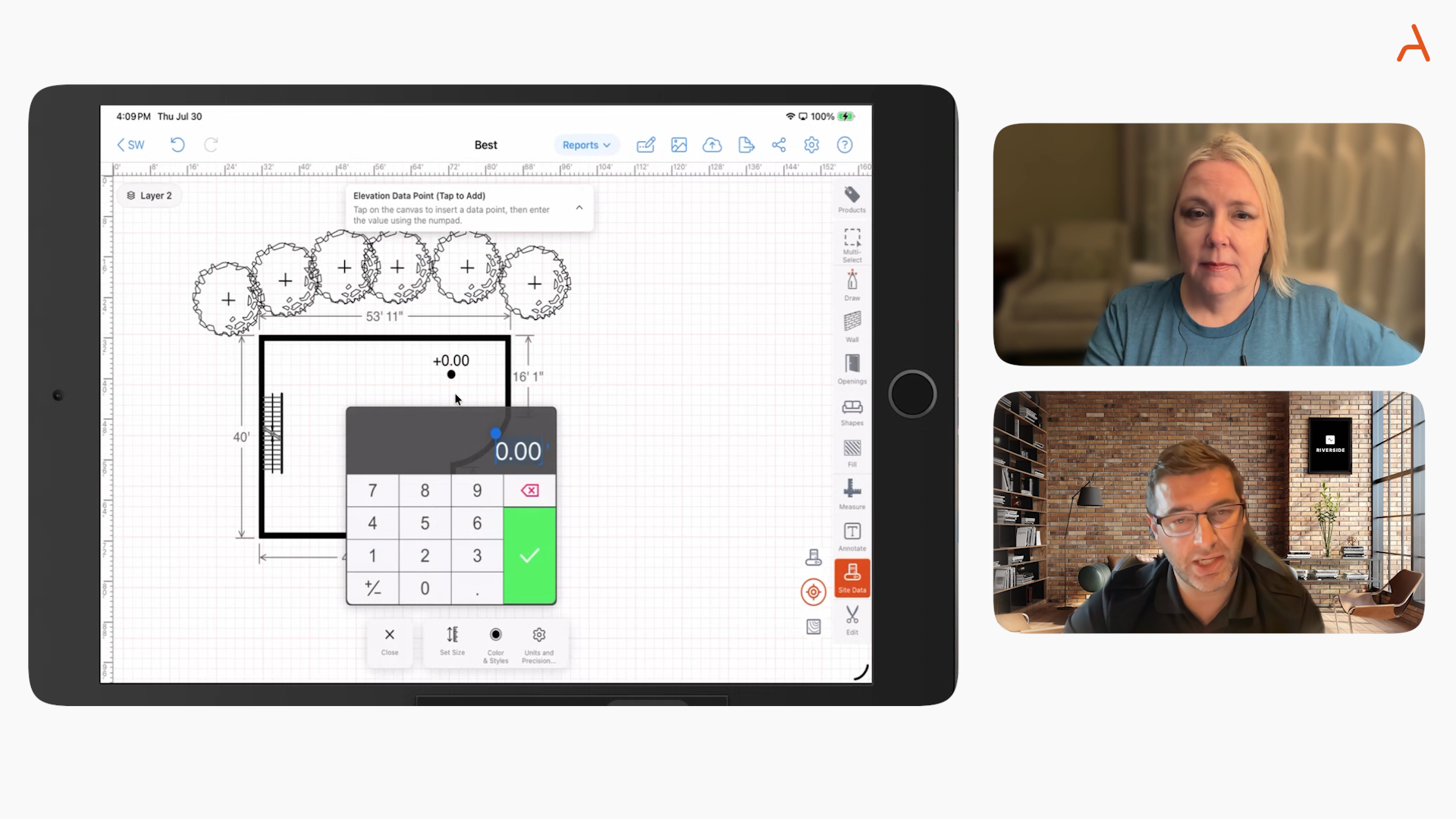
ArcSite combines mobile CAD drawing, automatic takeoff, and estimating so field teams can complete inspections and produce proposals during the same visit - even offline. The result is a single source of truth that flows from site to signed proposal.
- Mobile CAD on-site: Draw floor plans and site layouts to scale with your finger or stylus. Mark issues, penetrations, and equipment in context.
- Smart symbols and assemblies: Drop manufacturer-specific or trade-specific components that carry quantities, materials, and labor rules.
- Automatic takeoff: Counts and linear/area measurements update instantly as you draw and edit.
- Instant pricing: Apply your rates, item catalogs, and assemblies to generate accurate estimates in minutes.
- Professional reports: Output clear drawings, photo-labeled notes, and line-item estimates your customers can sign.
This is not just digitizing a paper form. It is creating a structured, visual record that drives estimating accuracy and compresses your sales cycle.
Johnson Controls Sees a 50% Reduction in Field Time
A clear example of this shift comes from Johnson Controls, whose survey and inspection teams adopted ArcSite to replace paper sketches and fragmented reporting. By using mobile CAD drawings tied directly to measurements, photos, and structured data, their inspectors were able to document complex sites accurately during the first visit—without returning to the office to redraw plans or reconcile notes. The result was faster turnaround on inspection reports, fewer clarification calls between field and office, and more consistent, audit‑ready documentation across teams. For large, distributed inspection organizations, going digital wasn’t just about speed—it was about standardization, risk reduction, and confidence that every site was captured correctly the first time.
Practical workflows you can run today
1) Pre-bid inspection with real-time scope capture
- Open the project and sketch the space to scale.
- Drop standardized symbols for fixtures, devices, or issues (e.g., damaged conduit, failed sealant, missing insulation).
- Attach photos to each symbol so office teams see exactly what you saw.
- Use layers to separate existing conditions from proposed work.
- Generate the takeoff automatically - counts, lengths, areas - then apply pricing.
Outcome: You leave the site with a complete, priced scope that aligns drawings, photos, and line items.
2) Code compliance punch and closeout
- Load your checklist as annotated symbols tied to code references.
- Mark deficiencies on the plan and assign tasks to subs with due dates in your report.
- Capture before/after photos at the same map location for clear closeout documentation.
Outcome: Faster corrections, fewer disputes, and audit-ready records.
3) Multi-site program inspections
- Define a standard symbol library and assemblies once for consistency.
- Roll out to all techs so every site is drawn, counted, and priced the same way.
- Aggregate quantities across locations for bulk pricing and procurement.
Outcome: Predictable outputs from every inspector, less training overhead, and stronger margin control.
For a deeper look at how inspectors apply these workflows, explore our building inspection app overview.
Implementation without disruption
Adopting new tech can stall if it feels complex. We recommend a phased approach that respects the realities of field work.
- Start with one crew: Pick a foreman or inspector who is open to change. Run a pilot on a contained scope.
- Standardize symbols and assemblies: Use a limited catalog that covers 80% of jobs, then expand.
- Mirror your current estimate format: Keep familiar line items so the office and customers see what they expect.
- Enable offline first: Ensure teams can draw, count, and price without connectivity. Sync when back online.
- Create quick wins: Aim to generate a same-day estimate on week one. Celebrate and share the result.
Training tip: 60 minutes of hands-on drawing with real projects typically gets field users productive. Record a short video walkthrough of your chosen workflow so new hires can self-serve.
Change management that sticks
Tech adoption is not only about features - it is about habits. Make it easier to do the right thing than the old thing.
- Make ArcSite the single destination: Draw, measure, count, and price in one place so there is no reason to revert to paper.
- Create a shared folder structure: Name projects and layers consistently for fast search and handoffs.
- Use templates for reports: One tap to generate customer-ready outputs reduces admin time.
- Measure usage weekly: Track how many jobs are drawn and estimated in-app. Coach lagging teams early.
What to measure: ROI and success metrics
Most contractors see value from tighter accuracy and faster turnaround. Quantify it and you will know where to invest.
- Cycle time: Days from site visit to delivered estimate. Target same-day or next-day delivery.
- Win rate: Compare jobs quoted within 24 hours vs. longer. Faster, clearer proposals typically convert more.
- Estimate accuracy: Variance between estimated and actual material/labor. Visual takeoffs cut misses.
- Revisits and rework: Trips saved because measurements and photos were complete the first time.
- Average job margin: With better scoping and standardized pricing, small percentage gains add up quickly.
Example approach to quantify ROI:
- Baseline 30 days of quotes and outcomes using your current process.
- Run ArcSite for the next 30 days with the same team and job mix.
- Compare cycle time, win rate, and variance. Even modest improvements usually cover the subscription many times over.
Buyer checklist: what matters in a mobile solution
- True mobile CAD: Create to-scale drawings on-site without desktop CAD.
- Integrated takeoff and estimating: Counts and measurements automatically drive pricing.
- Offline reliability: Full functionality without a signal.
- Configurable catalogs: Your items, assemblies, and rates - not a generic price book.
- Clear, professional outputs: Drawings, photos, and line items in one branded report.
- Ease of use: Field-ready interface that techs actually adopt.
- Security and admin: User roles, version control, and audit trails for compliance.
The bottom line
Inspectors who go digital win more work and protect more margin because they capture reality once - visually and accurately - and reuse that information everywhere. With ArcSite, your team can sketch to scale, perform takeoffs, and produce accurate estimates before leaving the site. Less back-and-forth, fewer surprises, and a better experience for your customers.
If you are ready to move from on-site chaos to online clarity, see how ArcSite can fit your workflow and trade. Book a demo and we will walk through your use case live.
Categories
INDUSTRY


FAQs
Specialty contractors are shifting to digital solutions to reduce rework, speed revenue, tighten risk control, and meet tighter budgets and shorter timelines while delivering faster, more accurate proposals.
Manual workflows suffer from data loss, slow estimating, inconsistent documentation, scope creep, and poor customer experience due to delays and errors.
ArcSite combines mobile CAD drawing, automatic takeoff, and estimating into one app, enabling field teams to complete inspections and generate accurate proposals during the same visit, even offline.
Contractors can perform pre-bid inspections with real-time scope capture, code compliance punch and closeout with annotated checklists, and multi-site program inspections using standardized symbols and assemblies for consistency and margin control.
Contractors should look for true mobile CAD, integrated takeoff and estimating, offline reliability, configurable catalogs, professional outputs, ease of use, and security with user roles and audit trails.
Related posts