

Growing pest control companies need bookkeeping processes that are accurate, repeatable, and tightly connected to tools like QuickBooks pest control software so every service call, drawing, and estimate turns into clean financial data. In this article, we explore how pairing strong bookkeeping habits with ArcSite's mobile CAD, takeoff, and estimating workflows keeps your numbers organized as your business scales.
Most pest control owners do not start their business because they love bookkeeping. Yet as routes expand and commercial contracts grow, a messy back office quietly eats into profits, causes billing delays, and makes tax season stressful.
When your technicians are creating drawings, takeoffs, and estimates in the field, every line item needs to flow into your accounting system without retyping. That is where combining ArcSite with tools like QuickBooks pest control software becomes a powerful foundation for smart bookkeeping.
Why bookkeeping matters so much for pest control growth
Pest control is a volume business. You might complete dozens of residential stops in a day or dedicate entire crews to large commercial properties. Without disciplined bookkeeping, it is easy for revenue, costs, and scheduling data to fall out of sync.
Common pain points we hear from pest control contractors include:
- Invoices that do not match what techs actually did on-site
- Handwritten notes that never make it into QuickBooks or your accounting system
- Underbilling for extra services like exclusion, clean-up, or follow-up visits
- Difficulty reconciling product usage and chemical costs with revenue
- No clear view of job profitability by service type, technician, or route
When your books are off, everything downstream gets harder - cash flow planning, hiring, equipment purchases, and even selling your business one day.
The good news: a few essential practices, backed by the right software, can turn bookkeeping from a pain point into a strategic advantage.
Connect field work to your books with ArcSite
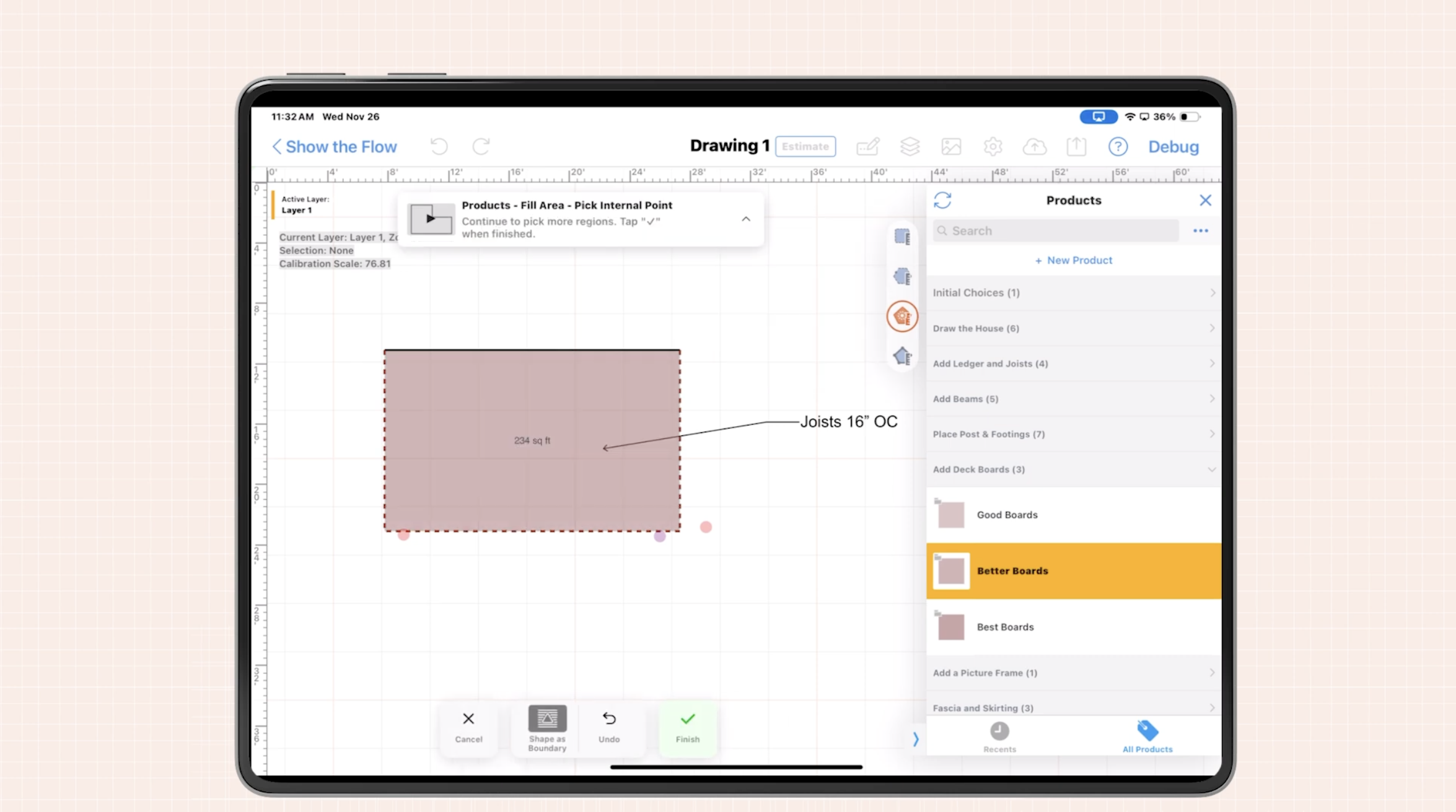
ArcSite is a mobile CAD, takeoff, and estimating tool built for specialty contractors who work in the field every day. For pest control teams, this means technicians can:
- Draw property layouts and infestation zones directly on a tablet or phone
- Attach line items, assemblies, and pricing to those drawings
- Generate professional estimates and proposals on-site
- Capture customer approvals and signatures immediately
From a bookkeeping perspective, the critical piece is that every room, bait station, exclusion line, and treatment area in ArcSite can be tied to specific items and quantities. That structure eliminates guesswork and minimizes the manual data entry that often introduces errors into QuickBooks.
Instead of your office team trying to decipher handwritten notes, they can rely on a consistent digital workflow where drawings, takeoffs, and estimates are aligned with your chart of accounts and item catalog.
Essential bookkeeping practices for pest control businesses
Whether you are just implementing QuickBooks or are already using dedicated quickbooks pest control software, the following practices help keep your books accurate as you scale.
1. Standardize your services and items
Start by defining a standard list of services and materials that appears the same everywhere - in ArcSite, in QuickBooks, and on your proposals.
- Create clear service items such as General pest treatment, Termite inspection, Rodent exclusion per linear foot, and Commercial monthly service.
- Include material items like bait stations, traps, foam, sealant, and PPE where relevant.
- Assign internal codes or SKUs that match between your estimating system and your accounting system.
In ArcSite, you can link these items to symbols, shapes, or assemblies in your drawings. Every time a technician adds 30 linear feet of exclusion or 10 bait stations to a plan, those quantities are ready to flow into your estimate and ultimately to your invoice.
2. Capture scope and approvals in the field
Disputes and write-offs often come from unclear scope. The customer remembers one thing, the technician another, and the invoice shows something different.
To avoid this:
- Use ArcSite drawings to visually document where you will treat, exclude, or monitor.
- Attach line items and pricing directly to the drawing so the customer can see exactly what they are paying for.
- Collect digital signatures in the field to lock in the agreed scope and price.
Once the customer signs, your bookkeeping team can trust that the estimate, work order, and final invoice align - dramatically reducing billing disputes and adjustments in QuickBooks.
3. Separate recurring from one-time work
Pest control revenues are typically a mix of recurring service plans and one-time jobs. Clean bookkeeping requires tracking them separately.
- Use distinct items or classes for monthly, quarterly, and annual service contracts.
- Tag one-time inspections, cleanouts, and remedial work differently in both ArcSite and QuickBooks.
- Ensure technicians select the correct template in ArcSite when building drawings and estimates for recurring vs project-based work.
This separation makes it easier to:
- Forecast predictable recurring revenue
- Analyze profitability by contract type
- Plan staffing and route density around your service base
4. Tie material usage to revenue
As chemical and material costs change, your margins can erode quietly if you are not monitoring usage against revenue. With ArcSite, every bait station, trap, or application area can be associated with specific quantities.
Best practices include:
- Building assemblies in ArcSite that bundle labor and materials for common services (for example, Rodent exclusion with X feet of sealant, Y traps, and Z labor hours).
- Reviewing variance reports in your accounting software to spot jobs where material percentages are out of range.
- Updating your price lists periodically so estimates stay aligned with current costs.
When your estimates reflect real usage and those same items map cleanly into QuickBooks, you get a far clearer view of job-level profitability.
5. Close the loop quickly after each visit
Timely bookkeeping starts with timely data from the field. The longer technicians wait to document work, the more information is lost.
We recommend:
- Requiring techs to complete drawings, treatments, and notes in ArcSite before leaving the site.
- Having office staff review and sync those records into your accounting system daily or at least several times per week.
- Sending invoices promptly so receivables do not pile up.
A consistent close-out routine keeps your books current, your cash flow healthier, and your reports trustworthy.
Practical workflows that connect ArcSite to your accounting
Here is how a clean workflow can look when ArcSite and your accounting tools work side by side.
From inspection to estimate
- The technician arrives on-site and opens a relevant ArcSite template (residential general pest, commercial kitchen, warehouse, etc.).
- They sketch the structure, noting problem areas, access points, and existing equipment.
- They drop in assemblies for treatments, exclusion lines, and monitoring devices that automatically calculate quantities and pricing.
- ArcSite generates a professional estimate tied directly to the drawing, which the customer reviews and signs on the spot.
From estimate to invoice
- The office receives the completed drawing and estimate and checks it for accuracy.
- Line items and quantities are exported or entered into QuickBooks, matching pre-defined items and accounts.
- After the work is completed, adjustments (if any) are updated in ArcSite and mirrored in the invoice.
- The invoice is sent out promptly, reducing days sales outstanding and keeping your books aligned with reality.
This workflow minimizes double entry, reduces errors, and gives both your field team and your bookkeeper a single source of truth.
Implementation and change management tips
Rolling out new tools and processes can feel daunting, especially for teams used to paper forms. A few steps help smooth the transition:
- Start with a pilot team. Choose a small group of techs to adopt ArcSite first, refine your item lists, and test your QuickBooks workflows.
- Build simple templates. Create a handful of common service templates in ArcSite so techs are not starting from a blank screen.
- Train on outcomes, not just buttons. Emphasize how better drawings and estimates reduce call-backs, disputes, and unpaid work.
- Update your SOPs. Document step-by-step how inspections, estimates, approvals, and invoicing should work with the new tools.
- Review reports regularly. In the first few months, spot-check jobs to make sure what is in ArcSite matches what lands in QuickBooks.
Measuring ROI from better bookkeeping
To understand the impact of these practices, track a few key metrics before and after implementing ArcSite-driven workflows:
- Time to send invoices - Average days from job completion to invoice created and sent.
- Billing accuracy - Percentage of invoices that need manual corrections or credits.
- Estimate-to-close rate - Percentage of proposals that convert to sold work.
- Average ticket size - Especially for residential work, as clearer drawings and options can support higher-value recommendations.
- Gross margin by service type - To see where structured assemblies and accurate material tracking improve profitability.
Even modest improvements across these areas add up to significant ROI over a year, especially as your route density and customer base grow.
Next steps: connect your field work and your books
Strong bookkeeping is not just about clean ledgers - it is about making sure every inspection, drawing, and treatment your team performs turns into accurate, timely revenue you can rely on.
By combining disciplined bookkeeping practices with ArcSite's mobile CAD, takeoff, and estimating capabilities, growing pest control companies can reduce errors, speed up cash flow, and gain a clear picture of profitability across every job.
Ready to see how ArcSite can support your office and your technicians? Book a demo to walk through real pest control workflows and explore how to streamline your estimating and bookkeeping processes.
Categories
FAQs
ArcSite structures drawings, takeoffs, and estimates so every service item and quantity is clearly defined, making it easier to transfer accurate data into your accounting system and reduce manual entry errors.
Yes, ArcSite is designed to complement accounting platforms like QuickBooks by organizing field data, items, and quantities so they can be quickly aligned with your existing chart of accounts and invoicing process.
ArcSite helps eliminate illegible notes, mismatched invoices, missing billable items, and inconsistent pricing by standardizing how technicians capture work on-site and tying that information directly to estimates.
No, ArcSite is built for field teams, with simple templates, drag-and-drop symbols, and assemblies so technicians can capture accurate layouts and scopes without formal CAD training.
Track metrics like time to send invoices, billing accuracy, estimate-to-close rate, average ticket size, and gross margin by service type before and after implementing ArcSite to quantify efficiency and profitability gains.
Related posts