
A building inspection app helps specialty contractors capture site details accurately, create clear drawings, and deliver professional estimates fast - turning confusing checklists and back-and-forth calls into confident, on-the-spot decisions clients trust.
If you have ever left a walkthrough with a notebook full of scribbles and a nagging fear you missed something, you are not alone. Client conversations stall when details are unclear, drawings are hard to read, and estimates take days. A modern building inspection app fixes that by letting us document, draw, quantify, and price in one place while we are still on site.
ArcSite built mobile CAD, takeoff, and estimating tools for specialty contractors who need to move from rough notes to precise, professional outputs in minutes. There has never been a better time to streamline how we capture conditions, share visuals, and communicate value.
Why communication breaks down in the field
Specialty work is visual and detail-heavy. Yet traditional workflows rely on paper forms, phone photos, and memory. The result is avoidable friction that costs time, money, and credibility.
- Ambiguous site notes lead to backtracking and change orders.
- Photos without context force clients to guess what they are seeing.
- Hand-drawn sketches are hard to scale or reuse.
- Manual takeoffs delay estimates and slow approvals.
- Updates get lost between field teams, office staff, and the client.
The stakes are real: slow communication creates doubt, and doubt postpones signatures. Clear visuals, precise quantities, and consistent pricing - delivered fast - move projects forward.
How ArcSite solves it with mobile CAD, takeoff, and estimating
ArcSite brings measurement, drawing, material counts, and pricing together so the conversation stays grounded in facts, not assumptions.
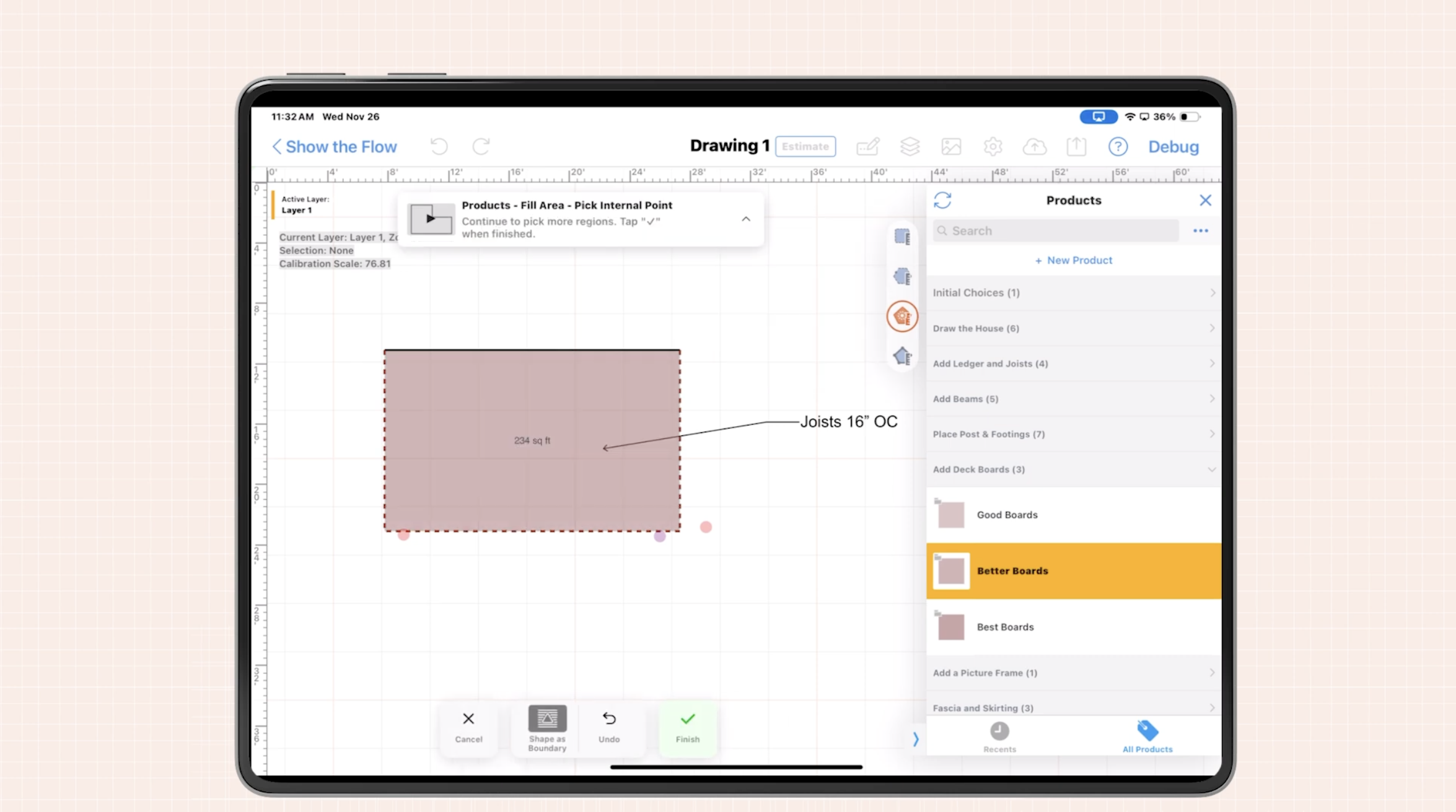
- Mobile CAD built for the field: Sketch over photos, trace floor plans, and snap to scale with a finger or stylus. Add symbols for equipment, defects, or code-related notes.
- Automated takeoffs: As we draw, ArcSite calculates lengths, areas, and counts. Materials and labor map to shapes, reducing manual math and errors.
- Instant, branded estimates: Turn drawings into line-item proposals while on site. Adjust scope in real time and show the cost impact immediately.
- Context-rich documentation: Every measurement, mark-up, and photo is tied to the drawing, so anyone can understand the site conditions later.
- Shareable outputs: Send a clean PDF with visuals, quantities, and pricing right after the visit to keep momentum.
When we connect visuals to quantities and price, clients understand what they are buying, why it costs what it costs, and how scope changes affect the bottom line.
Practical workflows that upgrade your inspections
1) The quick-scope site visit
- Open a new project and import a photo of the area or a floor plan.
- Sketch the footprint to scale and drop standard symbols for issues or equipment.
- Use layers for as-built conditions vs. proposed fixes to keep the story clear.
- Generate quantities automatically as shapes are placed.
- Create a same-day proposal with options (good/better/best), then send before leaving the site.
2) Deficiency documentation that clients can act on
- Capture each issue with a photo and a callout linked to the drawing.
- Tag items by priority or code reference to support decisions.
- Bundle related items into a phase or change order and show the cost roll-up.
3) Multi-trade coordination
- Use consistent symbols and templates across teams so drawings read the same way.
- Export a clear PDF for client review and an internal version with takeoff details.
- Reduce overlap or gaps by visually assigning ownership per layer or color.
These repeatable workflows turn a walk-through into a professional deliverable that accelerates approvals.
Using a building inspection app to make conversations crystal clear
Clarity wins jobs. Here is how we keep clients confident at every step:
- Show, do not tell: Sketch in front of the client so they see service lines, fixtures, or repair areas appear in scale.
- Quantify the why: Let automated takeoffs explain pricing. When the client asks, we can point to lengths and counts, not guesses.
- Offer options live: Duplicate a drawing, tweak scope, and show how it changes the estimate. Side-by-side comparisons remove hesitation.
- Capture approvals in the moment: Deliver a clean, branded proposal from the field so sign-off is a single click instead of a week-long email chain.
For a deeper look at how contractors use ArcSite as a building inspection app, explore examples from teams standardizing drawings, takeoffs, and client-ready proposals.
Implementation and change management
Rolling out new tools is easier when we plan for the field reality. Here is a practical approach:
- Start with one crew and one use case: Choose a common job type (e.g., small interior retrofit) to prove value quickly. Let that team iterate on the process and provide feedback.
- Standardize templates and symbols: Create a shared library for common fixtures, defects, and assemblies, each tied to materials and labor. This ensures every drawing is accurate, scannable, and usable by any tech or estimator on your team.
- Train in the field, not the classroom: Run through a real site visit. Have technicians practice drawing, measuring, and generating an estimate end-to-end. Field-based training builds muscle memory, helps overcome resistance to change, and shows the value in real time.
- Set clear handoff expectations: Once a job is scoped and drawn in ArcSite, define how and when it gets handed off—to the estimator, project manager, or production crew. Use the same project file to keep everyone aligned.
- Review and refine: After a few weeks, evaluate results. Are drawings more accurate? Are estimates being delivered faster? Use those wins to expand across more crews or services.
The payoff: Clarity, speed, and consistency from first visit to final invoice
Contractors don’t win work by being the cheapest anymore—they win by being the clearest. When you can show the scope visually, back it up with quantities, and price it live in front of the customer, you become the contractor that clients trust.
ArcSite is the building inspection software designed for real-world jobs—where accuracy matters, proposals can’t wait, and the field team is your sales engine.
Whether you're identifying deficiencies, scoping retrofit work, or just trying to keep everyone aligned across trades, ArcSite helps you capture exactly what’s needed, build proposals that reflect real conditions, and close work faster—without the confusion or back-and-forth.
Ready to streamline your site visits and win more work?
Book a demo to see how your team can transform site data into fast, confident decisions.
Categories
INDUSTRY


FAQs
Communication breaks down due to reliance on ambiguous site notes, uncontextualized photos, hand-drawn sketches, manual takeoffs, and lost updates between teams and clients.
ArcSite integrates mobile CAD, automated takeoffs, and instant branded estimates to document, quantify, and price projects accurately while onsite.
The app supports quick-scope site visits with scaled sketches, deficiency documentation linked to drawings, and multi-trade coordination using standardized symbols and templates.
It enables live sketching for visual clarity, automated takeoffs to quantify pricing, live scope options for comparison, and instant proposal approvals on site.
Starting with one crew and use case, standardizing templates and symbols, training in the field with real site visits, and defining workflows help ease implementation.
Related posts