

Flooring projects move fast. Homeowners want quotes on the spot, commercial clients expect tight budgets, and your crew needs clear direction before they roll out a single yard of material. Yet many flooring contractors still rely on paper drawings, manual measurements, and spreadsheets that eat up nights and weekends.
At ArcSite, we work with specialty contractors who want to keep their estimating simple, visual, and accurate without adding more office work. Visual estimating, powered by mobile CAD and flooring takeoff software, is one of the most effective ways to do that.
The real pain points behind flooring estimates
Before we talk tactics, it helps to be honest about what slows flooring contractors down today.
Common estimating challenges
- Time-consuming takeoffs: Printing plans, using a scale ruler, and re-entering numbers into spreadsheets.
- Measurement errors: Mis-reads, skipped rooms, or forgotten closets that eat into profit when you honor the quote.
- Change-heavy projects: Layout changes, add-ons, and value-engineering that require redoing the entire estimate.
- Inconsistent pricing: Different sales reps measuring differently and building estimates in their own formats.
- Weak homeowner experience: Handwritten sketches and rough numbers that make it easy for a competitor with a polished proposal to win the job.
Each of these issues chips away at margin, but the biggest cost is often hidden: time. Every hour spent re-measuring, hunting for notes, or rebuilding an estimate is an hour not spent selling or running projects.
How ArcSite turns visual estimating into a system
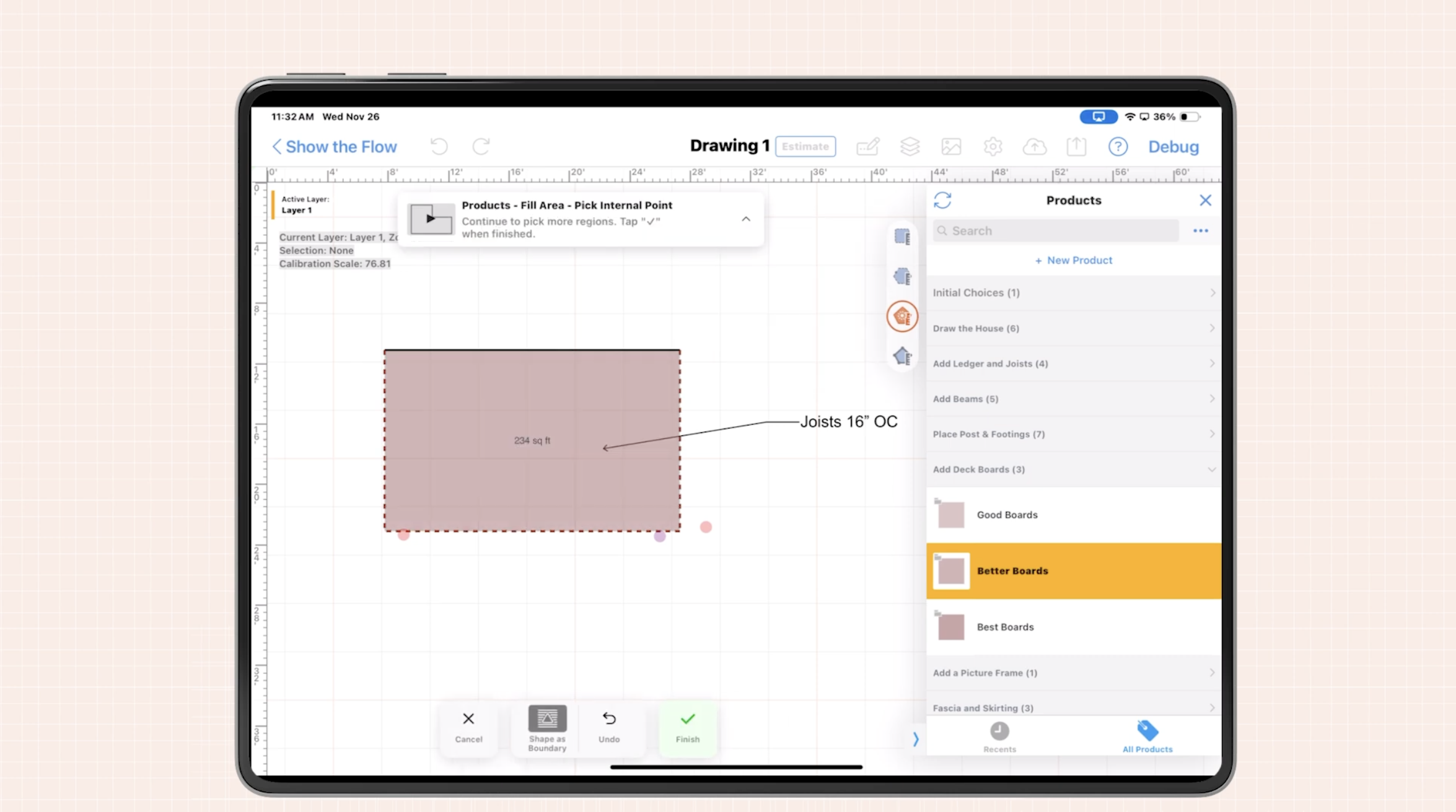
Visual estimating is simple: draw what you are going to install, then let your tools do the math. With ArcSite, your drawing, takeoff, and estimate are all connected in one mobile workspace.
Mobile CAD built for the field
Instead of sketching on graph paper, you open ArcSite on a tablet or phone and create a clean, scale-accurate floor layout while you walk the site. Walls, doors, transitions, and special areas are all captured visually as you go.
- Draw to scale on-site: Trace existing plans or sketch rooms from scratch in minutes.
- Handle complex layouts: Hallways, angled walls, and multi-room spaces are easier to manage when you can see them.
- Capture photos and notes: Attach site photos and notes directly to the plan for install crews and change tracking.
This is where flooring takeoff software really pays off: the drawing is not just a picture; it becomes the engine for your quantities and pricing.
From drawing to takeoff to estimate
Once your plan is drawn, ArcSite links areas and symbols to your items and assemblies, so quantities are generated instantly.
- Automatic area calculations: Square footage for each room or zone is calculated from the drawing.
- Material rules: Add waste factors, roll sizes, carton coverage, or plank counts as part of your assemblies.
- Labor and accessories: Baseboards, transitions, adhesives, underlayment, and other items can be tied to areas or edges.
- Instant pricing updates: Adjust material or labor rates and see the estimate update without redoing the takeoff.
Instead of building every quote from scratch, you draw once and let the software keep everything in sync. That is the core advantage of using visual, drawing-based flooring takeoff software.
Practical visual estimating workflows for flooring contractors
The best visual estimating system is one your team will actually use. Here are practical workflows we see busy flooring contractors adopt with ArcSite.
1. On-site measure and quote in a single visit
- Walk the job with your tablet: Sketch each room, hallway, and closet as you move through the space.
- Assign products: Apply the correct flooring type to each area (carpet, LVP, tile, hardwood) right in the drawing.
- Apply standard waste: Use consistent waste factors based on product type and install complexity.
- Generate the estimate: Tap to produce a professional proposal with line items, quantities, and pricing.
- Review visually with the customer: Show the drawing so the customer can confirm rooms, transitions, and patterns.
This workflow replaces back-and-forth site visits and days of delay with a same-day, visual proposal that looks professional and reduces misunderstandings.
2. Handling layout changes without starting over
Change orders and design adjustments are where connected drawings and takeoffs shine.
- Edit the drawing: Move a wall, split a room into zones, or change the product in a specific area.
- Let quantities update: The system recalculates square footage, trim lengths, and related items automatically.
- Issue a revised quote: Generate an updated estimate that clearly shows the price impact of each change.
Because the drawing drives the math, you avoid manual recalculation and reduce disputes about what was or was not included.
3. Standardizing estimates across your team
One of the biggest benefits of flooring takeoff software is consistency. With ArcSite, you can create templates and assemblies so every rep estimates work the same way.
- Item libraries: Maintain a single source of truth for products, labor, and accessories.
- Assemblies: Package material, labor, and common add-ons into reusable bundles.
- Templates: Use pre-built room types or project templates for recurring work (multi-family, retail, office, etc.).
This reduces pricing drift between salespeople and makes it easier to train new team members quickly.
Implementing visual estimating and flooring takeoff software
Even when the benefits are clear, adopting new tools can feel risky. We recommend a phased approach so your team sees quick wins without being overwhelmed.
Phase 1: Start with one project type
Pick a high-volume, relatively standard type of job—such as residential carpet replacement or LVP in multifamily units.
- Build your core product list and assemblies for that work.
- Create 1–2 basic templates for typical room layouts.
- Have a small pilot group run all of those jobs through ArcSite for a few weeks.
This allows you to refine your assemblies and pricing logic before rolling it out to the entire company.
Phase 2: Train for habits, not just features
Successful teams focus on consistent habits:
- Always draw the full project, even if a quick quote seems possible without it.
- Use standard assemblies rather than building line items from scratch.
- Review the visual plan with the customer on every proposal.
Short, focused training sessions—ideally on live projects—help your team connect the dots between drawing, takeoff, and estimate.
Phase 3: Integrate with the rest of your workflow
As visual estimating becomes your normal process, think about how to connect it with the rest of your operations.
- Handoffs to installation: Use the same ArcSite drawing as the install roadmap so crews know exactly what was sold.
- Back-office systems: Export quantities and pricing to your accounting or project management tools where appropriate.
- Documentation: Keep a record of drawings and signed proposals to reduce disputes and callbacks.
Measuring ROI on flooring takeoff software
To justify any new system, you need to measure its impact. We encourage contractors to track a few simple metrics before and after adopting visual estimating.
1. Time per estimate
Track how long it takes from first site visit to sending a complete proposal.
- How many visits are required?
- How much office time is spent on takeoffs and spreadsheets?
- How many estimates can each rep complete per week?
With drawing-based flooring takeoff software, contractors often see significant time savings per quote, which rolls up into more bids and more revenue.
2. Win rate and average job size
Compare your close rate and average project value before and after adopting visual estimating.
- Do visual drawings and clearer proposals improve homeowner trust?
- Are you able to present good-better-best options more consistently?
Even a small increase in win rate or upsell can produce outsized returns over a year.
3. Margin protection
Look at how often you end up eating costs due to mis-measurements, missing materials, or unclear scope.
- Fewer surprises from missed rooms or under-ordered material.
- Clearer documentation of what was included in the quote.
- Faster, more accurate change orders when scope shifts.
Visual, drawing-driven estimates make it easier to protect your margin without arguing with customers.
Bringing visual estimating to your flooring business
Visual estimating, powered by mobile CAD and connected flooring takeoff software, transforms how busy flooring contractors sell and deliver work. Instead of juggling sketches, measurements, and spreadsheets, you draw once, let the system handle the math, and present professional, accurate proposals on the spot.
If you want to standardize your estimating, protect your margins, and win more flooring jobs with clear visual proposals, we invite you to explore how ArcSite can help. Book a demo to see ArcSite in action on a real flooring project and find out how quickly your team can move to visual estimating.
Categories
FAQs
Flooring takeoff software is a digital tool that converts floor plans or on-site drawings into accurate material and labor quantities, helping contractors price flooring projects faster and with fewer errors.
ArcSite lets you draw scale-accurate floor plans on a mobile device, automatically calculates areas and related materials, and generates professional estimates directly from the drawing.
Yes. When you update the drawing—such as changing products or adjusting room layouts—the associated quantities and prices can be recalculated, making it easier to issue precise change orders.
No. ArcSite is designed for field teams, with simple drawing tools, templates, and assemblies so users can create accurate plans and takeoffs without traditional CAD training.
By tying quantities directly to a scale drawing and standard assemblies, flooring takeoff software reduces manual entry, applies consistent waste factors, and helps prevent missed rooms or materials.
Related posts