
If your team is evaluating a building inspection app, this guide shows how mobile visual drawing tools cut site time, reduce rework, and turn field sketches into accurate takeoffs and estimates in minutes.
Paper plans, photos, and scattered notes make on-site assessments slow and error-prone. We have all lost hours reconciling measurements, redlines, and material counts after leaving the job. ArcSite brings drawing, takeoff, and estimating together on a mobile device so inspectors and specialty contractors can document, price, and share a clear scope before leaving the site.
Field teams expect speed without sacrificing rigor. Visual tools in a modern building inspection app let you sketch, measure, and quantify in real time - with the accuracy to stand up in bids, change orders, and compliance audits.
Why speed and clarity matter on site
Assessments drive everything that follows - bid accuracy, crew scheduling, material ordering, and client confidence. When drawings are vague or counts are off, small misses become costly rescheduling, rush orders, and margin erosion.
- Missed measurements lead to add-ons and change orders later.
- Scattered photos and notes slow down office handoff and approvals.
- Manual counts and calculations introduce avoidable errors.
- Delays between site visit and estimate open the door to competitors.
Visual documentation done correctly at the point of assessment removes doubt and compresses your quote-to-close cycle.
How ArcSite delivers fast, accurate field documentation
ArcSite is built for inspectors and specialty trades who need to capture scope, quantify materials, and price work on the first visit. Our mobile CAD, takeoff, and estimating tools combine precision drawing with contractor-ready outputs.
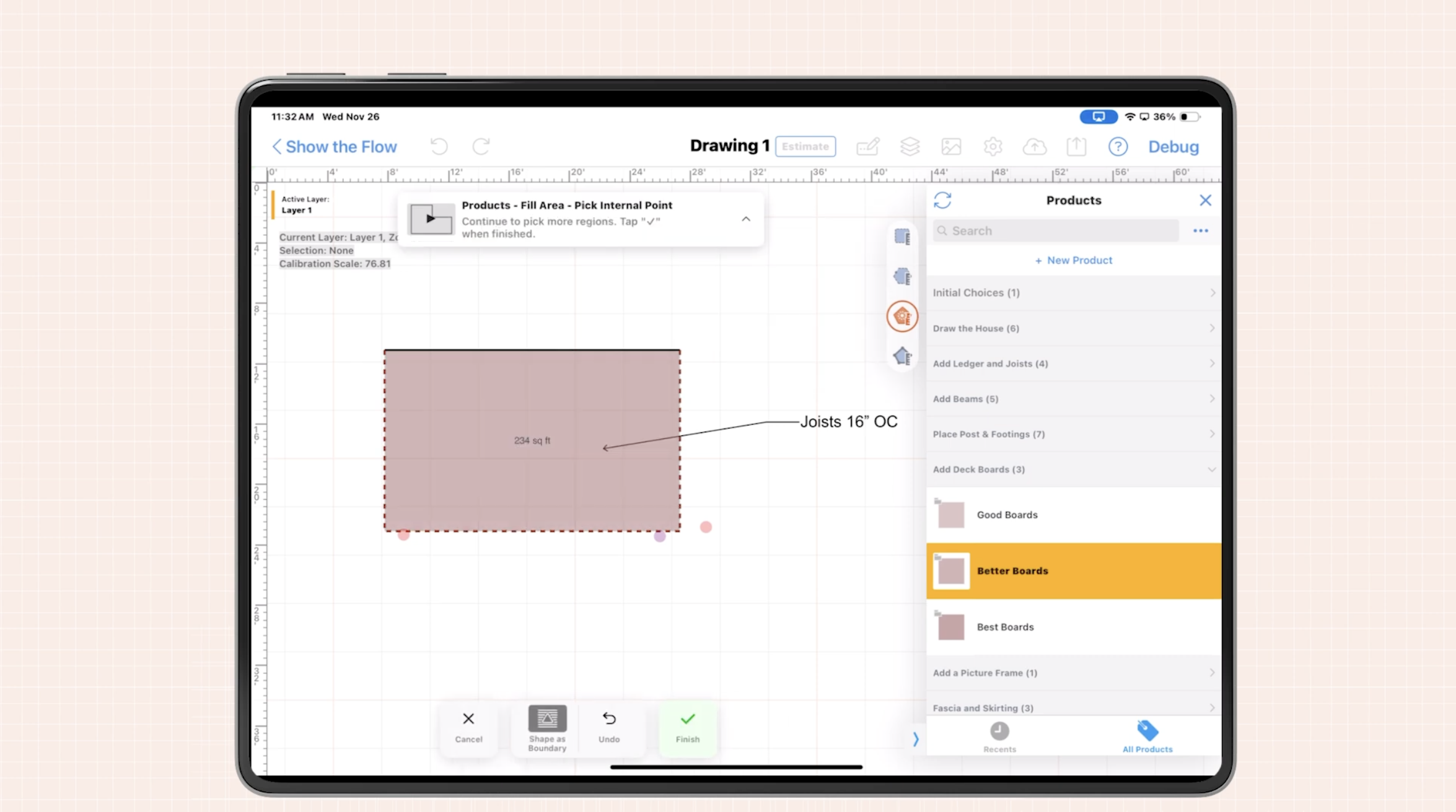
Sketch with precision on-site: Draw to scale, snap to corners, and auto-dimension rooms, walls, utilities, and site features.
Drag-and-drop symbols: Use trade-specific symbol libraries for devices, assemblies, and fixtures; maintain consistency across teams.
Smart counts and measurements: Auto-count symbols, calculate linear, area, and volume quantities directly from the sketch.
Photo pins and annotations: Drop photos onto the plan with notes, condition tags, and remediation details.
Instant takeoff and estimating: Link items to pricing and labor so a quantified estimate is one tap away.
Offline-first: Work anywhere and sync when you are back online.
Share-ready outputs: Export clear PDFs for clients and crews or CAD-friendly files for coordination.
The result is a single, visual source of truth from site walk to proposal.
Practical workflows using mobile visual tools
1) Rapid floor plan capture
Start with a blank canvas or import a photo. Trace walls and openings, add doors, windows, and equipment. Use auto-dimensioning to lock in accurate measurements. The plan becomes your backbone for counts, costs, and project notes.
2) Condition mapping with layers
Use layers to separate existing conditions from proposed work. This helps both your team and the client see what’s there now versus what’s being added or repaired. For example, one layer can show current ductwork, another can show new routing, and a third might highlight problem areas like leaks or code violations. Each issue can be labeled and documented with callouts or photo pins. This layered approach makes it easy to communicate scope clearly—without clutter or confusion.
3) Real-time takeoffs and pricing
As you draw and document, ArcSite automatically tracks quantities—linear feet, square footage, symbol counts—and ties them to your pricing database. This eliminates double entry and lets you present accurate estimates while still on site. When a client asks for an option—like upgrading materials or adding a zone—you can duplicate the plan, make the change, and show them the price impact immediately.
4) Immediate proposal generation
Once the drawing and takeoff are complete, ArcSite can generate a branded, line-item proposal on the spot. Include visuals, notes, and optional scopes to support the conversation. Clients appreciate transparency, and proposals created in the field help shorten decision cycles. You can even capture a digital signature before leaving the property.
5) Streamlined handoff to production or inspection teams
Because all notes, photos, drawings, and quantities live in one file, you reduce the chance of missed details during handoff. Whether you're passing the file to an inspector, PM, or installer, they get full context with no need to interpret separate sketches or chase down site photos. This reduces errors, rework, and costly miscommunication across the project lifecycle.
Closing the loop on inspections with ArcSite
When you combine drawing, measurement, and estimating into a single mobile workflow, every part of the inspection process gets faster, clearer, and more accurate. Your field team saves time. Your office team gets consistent data. And your clients see a level of professionalism that builds trust from the first visit.
If your business is still juggling paper, photos, and guesswork, now’s the time to explore a smarter way. ArcSite is the building inspection app that turns site documentation into a competitive advantage—one drawing at a time.
Ready to see ArcSite in action?
Book a demo or download the app to experience how mobile drawing and estimating can simplify your inspection process, reduce rework, and help you win more jobs, faster.
Categories
INDUSTRY


FAQs
Mobile visual drawing tools reduce site time, minimize rework, and convert field sketches into accurate takeoffs and estimates quickly, enhancing overall efficiency.
Because assessments affect bid accuracy, scheduling, material orders, and client confidence, and errors or delays can cause costly rescheduling, rush orders, and lost margins.
ArcSite provides precision on-site sketching, drag-and-drop trade-specific symbols, smart counts, photo annotations, instant takeoff and estimating, offline capability, and share-ready outputs.
It allows drawing to scale with corner snapping and auto-dimensioning of rooms, walls, utilities, and site features for precise measurements.
Users can start with a blank canvas or import a photo to trace walls, openings, doors, windows, and equipment, using auto-dimensioning to ensure accuracy for counts, costs, and notes.
Related posts