

This guide shows how using concrete foundation estimating software connects your on-site drawings, takeoffs, and estimates directly to accurate, professional invoices so you get paid faster with less back-and-forth.
Pouring a foundation is only half the job. The other half is turning that work into a clear, defensible invoice that your customer pays quickly and without dispute. That is where many concrete and foundation contractors lose margin - not in the slab, but in the paperwork that follows it.
ArcSite helps specialty contractors close that gap by tying mobile CAD drawings, material takeoffs, and field-approved estimates directly into a repeatable invoicing workflow. When the numbers start off accurate, the invoice becomes easy.
Why invoicing after foundation work is so painful
Foundation projects create a perfect storm for invoicing problems. Each job typically involves multiple pours, change orders in the field, and a mix of labor, equipment, and materials that shift as conditions change.
Common pain points we hear from concrete and foundation contractors include:
- Handwritten notes that never make it cleanly from the jobsite to the office
- Differences between what the salesperson promised and what actually got built
- Arguments with GCs or homeowners about square footage, depth, or reinforcement
- Missed billable items like extra thickened edges, pump time, or additional rebar
- Slow invoicing cycles that choke cash flow and delay final payment
The root problem is usually the same: the estimate is not tightly connected to the real-world design and as-built conditions. When the estimate is off, the invoice feels negotiable. And every negotiation eats into profit.
How ArcSite connects estimates to invoices
ArcSite is built to keep your numbers consistent from the first sketch all the way to the final invoice. Instead of treating drawings, takeoffs, estimates, and invoices as separate steps, we treat them as one continuous workflow.
Key ways ArcSite supports better invoicing after foundation work:
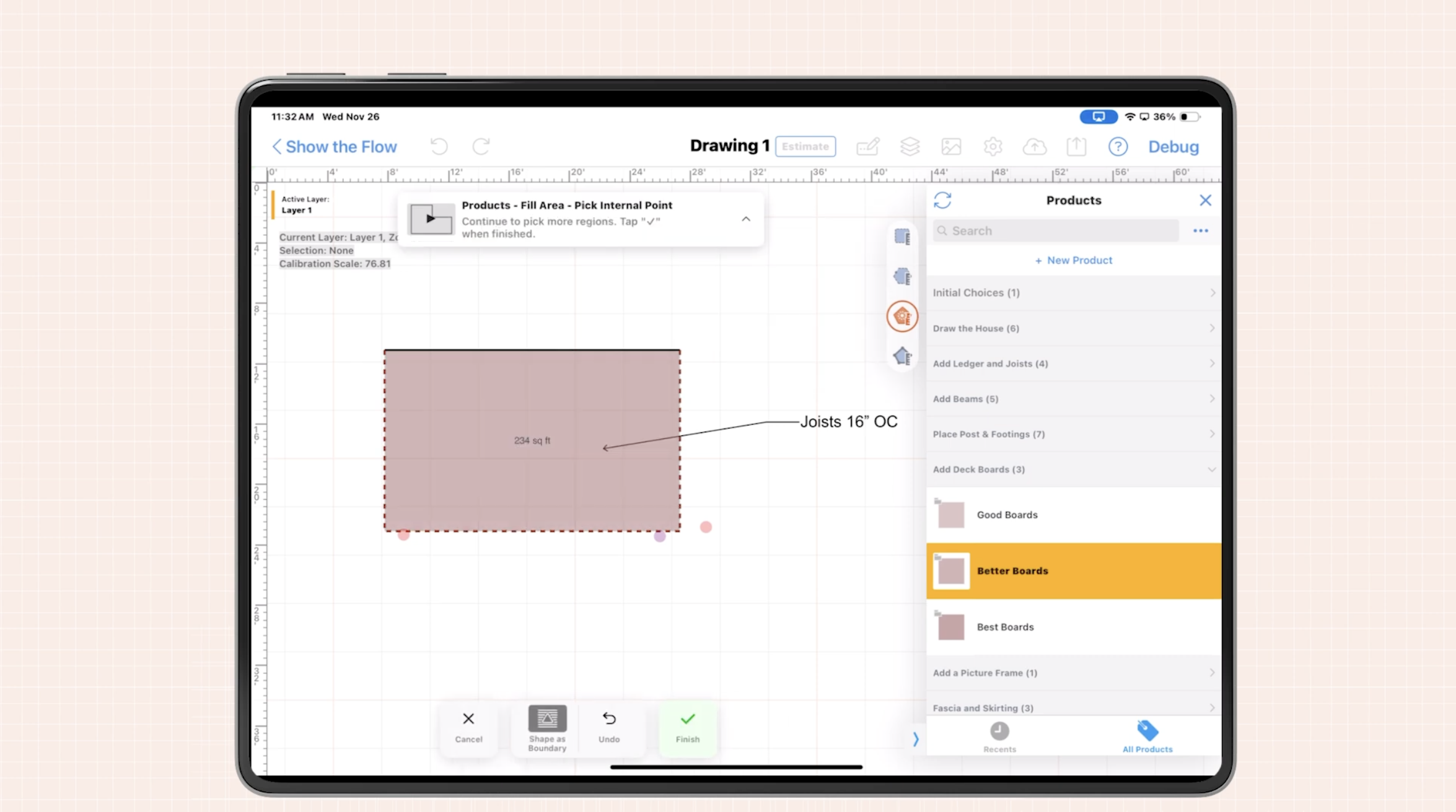
- Mobile CAD in the field - Draw footings, slabs, thickened edges, piers, and stem walls directly on a tablet while meeting with the customer or walking the site.
- Automated takeoffs - As you draw, ArcSite calculates square footage, linear footage, volume, and counts, then ties them to your pricing catalog.
- Standardized line items - Each drawn element corresponds to a priced item (concrete yardage, rebar, forms, excavation, pump time, etc.), so nothing is forgotten.
- Estimate-to-invoice consistency - The items on your original estimate become the backbone of your final invoice, with clear visibility into changes.
- Change order management - When conditions change, you update the drawing, re-run the takeoff, and instantly generate a revised quote or change order.
When you use concrete foundation estimating software that is integrated with your field workflow, your invoice is no longer a fresh calculation - it is simply a reflection of the work already documented and priced.
A simple end-to-end workflow: from pour to paid
To see how this plays out in daily work, here is a practical workflow you can follow with ArcSite on a typical foundation project.
1. Capture the design accurately in the field
Start during the site visit or pre-pour meeting:
- Open ArcSite on your tablet and create a new project.
- Sketch the building footprint, footings, thickened edges, and interior pads.
- Use layers for different components (footings, slab, rebar, insulation) if needed.
- Apply your standard assemblies (for example, 4 in slab with 6x6 W2.9 mesh, 3,000 psi concrete, specified base).
Because the drawing is done at scale, your areas and lengths are precise. This accuracy is what will drive both your estimate and later your invoice.
2. Auto-generate the estimate on-site
With the drawing complete:
- Run an automated takeoff to calculate concrete volume, rebar length, formwork, and labor assumptions.
- Review the auto-generated line items that ArcSite pulls from your pricing catalog.
- Adjust any job-specific details like mobilizations, travel, or equipment rental.
- Show the customer a professional estimate right on-site, with clearly broken-out scopes.
This on-the-spot estimate sets expectations early and gives you a baseline for any changes that might arise as the job progresses.
3. Track changes and as-built conditions
As the job evolves, so does the design:
- If the GC asks for a thicker edge, add it to the drawing, not just your notes.
- If you add piers, grade beams, or change reinforcement, update the sketch.
- Create change order versions directly from the updated drawing and takeoff.
Because every change is visually documented and quantified, you have a clear story to support your eventual invoice. Your crew, your office, and your customer are all working from the same source of truth.
4. Translate the final scope into an invoice
Once the foundation is complete and any punch list items are resolved, you are ready to invoice. At this point you already have:
- A scalable drawing showing what was built
- Takeoffs tied to your pricing for each component
- A history of any change orders with updated quantities and costs
Instead of building an invoice from scratch, you export or reference these final line items and totals to create a clear, itemized invoice. Many contractors choose to:
- Attach a PDF of the final plan view from ArcSite to the invoice
- Include line items that match the original estimate and change orders exactly
- Add notes referencing specific drawing views or sections for clarity
The result is an invoice that is easy for customers and GCs to understand and approve because it mirrors everything they have already seen along the way.
Best practices for cleaner, faster foundation invoicing
To get the most value out of concrete foundation estimating software in your invoicing process, a few habits make a big difference.
Standardize your line items and assemblies
Define a consistent set of items you bill for, such as:
- Concrete by yard or by slab area
- Rebar and reinforcement by linear foot or weight
- Formwork, excavation, base prep, and compaction
- Equipment and pump time
- Mobilizations, site visits, and layout
Tie these items to common drawing objects and assemblies in ArcSite so every new project automatically pulls in the right billable components.
Use visuals to reduce disputes
Most customers do not argue with what they can clearly see. Including screenshots or PDFs of your ArcSite drawing with highlighted areas can help resolve questions like:
- Why did the concrete yardage increase?
- Where exactly did we add thickness or reinforcement?
- What part of the job did this change order cover?
When the drawing, quantities, and invoice all agree, payment conversations become simpler and shorter.
Close the timing gap
One of the easiest ways to improve cash flow is to shorten the time between finishing a pour and sending an invoice. Because ArcSite keeps your quantities and pricing up to date as the project evolves, you can:
- Prepare a draft invoice before the final day on-site
- Send progress invoices based on clearly defined milestones
- Issue final invoices within hours, not weeks, of project completion
The faster your invoices go out - and the clearer they are - the faster you get paid.
Implementation and change management
Shifting from manual notes and spreadsheets to a connected digital workflow requires some planning, but it does not have to be complicated.
We typically recommend:
- Start with one crew or estimator - Pilot ArcSite on a handful of foundation jobs to refine your templates and assemblies.
- Document your standard scopes - Capture your common slab types, footing details, and reinforcement patterns as reusable assemblies.
- Train both field and office - Make sure crews know how to capture changes in the drawing, and office staff know where to find final quantities.
- Align on naming - Use the same item names in ArcSite and your accounting or invoicing system so line items match cleanly.
The goal is not to add more steps; it is to replace scattered, manual steps with a single, reliable workflow everyone trusts.
Measuring ROI from better invoicing
To know whether your investment in software and process change is paying off, it helps to track a few simple metrics over time:
- Time from job completion to invoice sent - Are you cutting this window from weeks to days?
- Invoice adjustment rate - How often are invoices being discounted or changed after submission?
- Dispute rate - Are disagreements with GCs or homeowners decreasing as drawings and quantities become clearer?
- Estimated vs actual margin - Are you seeing fewer surprises between the estimate and final profit?
Many contractors find that as their estimates become more accurate and their invoices more defensible, overall profitability rises - not just from higher prices, but from fewer write-offs and less time wasted arguing over scope.
Next steps: connect your estimates to your invoices
Invoicing after foundation work does not have to be a headache or a guessing game. When your design, takeoff, pricing, and invoicing all share the same source of truth, you protect your margins and speed up payment on every job.
If you are ready to see how ArcSite can streamline your concrete and foundation workflow from first sketch to final invoice, book a demo today.
Categories
FAQs
Invoicing is challenging due to multiple pours, change orders, shifting labor and materials, handwritten notes, discrepancies between estimates and actual work, disputes over measurements, missed billable items, and slow invoice cycles.
ArcSite integrates mobile CAD drawings, automated takeoffs, standardized line items, estimate-to-invoice consistency, and change order management into a continuous workflow that links estimates directly to invoices.
The workflow includes capturing accurate on-site designs, auto-generating estimates, tracking changes with updated drawings, and translating final scopes into clear, itemized invoices.
Standardizing line items and assemblies, using visuals to reduce disputes, and closing the timing gap between job completion and invoicing improve invoicing efficiency.
By tracking metrics like time from job completion to invoice sent, invoice adjustment rates, dispute rates, and estimated versus actual profit margins over time.
Related posts