
Service contractors are under pressure to quote faster, win more work, and deliver consistent margins - all while managing complex sites and demanding customers. Modern pest control proposal software and mobile CAD tools can turn rough sketches and manual takeoffs into accurate, repeatable workflows your whole team can follow.
Why drawing and estimating feel disconnected today
Most specialty contractors still run two separate processes in the field:
- Sketch the job by hand on paper, a tablet, or whiteboard.
- Later, try to interpret that sketch to build an estimate in a spreadsheet or separate app.
This split creates problems at every step:
- Lost detail and context: Quick field sketches do not capture measurements, materials, or treatment zones clearly. Office staff must call techs back or guess.
- Inconsistent pricing: Two techs can estimate the same job very differently when there is no standardized drawing-to-estimate workflow.
- Rework and callbacks: Misunderstood scope or missed areas on the drawing lead to under-treatment, unhappy customers, and return trips.
- Slow proposals: Time spent re-drawing, re-measuring, and manually counting areas and lengths delays the proposal, giving competitors an opening.
For pest control, lawn care, waterproofing, and other service trades where work is driven by what you find on site, the drawing is the job. If the drawing is not integrated into your estimating system, you are always at risk of missed scope and lost profit.
How ArcSite connects drawings, takeoffs, and estimates
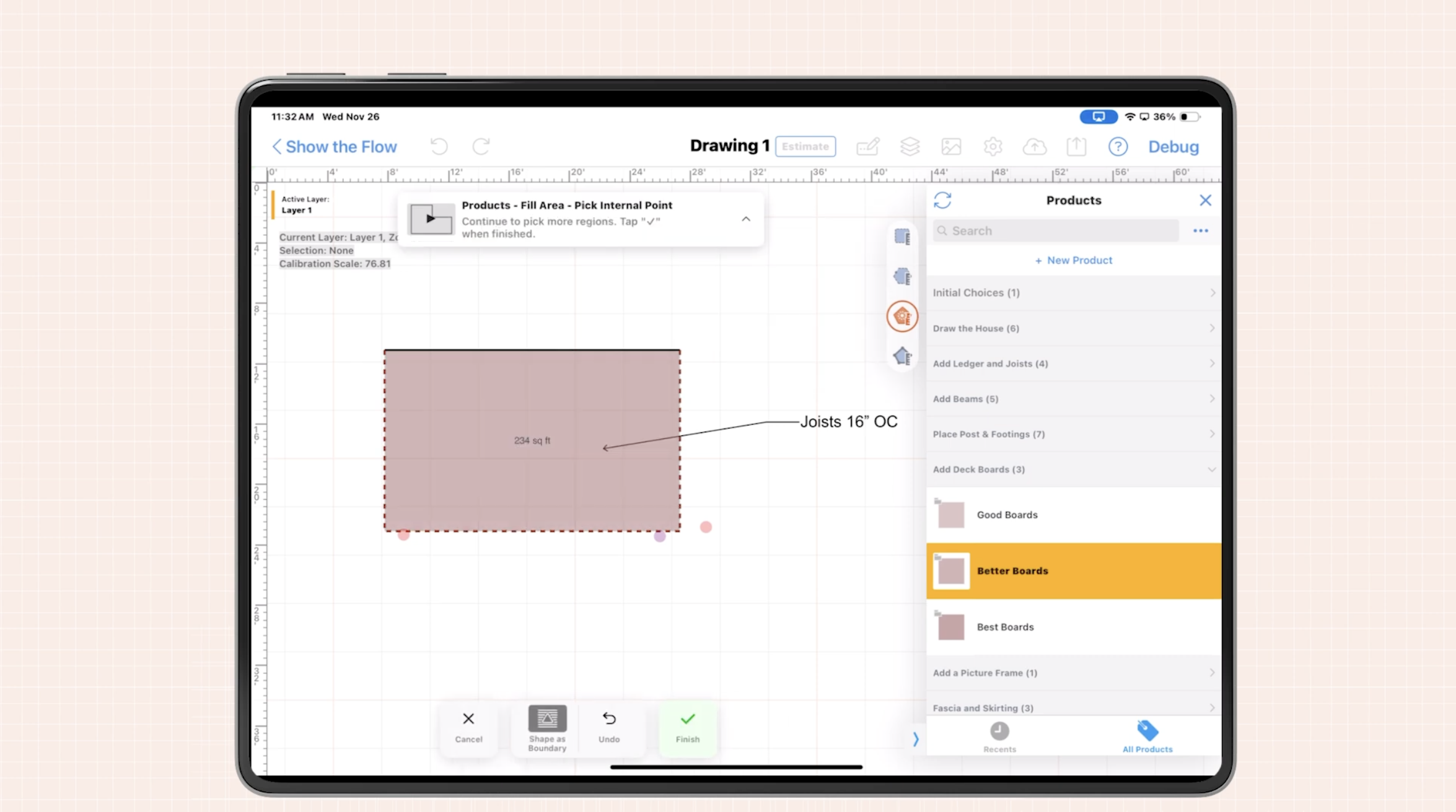
ArcSite is designed to close the gap between what your techs see on site and the numbers in your proposal. We do this by combining mobile CAD-style drawing tools, automated takeoff, and templated estimating in one app your team can use on a tablet or phone.
At a high level, the workflow looks like this:
- Draw the site in the field: Techs trace structures, treatment zones, and obstacles on a digital canvas while walking the property.
- Apply smart shapes and symbols: Custom symbols represent bait stations, exclusion work, termite zones, traps, and more.
- Capture dimensions automatically: Areas, lengths, and counts are calculated from the drawing in real time.
- Generate an estimate: Those quantities feed directly into standardized pricing templates to produce a complete, itemized proposal.
- Present and sign on site: Customers see a clear visual of the proposed work along with pricing, then approve the proposal immediately.
Instead of hand-drawn sketches that only the field tech understands, you get precise, reusable drawings that drive accurate proposals and become a single source of truth for operations, sales, and the customer.
Where pest control proposal workflows benefit most
While these workflows help many service contractors, they are especially powerful for pest control teams implementing modern pest control proposal software. Here are key use cases where integrated drawings and estimating really pay off.
1. Residential general pest and termite treatments
For residential jobs, speed and clarity are everything. Homeowners want to understand exactly what you are treating and why the price is what it is.
With integrated drawing and estimating, your tech can:
- Sketch the footprint of the home, patio, garages, and sheds.
- Mark active infestation zones, conducive conditions, and access limitations.
- Automatically calculate linear footage for foundation, perimeter, and expansion joints.
- Apply treatment templates that map footage and areas to chemical rates, labor time, and visit frequency.
The proposal shows both a clear site drawing and itemized pricing. This eliminates confusion, reduces price objections, and builds trust because the homeowner sees you are not guessing - you are measuring.
2. Commercial accounts and multi-visit service plans
Commercial bids are often competitive, complex, and long term. You may be responsible for multiple buildings, food-handling areas, docks, trash corrals, and landscaping, each with different treatment requirements.
Integrated workflows help you:
- Maintain accurate floor plans and site maps for each building or area.
- Standardize how you count and price devices, traps, and monitoring equipment.
- Roll up recurring service work into clear, consistent proposals and renewal packages.
- Communicate risk areas and compliance considerations visually to facility managers.
When pricing is tied directly to the drawing, you reduce the risk of underbidding complex commercial work and can quickly adjust scope when the site changes.
3. Wildlife, exclusion, and specialty services
Wildlife removal and exclusion projects are highly site-specific. Prices depend heavily on access, building envelope details, and number of points that must be sealed.
Using drawing-driven estimating, you can:
- Mark entry points, rooflines, soffits, vents, and chimney details right on the drawing.
- Associate each symbol (for exclusion work, screening, or trapping) with labor and material assemblies.
- Automate counts of exclusion points and lineal footage of sealing work.
- Produce clear scopes that operations teams can follow without re-walking the job.
This tighter connection between design and estimate reduces change orders and protects profitability on complex jobs.
Practical workflow tips for integrating drawing and estimating
To get real value from integrated tools, the workflow must be practical for techs in the field. Here are implementation tips based on what we see working best.
Standardize your symbols and templates
Start by deciding which site features and services should be represented visually and priced consistently. For example:
- Bait stations and traps by type.
- Perimeter treatment zones and interior spot treatments.
- Rodent proofing devices and exclusion points.
- Sanitation or cleanup services.
Build a small library of standardized symbols and estimate templates that map directly to your price book. This lets techs focus on capturing the site accurately, not on doing math in their heads.
Train on workflow, not just features
The goal is not for techs to become CAD experts; it is for them to follow a consistent, efficient process:
- Open the project and set up the base drawing (or load a template if it is a common building type).
- Walk the site once while drawing, labeling, and adding symbols.
- Review quantities and pricing with the customer, making minor adjustments on the spot.
- Generate and present the proposal, then capture signature.
Short, scenario-based training sessions with real jobs will help your team understand that the drawing is simply an enhanced version of what they already do with pen and paper.
Use drawings as communication tools
Once the proposal is accepted, those same drawings should guide scheduling and service delivery. Share them with:
- Technicians performing the work, so they know what to treat and where.
- Supervisors reviewing quality and compliance.
- Customer contacts, especially for commercial accounts, who need to report internally.
When everyone is literally on the same page, questions and disputes are reduced.
Change management: getting your team on board
Adopting integrated drawing and estimation workflows is as much about people as it is about software. A few practical steps make the transition smoother.
Start with a pilot group
Pick a small group of techs or a single branch to pilot the new workflow. Ideal champions are:
- Comfortable with tablets and smartphones.
- Open to trying new processes.
- Influential with peers.
Work closely with them to refine templates, symbols, and price mappings. Their feedback will help you shape a rollout plan that works in the field.
Measure and share early wins
From day one of the pilot, capture a few simple metrics:
- Time from first visit to proposal delivered.
- Proposal close rate.
- Average job value or upsell rate (for added services discovered during drawing).
- Number of return visits due to scope misunderstandings.
Share these early wins across the team. When techs see that integrated drawings help them close more work with less friction, adoption accelerates.
Measuring ROI: what success looks like
To justify investing in new tools, leadership needs clear, measurable outcomes. With integrated drawing and estimation, most service contractors focus on five areas of ROI.
1. Faster proposal turnaround
Because drawings, takeoffs, and pricing are connected, many teams cut proposal turnaround from days to hours, or from hours to minutes. Quicker proposals increase win rates simply by being first in front of the customer.
2. Higher close rates
Visual proposals with clear scopes and consistent pricing are easier for customers to understand and approve. Over time, you can track:
- Overall proposal-to-win percentage.
- Differences in close rates between techs using integrated workflows and those not yet on the platform.
3. Improved job profitability
Accurate, drawing-based quantities reduce underbidding. By tracking estimated margin versus actual margin on jobs, you can see whether the new workflow is closing the gap between plan and reality.
4. Reduced rework and callbacks
When crews follow precise drawings and scopes, fewer details are missed. Track how many callbacks or scope-related disputes occur before and after implementation.
5. Better visibility for growth decisions
Standardized digital drawings and estimates create a data set you can use to:
- Identify profitable service lines and job types.
- Refine pricing and minimums based on true effort.
- Plan staffing and route density more effectively.
These insights support strategic decisions that paper-based processes can never provide.
Next steps: see integrated drawing and estimating in action
Integrating drawing tools with estimation workflows helps service contractors move from hand-drawn guesses to data-driven proposals. For pest control teams, it means clearer visual scopes, faster bid turnaround, and more consistent margins across technicians and branches.
If you are ready to see how ArcSite can support your team with mobile drawings, automated takeoffs, and proposal generation in a single workflow, book a demo with our team. We will walk through real-world examples from contractors like you and help you evaluate whether this approach fits your operations, sales goals, and growth plans.
Categories
INDUSTRY


FAQs
Because contractors often sketch jobs by hand and later interpret those sketches separately to build estimates, leading to lost details, inconsistent pricing, rework, and slow proposals.
ArcSite combines mobile CAD-style drawing tools, automated takeoff, and templated estimating in one app that captures site drawings, applies symbols, calculates dimensions automatically, generates itemized estimates, and supports on-site proposal presentation and signing.
They enable quick, clear site sketches with infestation zones and access limitations, automatic calculation of footage, application of treatment templates, and proposals that reduce confusion and build homeowner trust by showing measured pricing.
Standardize symbols and estimate templates tied to your price book, train techs on consistent workflows rather than CAD features, and use drawings as communication tools throughout scheduling and service delivery.
Faster proposal turnaround, higher close rates, improved job profitability, reduced rework and callbacks, and better visibility for strategic growth decisions.
Related posts