

This guide explains how to connect your field operations with your back-office accounting by pairing quickbooks pest control software workflows with mobile CAD, takeoff, and estimating tools like ArcSite, so you can quote faster, reduce errors, and improve profitability.
Pest control businesses live and die by what happens in the field, but profitability is decided in your numbers. When job details, material counts, and pricing don’t flow cleanly into your accounting system, you end up with inaccurate invoices, underpriced contracts, and a constant scramble to reconcile the books.
By aligning your field workflows with quickbooks pest control software processes, you turn every site visit into structured data: drawings, quantities, and estimates that sync cleanly into invoices and financial reports. That’s where ArcSite’s mobile CAD, takeoff, and estimating capabilities fit in.
Why disconnected systems are so costly for pest control companies
Most pest control operations grow into a patchwork of tools over time. A CRM or scheduling app here, QuickBooks there, and spreadsheets everywhere in between. The result is inefficiency and risk at every step.
Common pain points we hear from pest control contractors include:
- Double entry between the field and QuickBooks – Techs handwrite notes, someone in the office retypes them into estimates and invoices, and you hope nothing gets missed.
- Inconsistent pricing and guessing on the fly – Field staff estimate square footage or treatment zones by eye, leading to underbidding or awkward price changes later.
- Missing or vague documentation – When drawings, photos, and notes are scattered, it’s hard to justify invoices, handle disputes, or manage recurring service plans.
- Slow approvals and delayed cash flow – Estimates sit in limbo because customers don’t see a clear, professional proposal they can approve immediately.
- Limited visibility into job profitability – Without accurate job cost data flowing into QuickBooks, you don’t truly know which services, routes, or technicians are profitable.
All of these problems have the same root cause: field data is not captured in a structured way, and it doesn’t flow smoothly into your accounting system.
How ArcSite connects field operations to your accounting stack
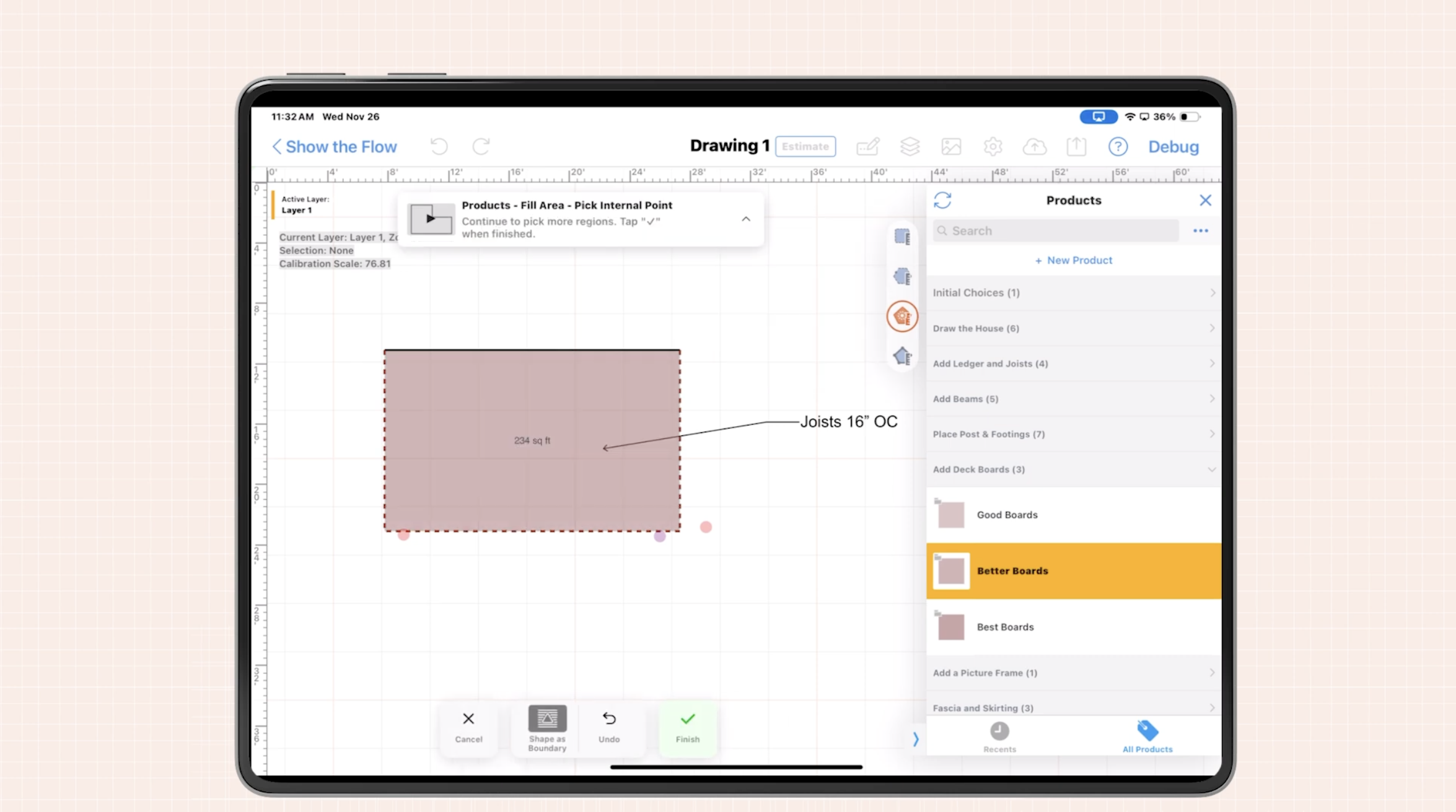
ArcSite is a mobile CAD, takeoff, and estimating solution designed for specialty contractors, including pest control companies. Instead of relying on rough sketches and mental math, your technicians can capture everything they need directly on a tablet or phone while on-site.
Key capabilities that support better integration with QuickBooks and other accounting workflows include:
- On-site drawing and layout – Technicians create precise, professional diagrams of structures, treatment zones, bait station layouts, exclusion work, and more.
- Automated takeoffs – As they draw, ArcSite calculates areas, linear footage, counts, and quantities tied directly to your catalog of services, materials, and assemblies.
- Instant estimating – Drawings feed directly into estimates using your standardized pricing, markups, and labor rates, producing consistent, accurate quotes in minutes.
- Professional proposals – Clear visuals plus itemized pricing give customers confidence, speeding approvals and reducing back-and-forth.
- Data export for accounting – Job details, line items, and totals can be exported and used to create invoices and job records in quickbooks pest control software workflows, reducing manual entry and transcription errors.
The result is a clean pipeline: site visit → drawing → takeoff → estimate → invoice, with far fewer chances for data to be lost, misread, or retyped incorrectly.
Field-to-accounting workflows that actually work in pest control
To get the most value from your accounting system, you need consistent workflows that bridge the gap between field and office. Here are practical examples of how ArcSite can support typical quickbooks pest control software processes.
1. Residential one-time treatments
- On-site assessment – Technician arrives, opens ArcSite, and draws the perimeter of the home and affected areas.
- Automated takeoffs – ArcSite calculates square footage of treated areas and the linear footage of foundation or fence lines.
- Standardized pricing – The app applies your pre-set service packages and chemical usage rates to generate an estimate.
- Customer approval – The tech reviews the visual plan with the homeowner and captures approval on-site.
- Accounting handoff – The approved estimate and line items are exported and used to create an invoice in QuickBooks, matching services and pricing exactly.
2. Commercial contracts and recurring service
- Site mapping – Use ArcSite to map large facilities, multi-building campuses, or complexes with detailed zones.
- Asset tracking – Mark bait stations, traps, exclusion points, and high-risk areas directly on the drawing.
- Contract pricing – Build recurring service schedules and pricing in ArcSite based on accurate quantities, not guesswork.
- Data-driven invoicing – Export contract line items and recurring service details to align with your QuickBooks items and classes for cleaner reporting.
3. Exclusion and repair projects
- Detailed drawings – Capture rooflines, entry points, damaged areas, and proposed exclusion work.
- Material takeoffs – Automatically calculate linear feet of screening, sealant, or new trim needed.
- Integrated estimate – Generate a clear, itemized proposal with both pest control and light construction line items.
- Job costing insight – Once the job is completed and invoiced in QuickBooks, you can compare estimated vs. actual performance with far better accuracy.
Best practices for connecting ArcSite with your QuickBooks processes
You don’t have to overhaul your entire tech stack overnight. Focus on building a stable bridge between ArcSite in the field and QuickBooks in the office.
Align your item lists and service codes
Start by reviewing your service and item lists in QuickBooks. Then mirror that structure in ArcSite:
- Create matching service items (e.g., “Quarterly Perimeter Treatment,” “Rodent Exclusion – LF,” “Bait Station – Each”).
- Use consistent naming conventions so exported ArcSite estimates line up with QuickBooks items without confusion.
- Standardize units (square feet, linear feet, each) to avoid manual conversions.
When your catalog is aligned, the transition from proposal in ArcSite to invoice in QuickBooks becomes largely administrative instead of detective work.
Define clear responsibilities between field and office
Integration is as much about people as it is about software. Clarify who does what:
- Technicians capture accurate drawings, notes, and on-site approvals in ArcSite.
- Office staff review approved estimates, apply any tax rules or payment terms, and generate invoices in QuickBooks.
- Management monitors job profitability and KPIs using financial reports and export data.
When everyone knows where their part of the workflow starts and ends, handoffs become smoother and fewer details fall through the cracks.
Start with one or two service lines
Instead of attempting to integrate your entire operation at once, pilot the process with one or two high-volume services—such as general pest control and termite work. Refine your templates, items, and exports there, then roll out to additional services.
Change management: getting your team on board
Technicians are busy. Any new system has to earn its place by making their lives easier in the field.
Here are practical steps to encourage adoption:
- Train on real jobs – Use ArcSite with actual properties your team services regularly so they see the relevance immediately.
- Provide templates – Pre-build common layouts, assemblies, and service packages so technicians can drag, drop, and adjust instead of starting from scratch.
- Show personal benefits – Emphasize fewer callbacks due to misunderstandings, less time filling out paperwork, and more professional proposals that close faster.
- Gather feedback – Ask technicians what slows them down and adjust your templates and workflows accordingly.
On the back-office side, highlight how structured ArcSite data reduces manual entry, makes reconciliation easier, and improves the accuracy of your QuickBooks reporting.
Measuring ROI from integrated field and accounting workflows
To justify an investment in new tools and processes, you need clear metrics. When you connect ArcSite with your quickbooks pest control software workflows, look at improvements in:
- Estimate turnaround time – How long from site visit to delivered proposal? Track before and after implementing ArcSite.
- Close rate – Are you winning a higher percentage of quotes once customers see clear drawings and professional proposals?
- Average ticket size – Visual plans often support upsells to exclusion work, preventive services, or higher-tier contracts.
- Invoice accuracy – Monitor credits, write-offs, and disputes tied to miscommunication or incorrect quantities.
- Administrative hours – Estimate how many hours per week your office saves by exporting structured data instead of retyping handwritten notes.
Even modest improvements in each of these areas can compound into significant profit gains over a season or a year.
Next steps: see ArcSite working alongside your accounting tools
Integrating your accounting platform with your field operations doesn’t have to be complicated. By capturing accurate drawings, takeoffs, and estimates in ArcSite—and aligning them with your QuickBooks items and processes—you create a reliable bridge from the job site to your financials.
If you’re ready to reduce manual data entry, standardize pricing, and gain a clearer view of job profitability in your pest control business, we’d be happy to walk you through how ArcSite can fit your workflow.
What’s next? Book a demo of ArcSite to see how mobile CAD, takeoff, and estimating can streamline your quickbooks pest control software processes and give your team a faster, more accurate way to work.
Categories
FAQs
ArcSite captures drawings, takeoffs, and estimates in the field and exports structured line items that can be used to create accurate invoices and job records in QuickBooks, reducing manual entry and errors.
Yes, technicians can draw the site, generate automatic takeoffs, and produce standardized estimates on-site, helping customers review and approve work immediately.
You can keep your existing invoicing process in QuickBooks while using ArcSite to supply cleaner, more detailed job data that makes creating invoices faster and more accurate.
ArcSite is well-suited for complex sites, allowing you to map multiple buildings, zones, bait stations, and exclusion points in a single, professional drawing tied to your pricing.
Begin by aligning your QuickBooks service items with ArcSite’s catalog, pilot the workflow on one or two key service lines, then refine templates and exports before rolling out to your entire team.
Related posts