

Digital drawings are one of the most effective turf business growth strategies because they shorten approval cycles, reduce redesigns, and turn on-site conversations into signed proposals. This article explains how mobile CAD, takeoff, and estimating tools like ArcSite help turf contractors win work faster and with higher margins.
For most turf contractors, the slowest part of the sales process is not measuring the yard or recommending products - it is waiting on homeowner, HOA, or GC approvals.
Paper sketches get lost. Texted photos create confusion. Handwritten numbers invite questions. Every clarification call or revision pushes revenue further down the calendar.
ArcSite was built to solve this exact problem. By combining mobile CAD, automated takeoffs, and professional estimates in one app, we help turf contractors capture site details on the first visit and leave with a visual, line-item proposal that decision-makers can approve quickly.
Why approval speed is critical for turf business growth
If you are serious about turf business growth strategies, you need a reliable way to shrink the gap between the first visit and the signed contract.
Slow, manual approval processes hurt turf companies in several ways:
- Leads go cold: The longer prospects wait for a clear proposal, the more likely they are to shop competitors or lose urgency.
- Scope confusion: Rough sketches and loosely worded descriptions make it easy for clients to misunderstand square footage, edges, and add-ons.
- Price pressure: When your proposal is unclear, the only thing left to compare is price - and that drives margins down.
- Change orders and rework: Missing details lead to onsite surprises, rushed changes, and friction with customers.
Digital drawings directly attack these issues. A clear, scaled visual backed by accurate quantities helps customers understand scope, trust your numbers, and move forward confidently.
How digital drawings change turf project conversations
Digital drawings are more than a cleaner version of a notebook sketch. When done with the right mobile CAD tool, they become a live, data-rich plan that drives approvals and profitability.
1. Visual clarity that speeds decisions
Homeowners and commercial clients are not turf designers. They struggle to imagine how 1,200 sq ft of turf and 80 linear feet of border will look in their space.
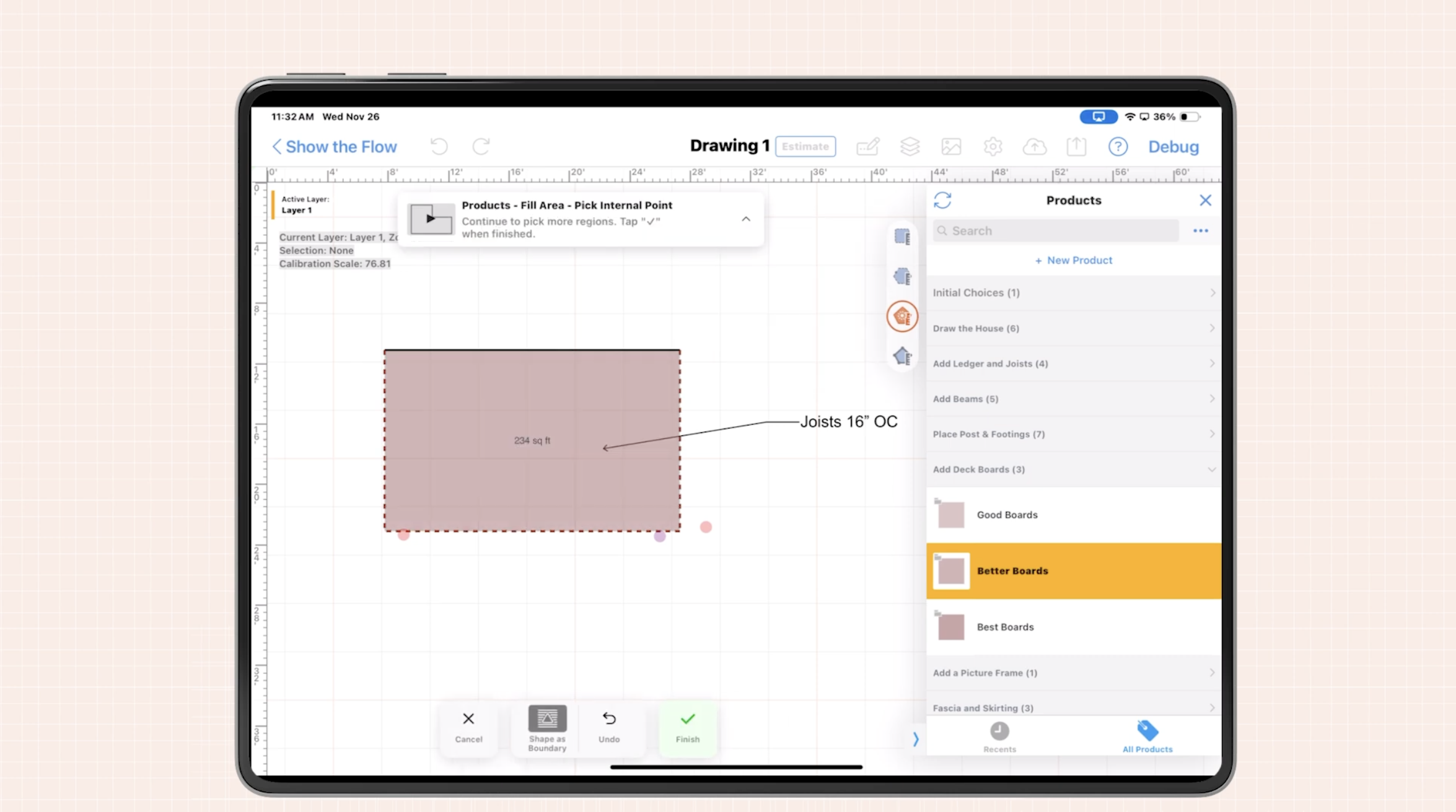
With ArcSite, your salesperson can stand in the yard, trace the property outline on a tablet, and drop in turf areas, hardscape, plant beds, and play zones. Colors, hatching, and labels make the plan easy to read.
When clients can see exactly what they are buying, they ask better questions, make faster decisions, and feel more confident signing during or shortly after the visit.
2. Automatic takeoffs from every line you draw
The best digital drawings are not just pretty pictures. They are measurement engines.
As you draw turf areas and perimeter edges in ArcSite, the app calculates square footage, linear footage, and counts in the background. Those quantities are tied to your catalog of materials, labor, and assemblies.
This means:
- No re-measuring back at the office
- No manual calculator work or spreadsheet imports
- Consistent, repeatable pricing across the sales team
When quantities are right and pricing is consistent, approvals go smoother and surprises during installation are reduced.
3. Professional estimates directly from the drawing
Because ArcSite links drawings to items and pricing, you can generate a professional, branded estimate from the same file - often before you leave the driveway.
Your proposal can include:
- Project overview and notes
- Embedded or attached digital plan
- Line items for turf, base, infill, border, accessories, and labor
- Option packages (good/better/best) if you choose
Approvals become dramatically easier when every stakeholder sees a clear drawing, accurate quantities, and transparent pricing in one document.
Practical digital drawing workflows for turf contractors
To turn digital drawings into real turf business growth strategies, you need simple field-ready workflows. Here are a few that successful ArcSite users rely on.
On-site design-and-approve workflow
- Arrive and document: Walk the property with a tablet. Take photos and drop them into the drawing as references.
- Trace and measure: Use ArcSite to trace property lines and structures. Draw turf zones, pathways, and beds to scale.
- Apply assemblies: Assign your standard turf systems (turf type, base depth, infill, border style) to each area.
- Review with the customer: Sit down with the client to walk through the plan, adjusting shapes or boundaries in real time.
- Generate estimate: Tap to create a detailed estimate based on the drawing. Present it immediately or email it before leaving.
- Capture approval: Many teams use digital signatures or written approvals tied to the estimate and plan.
This workflow compresses what used to take days into a single visit, which directly increases close rates.
Revisions without rework
Revisions are inevitable: a client wants to shrink a play area, expand a putting green, or switch turf grades.
With paper, every change means re-sketching and re-calculating. In ArcSite, you simply adjust the drawing - move a boundary, resize a zone, or swap an assembly - and quantities and pricing update automatically.
Faster, cleaner revisions keep deals moving and demonstrate professionalism that sets your company apart.
Standardized designs for multi-crew operations
Growing turf businesses often struggle to keep crews aligned with what was sold.
With digital drawings, every job has a documented plan that installers can pull up in the field:
- Exact turf layout and seam direction
- Base depth and materials per zone
- Border types and locations
- Notes on drainage, utilities, pets, or special site conditions
When sales, design, and production all reference the same plan, there are fewer callbacks, fewer disputes, and more capacity to take on new work.
Implementing digital drawings without disrupting your team
Switching from paper or basic sketch apps to mobile CAD may sound intimidating, but it does not have to be.
Start with a focused pilot
Instead of rolling out to your entire company on day one, choose:
- 1-2 sales reps who are open to technology
- Common project types (e.g., residential front and back yards)
- A small library of your most-used turf systems and edges
Have this pilot group run all new quotes through ArcSite for a few weeks. Use their feedback to refine templates, assemblies, and estimate layouts.
Build templates that match your business
The power of digital drawings comes from repeatability. Take time to define:
- Standard turf assemblies (turf + base + infill + edge)
- Common detail blocks (steps, drains, trees, planters, play equipment)
- Layer conventions (existing vs new, turf vs hardscape, utilities)
Once these are in place, new designs become drag-and-drop instead of starting from scratch.
Train for the field, not for the classroom
Field teams learn best by doing. Short, targeted training works better than long classroom sessions:
- 10-15 minute walkthroughs on how to start a drawing and take measurements
- Ride-alongs where a trainer builds the first few drawings live on customer visits
- Quick reference guides for common tasks (copy a zone, change a turf type, add options)
The goal is not to turn every rep into a CAD expert, but to give them enough confidence to produce clear, accurate plans quickly.
Measuring ROI from digital drawings
Digital drawings are an investment, so you should track the impact on your turf business over the first 3-6 months.
Key metrics to watch
- Time from visit to proposal: How many hours or days do you save by generating drawings and estimates on-site?
- Close rate: Do jobs with digital drawings close at a higher percentage than those with basic sketches?
- Average job size: Does visual upselling (e.g., adding side yards, putting greens, or pet zones) increase revenue per project?
- Rework and change orders: Are there fewer disputes about scope, turf area, or add-ons once clients sign off on a detailed plan?
- Sales capacity: How many more quotes can each rep complete per week?
Even modest improvements across these metrics can produce significant ROI, especially in growing operations with multiple salespeople and crews.
Qualitative benefits
Not everything shows up in a spreadsheet, but still matters for long-term growth:
- More professional brand image compared to competitors using pen and paper
- Higher homeowner confidence thanks to visual, transparent proposals
- Better communication between sales, operations, and crews
- Stronger documentation to support warranties and future add-on work
Turn digital drawings into a competitive advantage
Among all the turf business growth strategies available, digital drawings stand out because they directly address the bottlenecks that limit sales: unclear scope, slow approvals, and inconsistent pricing.
By equipping your team with mobile CAD, automated takeoffs, and integrated estimating, you can:
- Design and price jobs in a single site visit
- Give customers visually rich, accurate plans they can approve with confidence
- Reduce rework and miscommunication between sales and crews
- Free up time to pursue more leads and larger, more profitable projects
Next step: If you want to see exactly how ArcSite can fit your turf workflows and help you close more projects faster, book a demo with our team. We will walk through real-world turf scenarios, from on-site drawing to final proposal, so you can evaluate the impact on your business.
Categories
FAQs
Digital drawings give clients a clear, scaled plan with accurate quantities and pricing, reducing confusion and back-and-forth questions. This clarity speeds up decisions from homeowners, HOAs, and GCs, often allowing approvals during or shortly after the first site visit.
ArcSite combines mobile CAD with automatic takeoffs and estimating. Every line you draw is tied to real measurements, materials, and labor, so you can generate accurate quantities and professional estimates directly from the drawing instead of redoing work in spreadsheets.
Yes. When you adjust areas, boundaries, or assemblies in the drawing, ArcSite automatically updates the associated quantities and pricing. This makes it easy to present revised options without re-measuring or recalculating everything by hand.
ArcSite is designed for field use, not for CAD specialists. Most turf sales reps can learn to trace properties, draw turf zones, and generate estimates with a few short training sessions and practice on real visits.
Track changes in time from visit to proposal, close rate, average job size, rework or change orders, and the number of quotes each rep can complete per week. Improvements in these areas indicate positive ROI from adopting digital drawings and integrated estimating with ArcSite.
Related posts