

If you’ve ever spent a day in the field with a clipboard, you know inspections aren’t just paperwork —they’re the heartbeat of a safe, well-run job site. One missed thing can mean a safety hazard gets overlooked, or that compliance reports fall behind and end up costing real money.
The trouble is, paper and spreadsheets can’t keep up with the pace of work anymore. Crews move fast, regulators expect accurate records, and managers need updates yesterday. That’s why inspection apps have become less of a “nice to have” and more of a lifeline. With the right tool in your pocket, you can snap photos of an issue, tag its exact location, grab a timestamp, and sign off before you’ve even left the site.
This guide walks through the top inspection apps on the market today, and breaks down what you need to know to select the right tool for your business.
What to Consider in a Field Inspection App
When comparing field inspection software, there are a few things you should look at:
- Ease of use both on-site and back at the office
- Customization abilities
- Ability to add topographic and geographic information
- Photos and visual documentation
- eSign and approval
- Collaboration and sharing
- Reporting and dashbords
Offline Functionality in a Field Inspection App
Inspections happen in dark, hard-to-reach places. They're areas where Wi-Fi or cellular service is spotty, like basements, remote job sites, or large industrial facilities. If your field inspection app grinds to a halt without connectivity, crews will be forced back onto paper, and this defeats the whole point of finding a digital tool.
A tool that works fully offline ensures inspectors can keep capturing information, photos, and notes without interruption. Once a connection is restored, everything syncs automatically, keeping your workflow smooth and reliable.
Customizable Templates & Forms
No two inspections are the same. A fire safety audit will look very different from a construction punch list or a facilities compliance check. That’s why flexible templates are critical. An app that allows you to build and modify forms (with the right fields, logic, and layout) ensures your team can adapt quickly to regulatory changes, client requests, or internal standards. Customization helps eliminate wasted time scrolling through irrelevant fields and keeps every checklist fit-for-purpose.

Topographic and Geographic Data
Knowing the exact location of an issue is just as important as knowing what the issue is. Image location tagging allows inspectors to pinpoint hazards, equipment, or compliance failures with precision — especially valuable across large or dispersed sites. In more advanced setups, geospatial integrations can overlay inspection data on maps, making it easier for managers to see patterns, track asset history, or plan follow-up work with accuracy.
For many contractors, adding topographic elevation data is critical. It's a lot easier to explain to the client what the problem is when they can visualize it. Drop your data points on to the drawing, and quickly create detailed visual topographic maps.
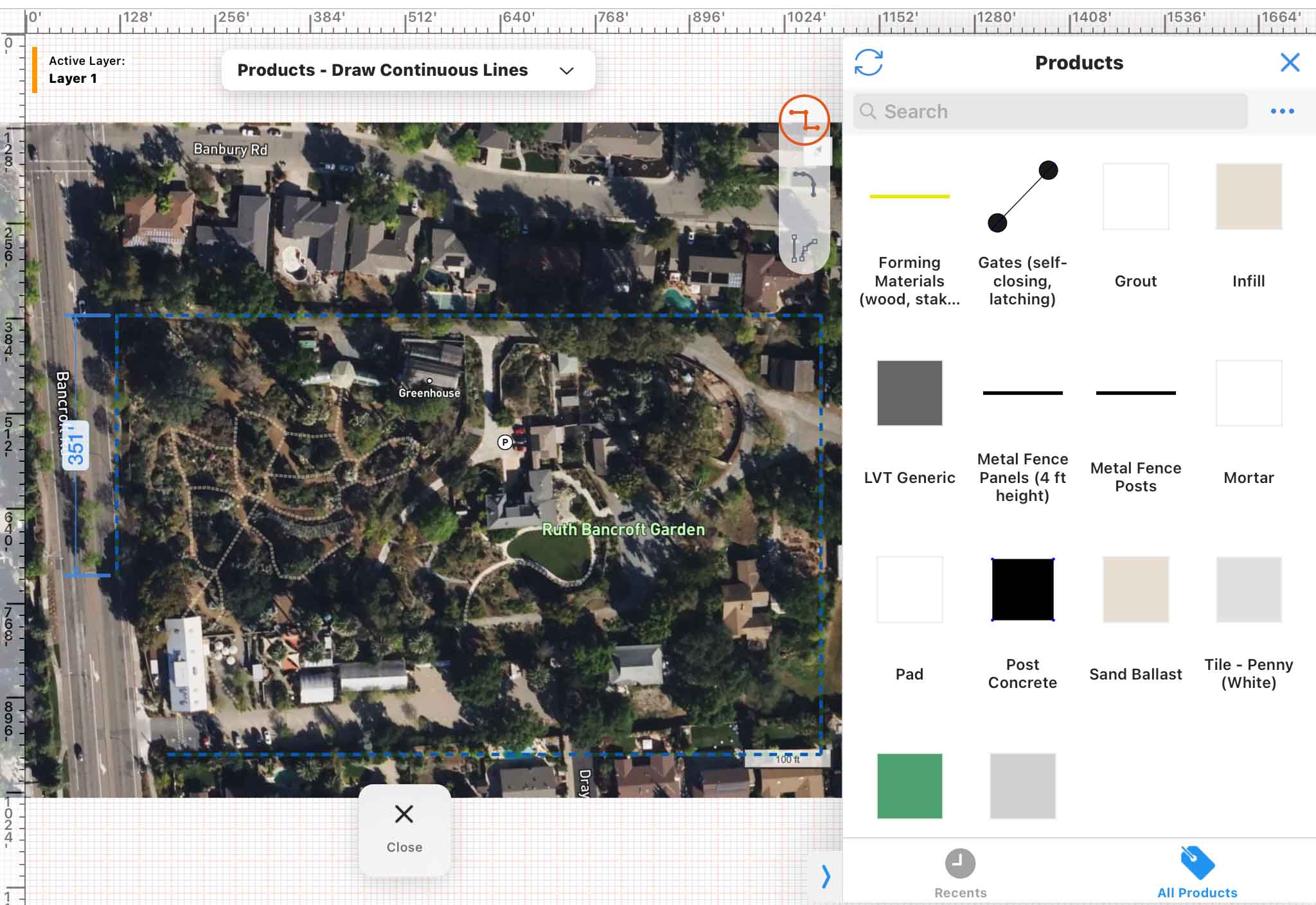
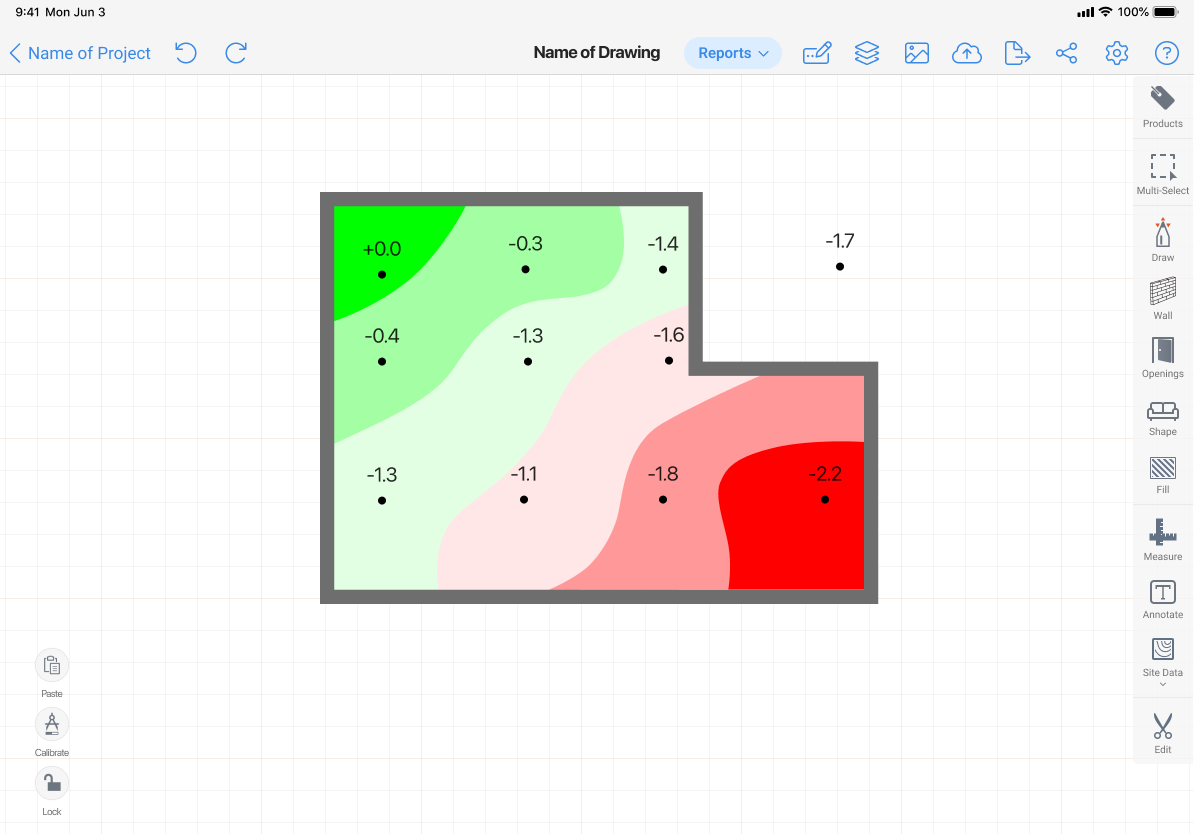
Photo & Video Capture
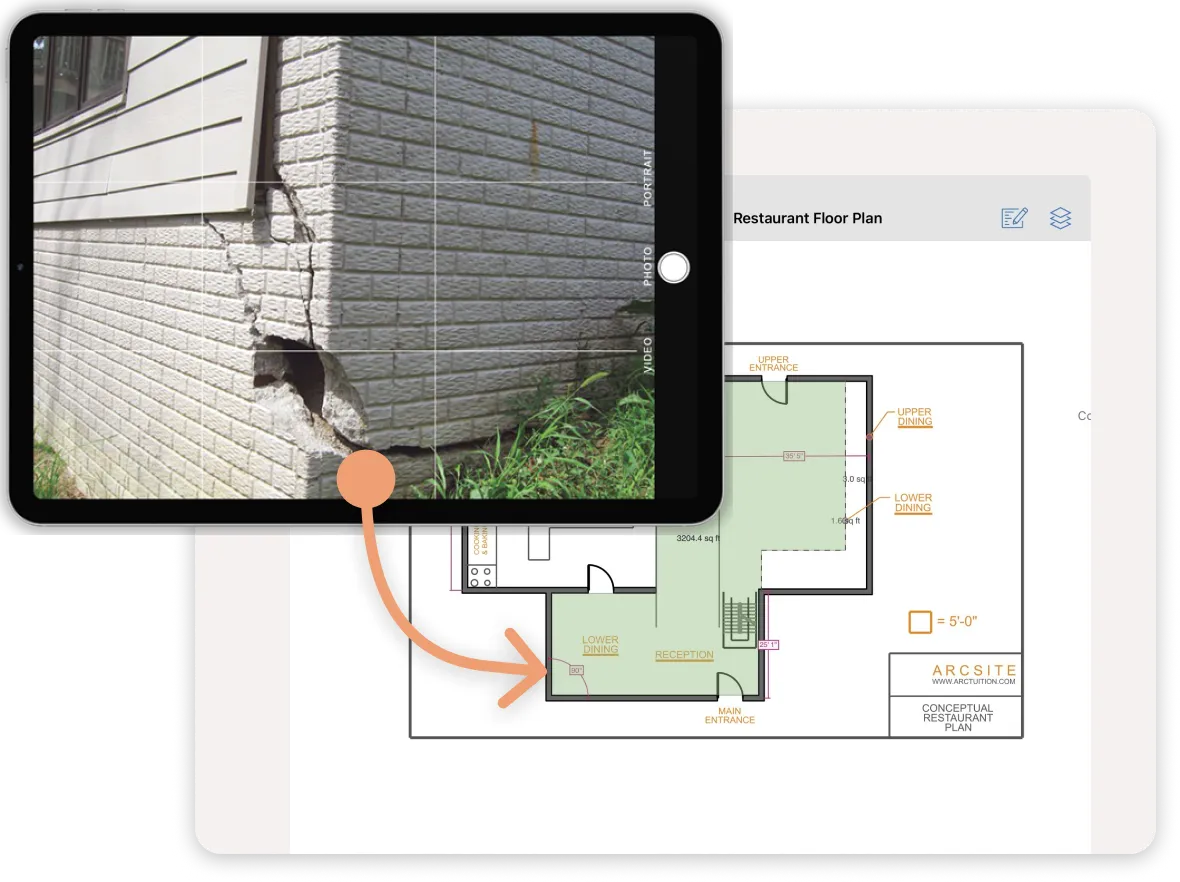
Text-only notes can leave room for interpretation, which leads to miscommunication and lost time. Images are an easy way to remove ambiguity. A quick photo or video can show exactly what was found and why it matters. When paired with annotation tools like arrows, highlights, or comments, images become even more powerful. They create an objective record, support accountability, and provide clarity for teams who weren’t present during the inspection but need to act on the results.
E-Signature & Approval Workflows

Inspection data is only useful if it moves quickly into the hands of decision-makers. Built-in eSign and approval workflows speed up the process of acknowledging findings, routing them to the right people, and getting corrective actions underway. By reducing the back-and-forth emails or paperwork, these workflows keep projects moving, ensure accountability, and give managers confidence that issues won’t sit unresolved.
Integration with Other Tools
Inspection data shouldn't live in a silo. By connecting your inspection platform to your CRM systems or project management systems, you ensure that findings flow seamlessly into the rest of your business processes. This reduces double entry, eliminates errors, and ensures that teams across the organization have access to the same source of truth. A well-connected field inspection app is more likely to be adopted by your team than a standalone tool.
Reporting & Dashboards in a Field Inspection App
The true value of inspection data is the actions taken from it. Strong reporting tools turn raw inspection results into actionable insights. Dashboards can reveal recurring issues, compliance trends, or areas where efficiency can be improved. For managers, this visibility makes it easier to assign corrective actions, track progress over time, and make informed, data-driven decisions. A field inspection app that prioritizes reporting transforms inspections into a strategic advantage.
App-by-App Reviews

1. SafetyCulture (iAuditor)
Best for: teams that need a ready-made form library and powerful reporting.
SafetyCulture (still widely called iAuditor) has become the go-to for organizations that want to digitize inspections quickly without reinventing their processes. Its vast template library covers everything from construction safety to food service audits, allowing teams to get up and running in hours, not weeks. The platform’s form builder is intuitive, making it easy to tailor checklists while still pulling from proven industry standards.

Where SafetyCulture shines is reporting. Managers gain access to dashboards that highlight trends, recurring issues, and compliance status across sites. This makes it particularly valuable for multi-location businesses that want consistency. The trade-off? It’s less strong in spatial documentation. If you need to mark up a floor plan or visually map where an issue exists, you’ll find the experience limited compared to visual-first apps like ArcSite.

2. TrueContext (ProntoForms)
Best for: enterprises that require deep integrations.
Formerly known as ProntoForms, TrueContext is built for large organizations that need inspections to tie directly into their existing systems. Out of the box, it integrates with several CRM platforms. This makes it a strong fit for industries like energy, utilities, and telecommunications, where inspections are just one part of a complex workflow.
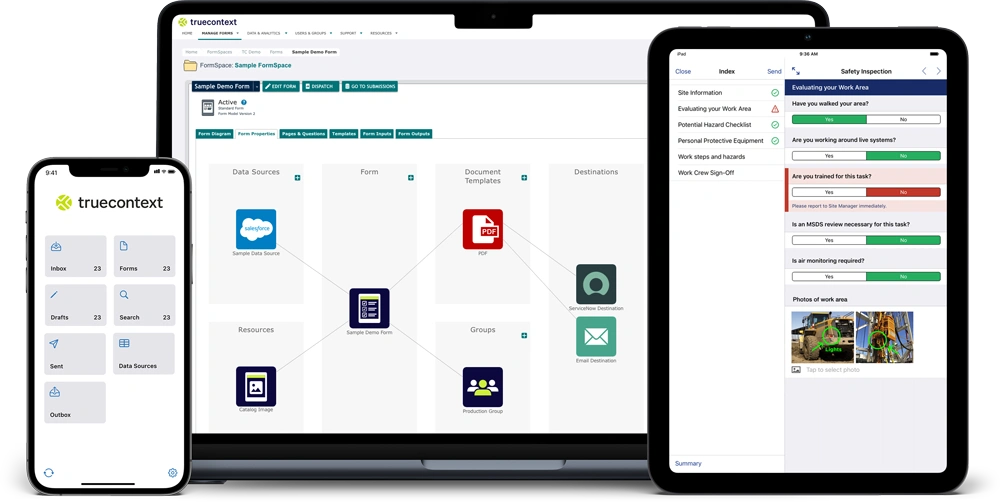
TrueContext also offers offline performance, dispatch functionality, and custom workflows. For example, an inspector can submit a form offline, have it automatically sync later, and trigger a work order in a connected maintenance system. The downside is cost and complexity. Small and mid-sized businesses may find it overkill, but for enterprises where integration is king, it’s worth considering.

3. ArcSite
Best for: visual inspections and plan-based documentation.
ArcSite takes a fundamentally different approach from most inspection apps. Instead of focusing solely on forms, it treats inspections as a visual process. Inspectors can pull up a floor plan, drop in symbols for equipment, sketch directly on the drawing, and tie photos or notes to exact locations. This makes it ideal for industries where spatial context matters, especially in construction, facilities management, fire safety, and more.

What sets ArcSite's field inspection capabilities apart is its usability. The mobile interface is clean and fast, designed for crews who don’t have time to fumble with menus. ArcSite has a unique ability to blend drawings, markups, and inspection data in one place. While it's typically overkill to draw site floor plans or job sites, in ArcSite you can use AR Scan to capture the bones of your site, or just draw with your finger. he native mobile drawing features were designed by an ex-AutoCAD engineer, who wanted to make it just as easy to draw accurate plans in the field without a laptop.
ArcSite's AR Scan uses your device's LiDAR technology to scan rooms to make floor plans in seconds.
ArcSite has dozens of integrations with platforms like Salesforce, Service Titan, Jobber, and Quickbooks, to scale with the workflows of larger complex organizations.
ArcSite is especially compelling for small, mid-sized, and enterprise organizations that want to replace paper-based workflows with something both visual and easy to adopt. Don't take our word for it - check out what our customers have to say.

Start a free trial for your team!
4. Fulcrum
Best for: inspections tied to geospatial data.
Fulcrum is another platform to consider for inspections that rely heavily on location accuracy. Its integration with GIS systems like Esri makes it the best option for asset inspections spread across large geographies, things like utility poles, water lines, or telecom equipment. Inspectors can capture GPS-tagged data points, link them to maps, and visualize inspection results spatially.
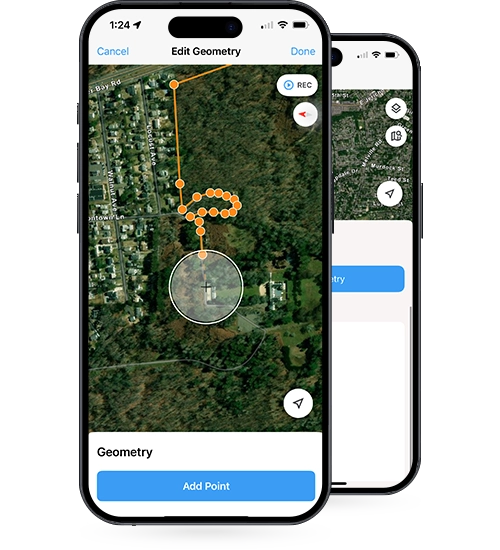
Beyond geospatial tools, Fulcrum offers good offline support, customizable forms, and reporting. However, it doesn’t offer strong sketching or markup tools. If your inspections are more visual than geographic, other platforms may be a better fit. But for mapping-intensive industries, Fulcrum is comprehensive enough to handle data inputs primarily based on location.

5. GoCanvas
Best for: flexible mobile forms with multimedia support.
GoCanvas positions itself as a paper replacement tool that makes any form digital. It supports photos, video, e-signatures, and even GPS coordinates. It allows you to embed all that into forms that can be customized for nearly any industry. One standout feature is its ability to replicate existing paper forms, providing a workflow to onramp with forms.
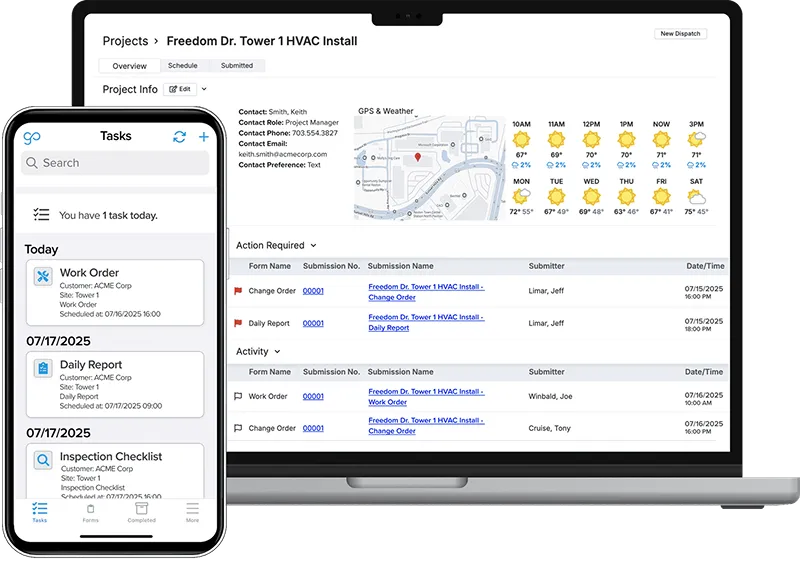
The platform also offers conditional logic and solid reporting. Its weakness is in specialized features like sketching or space measurement. However, it doesn't cover this as well as ArcSite or Fulcrum. Still, for organizations that just need versatile digital forms with strong media capture, GoCanvas is a reliable choice.

6. GoAudits
Best for: mid-sized teams that want fast adoption.
GoAudits is designed for simplicity. It offers a straightforward setup, strong offline functionality, and a drag-and-drop form builder. It’s well-suited for organizations that don’t want to spend weeks on configuration. Reporting and dashboards are solid, making it easy for managers to keep tabs on compliance and performance.
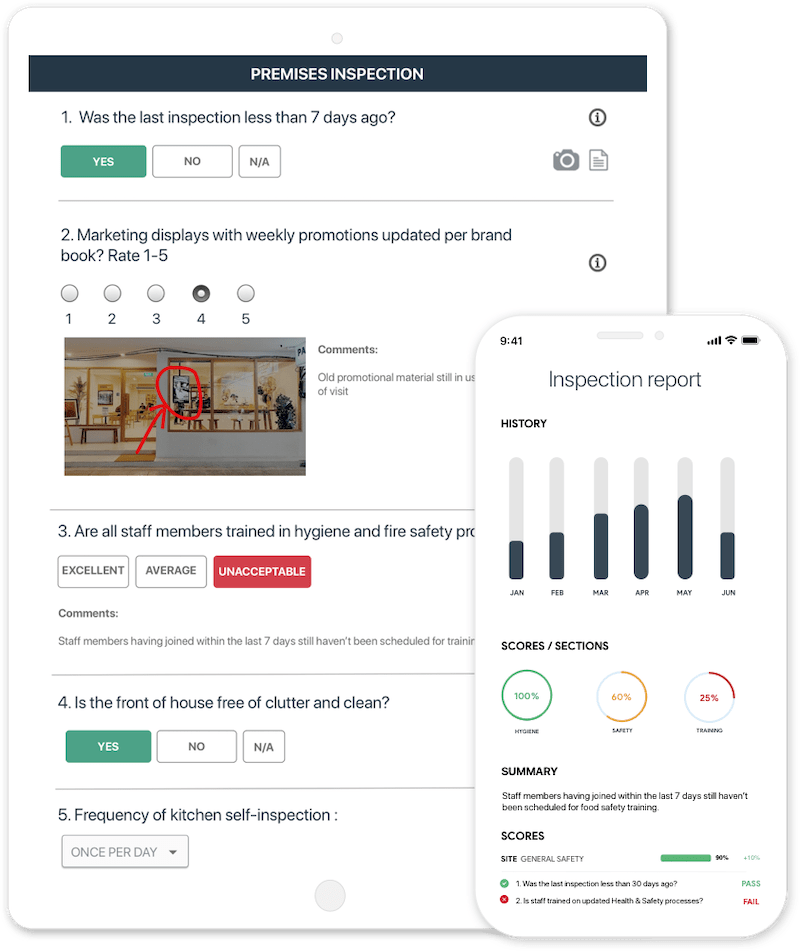
Where it falls short is in specialized features. GoAudits doesn’t offer advanced sketching or deep integrations. But for teams that just need reliable, user-friendly inspections at scale, it’s a safe middle-of-the-road option that balances ease of use with affordability.

7. MyFieldAudits
Best for: teams that need tailored support and customization.
MyFieldAudits offers a high degree of flexibility, especially for organizations with niche needs. Its platform supports customizable checklists, workflows, and reports, and it’s backed by responsive customer support. This makes it attractive for companies that value a more personal, tailored setup experience.
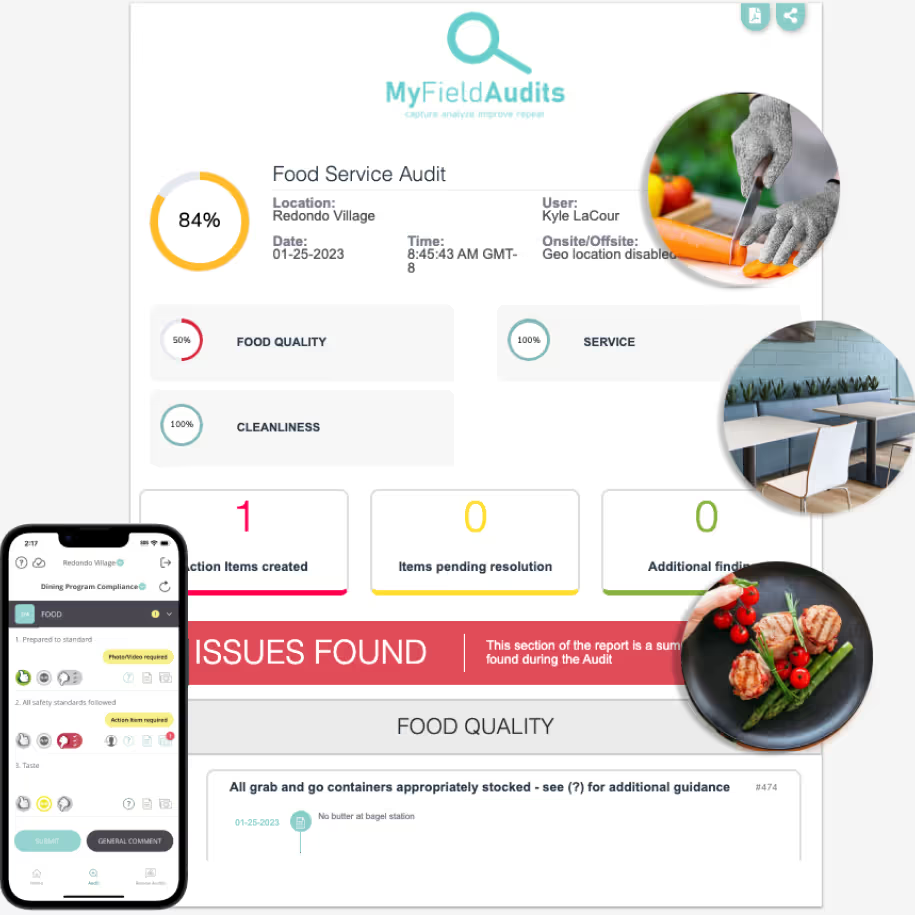
That said, it lacks some of the polish and breadth of larger competitors. Its form builder is solid, but integrations and advanced features are limited. For smaller organizations or those with unique inspection workflows, it’s a good fit. Larger enterprises, however, may find it restrictive.
So which app should I choose?
Choosing the best field inspection app depends on your priorities.
- SafetyCulture is often considered a good option for teams that value out-of-the-box templates and strong reporting dashboards.
- TrueContext may appeal to larger enterprises that need inspections to tie directly into systems like Salesforce or ServiceNow.
- ArcSite stands alone for inspections that depend on visual site documentation. By combining sketching, markups, and photos with forms, it provides a unique way to capture and share inspection data.
- Fulcrum is well regarded by teams that place a premium on mapping and geospatial accuracy.
- GoCanvas tends to work well for organizations that simply want flexible mobile forms with multimedia support.
- GoAudits is often chosen by teams that prefer simplicity and speed of setup.
- MyFieldAudits can be a fit for organizations that value tailored support and a more personalized approach.
Every organization has different pain points. ArcSite, in particular, proves that inspections don’t have to be just checklists. They can be drawings, maps, and actionable visuals that make inspections easier to complete and easier to act on.
Field Service Apps Comparison Table
Categories
INDUSTRY


FAQs
Related posts