


In specialty contracting, clarity wins jobs. That clarity often lives in a document most teams treat as an afterthought: the cut sheet.
Cut sheets are not just manufacturer PDFs or technical references. In the field, they are decision tools. They explain what is being installed, how much is needed, where it goes, and why it meets spec. When cut sheets are clear, accurate, and tied directly to your drawings and takeoffs, they reduce mistakes, speed approvals, and protect margin.
At ArcSite, we see the difference every day between teams who treat cut sheets as static paperwork and those who turn them into job‑ready, visual assets that flow directly from site measurements to proposals. This guide explains what cut sheets are, how contractors actually use them, and how modern mobile tools make them far more powerful than a standalone PDF.
What Is a Cut Sheet (From a Contractor’s Point of View)?
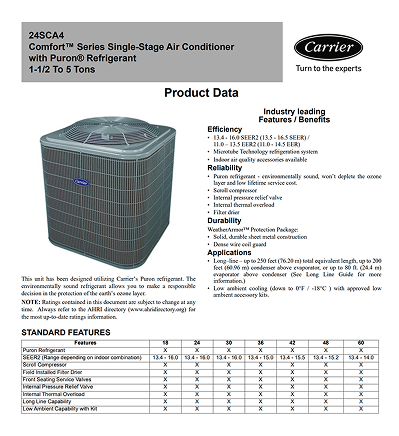
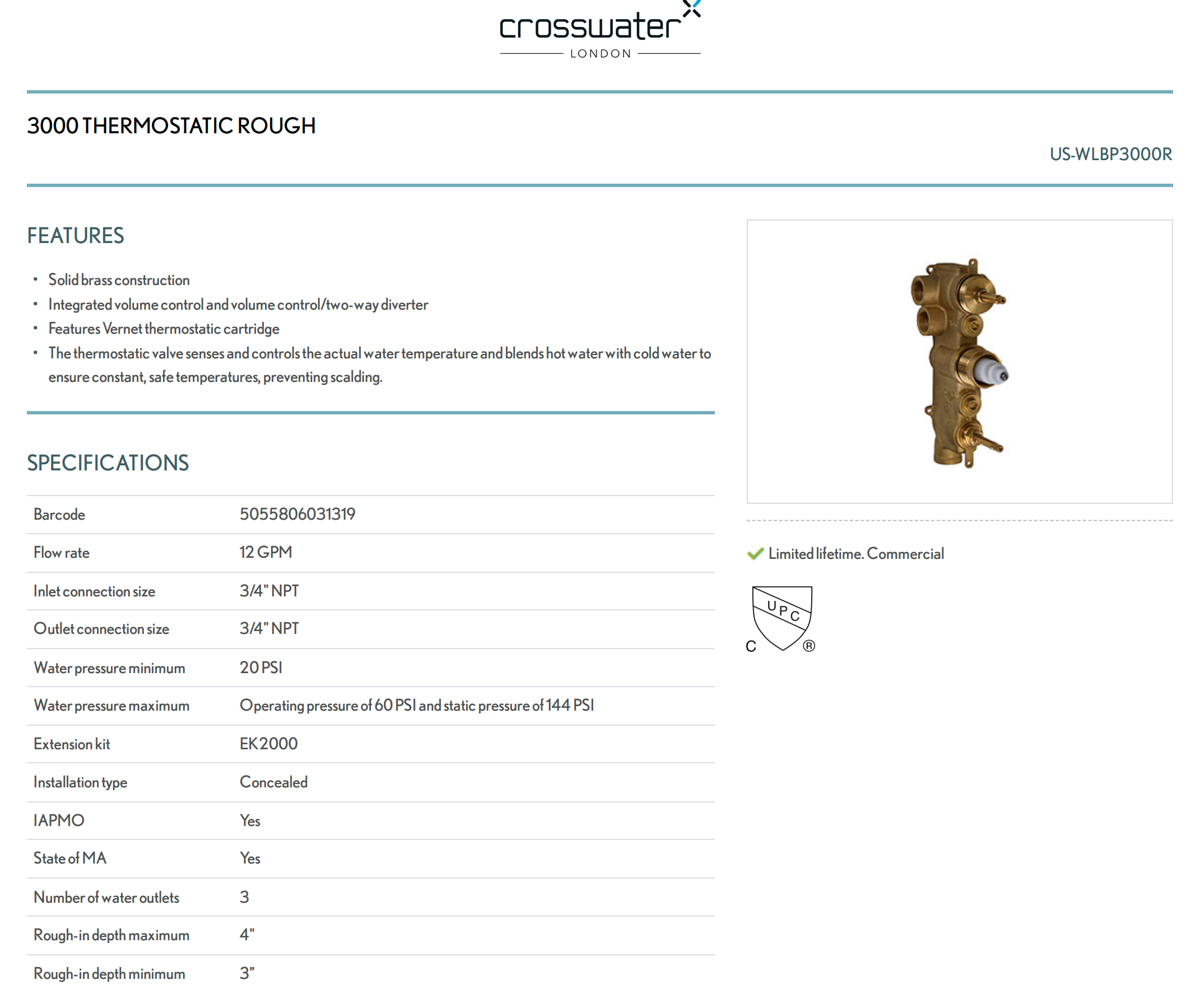
In construction, a cut sheet is a concise document that describes a specific product, material, or system—its dimensions, performance characteristics, installation requirements, and compliance details.
For contractors, a cut sheet answers four practical questions:
- What exactly is this product?
- Does it meet code and project requirements?
- How is it installed on this job?
- How does it affect quantities, labor, and cost?
Traditionally, cut sheets are provided by manufacturers and live as static PDFs. In modern field workflows, they work best when they are connected to drawings, takeoffs, and estimates, not floating in an email thread or submittal folder.
Cut Sheet Examples
Here's an example of something an HVAC professional would include in a quote to help inform the client on deciding on vendor or options.
Core Components of a Contractor‑Ready Cut Sheet
While formats vary by trade, effective cut sheets consistently include:
- Product identification
Product name, model number, and description—clearly labeled so there is no confusion during ordering or inspection. - Dimensions and technical specifications
Sizes, materials, capacities, ratings, tolerances, and performance data that directly affect layout and quantity calculations. - Installation requirements
Mounting details, clearances, spacing, slopes, or sequencing notes that installers need in the field. - Compliance and certifications
References to applicable codes, standards, or certifications (UL, ASTM, NFPA, ENERGY STAR, etc.). - Maintenance or lifecycle notes
Useful for handoff documentation, inspections, or future service work.
The challenge is not the information itself—it is making sure that information stays aligned with what was actually measured, drawn, and sold.
Why Cut Sheets Matter More Than Ever
Cut sheets touch nearly every phase of a job, whether teams realize it or not.
Accurate specification and compliance
Cut sheets help confirm that what you are proposing and installing meets project requirements and local codes. When they are tied to your drawings, inspectors and project managers can see exactly where compliant products are being used.
Faster approvals and fewer surprises
Clear cut sheets reduce back-and-forth during submittals. When reviewers can see product specs alongside a visual plan, approvals move faster and change orders drop.
Installation accuracy
Install crews rely on cut sheets to understand spacing, clearances, and sequencing. When those details are linked to a drawing instead of buried in a PDF, mistakes are far less likely.
Better cost control
Misaligned specs lead to wrong materials, rushed reorders, and wasted labor. Accurate cut sheets protect margin by ensuring what gets ordered matches what was estimated.
Long-term documentation
Well-organized cut sheets become part of the job record—useful for inspections, warranties, maintenance, and future upgrades.
Common Cut Sheet Examples Contractors Work With
Cut sheets appear across nearly every trade. A few familiar examples:
- HVAC equipment: airflow, electrical requirements, mounting clearances
- Lighting fixtures: lumen output, cutout sizes, certifications
- Plumbing fixtures: materials, drain locations, mounting options
- Doors and hardware: fire ratings, sizes, reinforcement details
- Roofing materials: wind ratings, underlayment compatibility
- Insulation: R‑values, thickness, fastening methods
- Electrical components: voltage, amperage, compatibility
- Flooring systems: thickness, coverage, installation method
- Structural elements: load ratings, dimensions, coatings
- Coatings and finishes: coverage rates, cure times, compliance
In the field, these cut sheets become far more useful when quantities, locations, and scope are visually clear.
The Problem With Traditional Cut Sheet Workflows
Most contractors still manage cut sheets in disconnected ways:
- PDFs stored separately from drawings
- Specs reviewed after the site visit
- Quantities calculated manually in spreadsheets
- Install details explained verbally or via photos
This creates risk. If the drawing changes but the cut sheet does not—or if the estimate updates but the spec does not—errors creep in fast.
Making Cut Sheets Job‑Ready With ArcSite
ArcSite changes how cut sheets function by tying them directly to field drawings and takeoffs.
Instead of treating cut sheets as standalone documents, contractors use ArcSite to:
- Draw the site to scale on a mobile device
- Place symbols that represent real products or assemblies
- Link those symbols to quantities, materials, and labor
- Attach specs, notes, and photos directly to the drawing
- Generate estimates and proposals from the same data
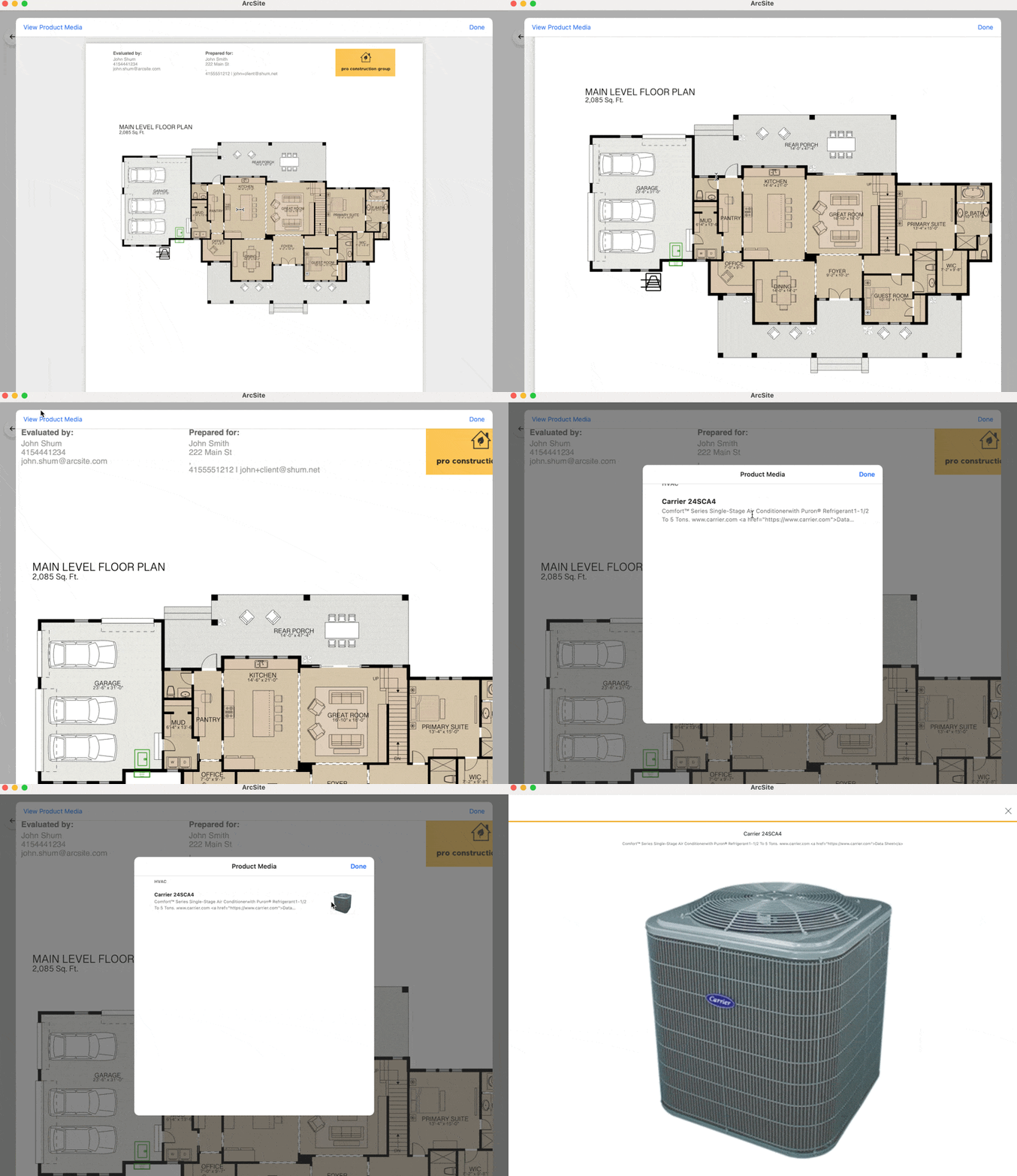
This creates a single source of truth. If the layout changes, quantities update. If a product changes, pricing and scope update. The cut sheet information stays aligned with what was measured and sold.
You can store your whole catalog of manufacturer products–even if it's tens of thousands. ArcSite uses AI to help automate your onboarding. Your ArcSite products get detailed descriptions, photos, and even videos to inform your customers, so you don't have to keep a library of data sheets and send them out separately.
Handling Cut Sheet Variations Without Chaos
Product substitutions and spec changes happen. The key is managing them without rework.
With a connected workflow:
- Variations are identified visually on the plan
- Updated specs are attached to the affected items
- Quantities and pricing adjust automatically
- Revised proposals or submittals are generated quickly
Instead of chasing changes across emails, PDFs, and spreadsheets, everything stays anchored to the drawing.
Best Practices for Contractors Using Cut Sheets
- Treat cut sheets as field assets, not office paperwork
- Tie specs to drawings and quantities, not just line items
- Standardize common products and assemblies across jobs
- Keep installation-critical details visible on the plan
- Update specs once and let pricing and takeoffs follow
The Bottom Line
Cut sheets are not just technical references—they are the bridge between design intent, field reality, and financial accuracy.
Contractors who modernize how they capture, attach, and use cut sheet data close jobs faster, reduce errors, and protect margin. With ArcSite, cut sheets stop being static PDFs and become part of a living, visual workflow that starts on-site and ends with a signed proposal.
If you want your specs, drawings, takeoffs, and estimates to finally agree with each other, it is time to bring cut sheets into your mobile workflow. Schedule a personalized demo today!
Categories
FAQs
A cut sheet is a document provided by manufacturers or contractors that outlines the specifications, features, certifications, and installation guidelines for a specific product or material used on a job site. It helps ensure correct usage and simplifies approvals and installs.
A cut sheet provides technical and product-specific information (e.g., dimensions, ratings, compliance) for installation and approval, while a takeoff focuses on quantifying the materials needed for a job based on drawings or plans.
Cut sheets support clearer communication with clients, inspectors, and crews. They help reduce installation errors, speed up submittals and approvals, and ensure that the right materials are used on-site according to spec.
A solid cut sheet should include the product name and image, key specifications, certifications (like UL or ASTM), installation instructions, and relevant performance data. It should be easy to read and tailored to field use.
Yes. ArcSite lets you link product data to your drawing symbols so every item placed on a plan can include relevant specs. You can export drawings with material details, making it easy to attach product specs, images, and video info to your proposals or install packages.
Related posts